
An AI HR assistant can answer HR questions, surface policies, support onboarding, and reduce repetitive admin work. Gartner predicts that by 2030, 60% of HR work tasks will run through an intelligent agent or large language model (LLM) interface. But that doesn’t make HR less important. In fact, it underscores the importance of HR’s judgment, governance, and employee support.1
Still, implementation makes or breaks the value, especially since only 45% of managers say AI has improved their teams’ work as much as they expected. To get results, you must embed AI into real workflows rather than just adding another tool. This guide explains what AI HR assistants do, where they add value, and how to choose and implement one responsibly.
Contents
What is an AI HR assistant?
Types of AI HR assistants: Standalone vs. embedded
What can an AI HR assistant do? 6 common use cases
Benefits and challenges of AI HR assistants
Examples of AI HR assistants
6 steps to choose and implement an AI HR assistant
What is an AI HR assistant?
An AI HR assistant is software that uses artificial intelligence, often large language models (LLMs), to answer HR questions, retrieve information, and complete routine HR tasks through a conversational interface. Employees and managers can ask questions in plain language, without having to search HR systems, policy documents, or knowledge bases.
For example, an employee could ask, “How many days of parental leave do I get?” or “Where can I find the remote work policy?” The assistant can return the relevant answer, link to the approved source, and guide the employee to the next step.
So, what’s the difference between an AI-powered assistant and a traditional, rules-based HR chatbot? Conventional chatbots follow predefined decision trees, guiding users through scripted pathways to reach an answer. They perform well when questions fit expected patterns, but require extensive manual updates as policies and processes evolve.
A modern HR assistant built on generative AI, on the other hand, can interpret user intent, understand conversational language, and respond to a broader range of questions. It can draw information from HR policies, employee handbooks, knowledge bases, and HR systems.
As such, it can provide contextual answers even if questions are phrased differently each time. This supports a more natural interaction that reflects how people actually look for information at work.
The technology is also moving beyond Q&A. Newer AI assistants can support agentic workflows, enabling them to help complete multi-step tasks. These may include preparing documentation, starting a leave request, drafting communications, or guiding managers through HR processes.

Types of AI HR assistants: Standalone vs. embedded
You can deploy AI HR assistants in several ways. The right option depends on your HR tech stack, where employees already work, and how easily the assistant can access trusted HR information.
Standalone tools
A dedicated application or web portal built as an AI virtual assistant for HR. Employees and HR teams use a separate interface to ask questions, search policies, draft HR content, and complete common tasks.
Employee policy questions, onboarding support, HR knowledge bases, document drafting, and self-service.
Embedded in collaboration tools
An AI HR assistant in Microsoft Teams or Slack brings HR support into the tools employees already use. Microsoft 365 Copilot and Copilot Studio support agent-building across Microsoft 365, while BambooHR extends Ask BambooHR into Slack.
Instant HR questions, leave guidance, onboarding support, manager guidance, and workflow help.
Embedded in your HRIS
Many HR technology providers include AI assistants in their core platforms. These assistants can ground answers in employee records, HR policies, and organizational data. Examples include Ask BambooHR and Workday’s self-service AI capabilities.
Personalized HR self-service, leave and benefits questions, employee record queries, manager approvals, and HR administration.
What can an AI HR assistant do? 6 common use cases
An AI-powered HR assistant can support employees, managers, and HR teams across the employee life cycle. It can answer routine questions, speed up admin work, and help HR professionals find information faster. The greatest value comes when AI uses trusted organizational knowledge and keeps strategic decisions in human hands.
Here are six common use cases HR professionals can include in daily workflows:
Use case 1: HR research and knowledge support
An AI HR assistant trained on a curated HR knowledge base can answer questions, summarize complex topics, and recommend relevant resources in seconds. It should link back to the original source so HR professionals can verify the answer.
Example: AIHR Copilot draws on AIHR’s HR articles, courses, templates, and practical resources. HR professionals can use it to research topics, find templates, and speed up day-to-day work while checking the source material.
Best practice: Remain responsible for interpreting guidance, adapting recommendations to your organization, and making policy decisions.
Use case 2: Employee self-service and policy questions
An AI assistant can answer routine questions about annual leave, parental leave, benefits, payroll, flexible work, and internal policies. It can pull answers from approved company documents and reference the relevant sections.
Why it helps: Employees get consistent answers faster, and HR receives fewer repeat questions.
Best practice: Own policy development, approve updates, and handle situations that need individual judgment or confidential discussion.
Use case 3: Recruiting and candidate screening
Recruitment teams can use AI to handle early hiring tasks. An AI recruiting chatbot can answer candidate questions, ask pre-screening questions, schedule interviews, and keep applicants updated.
Why it helps: Recruiters can stay responsive without spending as much time on manual coordination.
Best practice: Ensure that recruiters and hiring managers still own candidate evaluation, hiring decisions, and final selection.
The value of AI HR assistants depends on clean data, responsible governance, and informed human judgment. Develop practical AI skills to introduce these tools effectively and use them with greater impact.
AIHR’s Artificial Intelligence for HR Certificate Program gives you the tools to:
✅ Identify valuable AI use cases across HR and select the right tools for specific challenges
✅ Write and refine prompts that produce accurate, useful, and context-aware HR outputs
✅ Integrate generative AI into daily workflows while managing privacy, security, and ethical risks
✅ Develop an AI strategy that supports responsible adoption and measurable business value
🎓 Preview lessons from the program and explore AIHR Copilot in the Demo Portal to get an idea of what to expect.
Use case 4: Onboarding new hires
New hires often need answers before their next scheduled check-in. An AI assistant can guide them through required paperwork, explain benefits, share company policies, and answer first-week questions as they come up.
Why it helps: This creates a more consistent onboarding experience, especially for distributed teams or fast-growing organizations.
Best practice: Managers and HR should still build relationships, provide coaching, deliver role-specific training, and help each new hire integrate into the team.
Use case 5: HR service delivery and ticketing
HR teams often handle a high volume of repeat service requests. These may include leave balances, policy clarification, employment documentation, and password reset routing. AI assistants can automatically resolve many first-line questions. They can also identify requests that need specialist support and route them to the right HR team.
Best practice: Focus human attention on employee relations, complex cases, and situations that require empathy, discretion, or organizational context.
Use case 6: HR data, reporting, and drafting support
Modern AI assistants increasingly let HR professionals ask natural-language questions about workforce data. For example, they may ask about headcount, turnover trends, and team-level absenteeism without writing reports manually.
AI assistants can also draft job descriptions, policy documents, employee communications, and manager guidance. This can cut admin time, but you still need to review the output carefully.
Best practice: Verify figures, validate interpretations, and review all draft content before publishing or acting on it.
Benefits and challenges of AI HR assistants
AI HR assistants work best as part of a broader HR technology strategy. They can improve speed, consistency, and support access. But they also create risks if HR teams use them without clean data, clear ownership, and human review.
Benefits
- 24/7 availability for employee questions: Employees can get answers outside business hours, which helps global, distributed, and hybrid teams.
- Faster response times: AI assistants can retrieve information in seconds, helping employees and managers avoid long email chains.
- Reduced tier-1 HR workload: AI can handle routine requests for leave, benefits, payroll, policies, and onboarding.
- Consistent policy answers: When AI pulls from approved sources, employees get the same guidance regardless of when they ask.
- Multilingual support: Many AI assistants can support employees in multiple languages, making HR information easier to access.
Challenges
- Hallucination risk: Even advanced AI models can generate inaccurate or incomplete information. HR should responses that affect employment decisions, legal compliance, pay, benefits, or policy.
- Data privacy and access control: AI assistants require carefully managed permissions, strong governance, tight security controls, and compliance with privacy regulations. Set permissions so employees only see information they’re allowed to access.
- Sensitive situations: AI can support administrative tasks, but conversations on grievances, disciplinary matters, workplace investigations, health concerns, or terminations require human judgment, empathy, and confidentiality.
- Implementation and maintenance effort: Delivering reliable results requires well-maintained policies, accurate HR data, integrations with existing systems, and ongoing governance.
- Employee trust and adoption: Successful adoption requires transparency on how the AI works, its information sources, and when human support is available. Maintain clear communication, appropriate governance, and a positive user experience to build employee confidence and trust,
Examples of AI HR assistants
The market for AI HR assistants is changing quickly. Instead of choosing based on hype, focus on the type of assistant you need and the workflow it supports.
HR-trained AI assistant
AIHR Copilot
AIHR’s learning and resource platform
Researching HR topics, finding templates, answering HR questions, and speeding up daily HR work.
HRIS-embedded assistant
Ask BambooHR
BambooHR, with Slack integration
Finding policy information, navigating HR processes, and completing self-service tasks.
Recruiting assistant
Paradox (Olivia)
Recruitment and talent acquisition workflows
Engaging candidates, answering recruiting questions, scheduling interviews, and automating high-volume hiring communication.
Standalone HR assistant
Galileo
Independent AI platform for HR professionals and teams
Accessing research, comparing concepts, creating practical outputs, and supporting HR decisions.
HR service delivery assistant
Leena AI
Enterprise HR service delivery platform
Automating routine HR questions, resolving employee requests, managing HR knowledge, and routing complex cases.
As the market continues to mature, many enterprise software providers are also embedding conversational AI directly into broader HR suites, collaboration platforms, and employee experience applications. The best choice is usually the assistant that fits your systems, uses trusted data, and supports the workflows employees already use.
6 steps to choose and implement an AI HR assistant
Choosing AI HR technology starts with a business problem, not a product demo. Define what you want to improve first, then evaluate which assistant can support that outcome.
Step 1: Start with the business problem
Define the outcome you want to improve before evaluating vendors. This may be reducing HR service desk ticket volumes, improving response times, accelerating recruitment administration, or giving managers easier access to policy guidance. Clear business objectives make it easier to measure success and avoid investing in capabilities unlikely to deliver meaningful value.
Step 2: Audit your HR data and knowledge base
An AI assistant is only as reliable as the information it can access. Review policy documents, employee handbooks, HR procedures, knowledge articles, and workforce data before implementation. Remove outdated content, close gaps, and establish governance processes so the assistant always references trusted, current information.
Step 3: Evaluate integration with your existing HR ecosystem
The most valuable AI assistants work within the systems employees already use. Assess how well prospective solutions integrate with your HRIS, ATS, collaboration platforms (e.g., Microsoft Teams or Slack), identity management tools, and document repositories. Strong integration reduces context switching and enables more personalized, accurate responses.
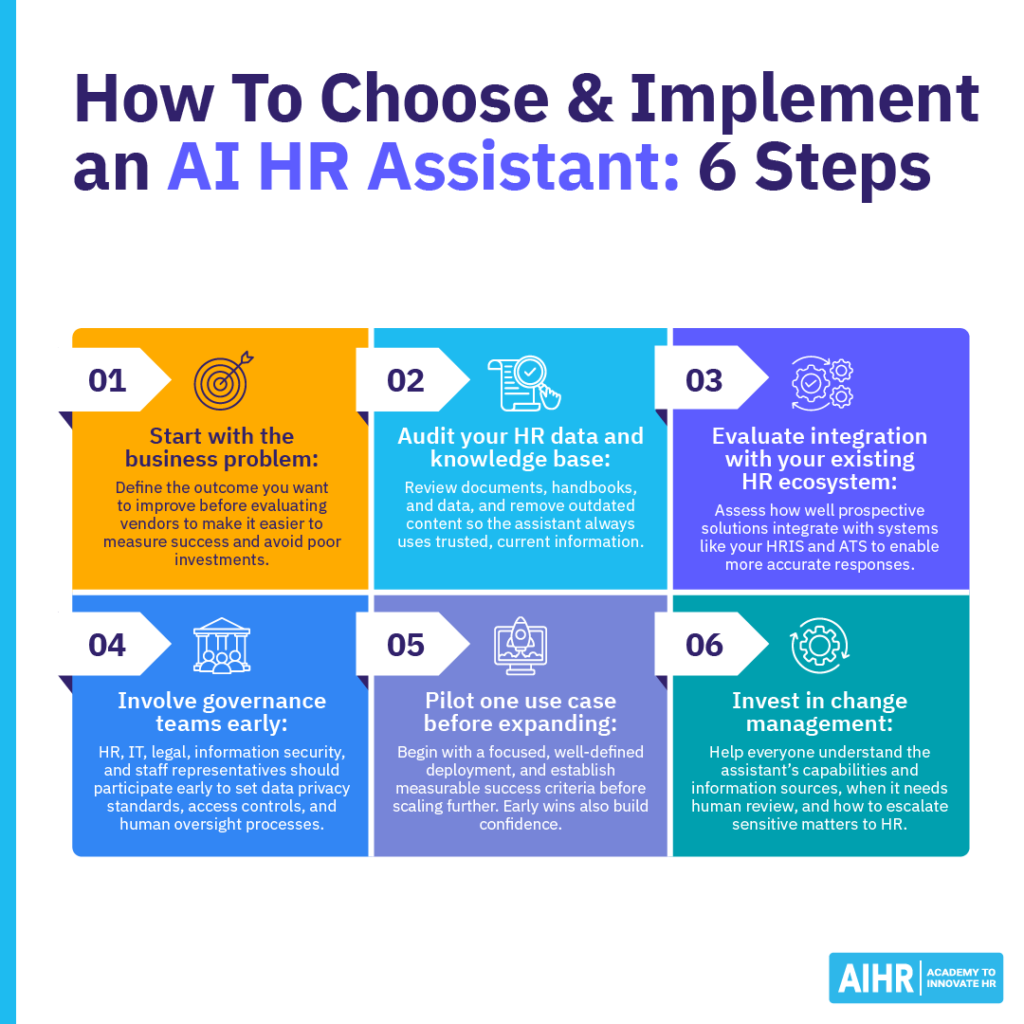
Step 4: Involve governance teams from the beginning
HR, IT, legal, information security, and employee representatives should all participate early in the project. Together, they can define data privacy standards, access controls, retention policies, and human oversight processes.
If your organization operates within the European Union (E.U.), you should also assess if any planned AI use cases fall within the scope of the EU AI Act. Employment-related AI can create additional obligations, especially in recruitment, workforce management, and access to employment opportunities.
Step 5: Pilot one use case before expanding
Begin with a focused, well-defined deployment (e.g., employee policy inquiries or onboarding support), and establish measurable success criteria before scaling further.
Useful metrics may include response time, ticket volume, first-contact resolution, employee satisfaction, escalation rate, and answer accuracy. Early results can help you refine the assistant before expanding, and early wins build confidence across the organization.
Step 6: Invest in change management
Successful implementation depends as much on adoption as it does on technology. Help everyone understand the assistant’s capabilities and information sources, when it needs human review, and how to escalate sensitive matters to HR. Clear communication and ongoing training help build trust while encouraging responsible use.
For organizations developing a broader AI strategy, AIHR’s comprehensive guide on using AI in HR provides practical frameworks for governance, capability development, and responsible adoption, helping HR teams introduce AI in ways that strengthen both employee experience and organizational performance.
Next steps
AI HR assistants can improve service delivery, cut admin time, and give employees faster access to trusted HR information. The strongest results come when you start with a clear business problem, use clean data, set governance standards, and help HR teams build the skills to work confidently with AI.
If routine questions or service requests are too time-consuming, start with one focused use case and measure the results before expanding. As AI becomes part of daily HR work, skill development matters, too. AIHR’s Artificial Intelligence for HR Certificate Program helps HR professionals learn how to use AI in HR, apply generative AI, evaluate AI solutions, and build an AI strategy for responsible adoption.