
AI use at work is rising, meaning HR automation ideas now go far beyond reminders and form routing. AI-powered tools can read, summarize, draft, classify, and spot patterns in HR data. This means you can automate more routine work and spend more time on tasks that need human judgment, empathy, and business context.
GenAI and other technologies could automate tasks that account for 60 to 70% of employees’ time. Staff expectations are also increasing, with employees now expecting faster responses, greater personalization, and better data use across every function, including HR.
This article examines what AI automation means for HR, the eligible HR tasks it can automate, and how to decide what to automate with AI.
Contents
HR automation vs. AI automation in HR
12 HR automation ideas you can hand to AI today
How to decide what to hand over to AI HR automation
Key takeaways
- HR automation follows set rules, while AI automation can interpret information, generate content, and spot patterns.
- The best AI HR tools target repetitive, high-volume work that takes time away from strategic HR.
- Candidate communication, employee support, payroll reviews, onboarding, and people analytics offer strong automation opportunities.
- Start with low-risk, high-frequency processes and keep human oversight for sensitive decisions.
HR automation vs. AI automation in HR
HR automation and AI automation in HR are often used together, but they don’t mean the same thing. HR process automation uses set rules to move information and trigger actions. It follows clear “if this, then that” logic and gives you consistent outcomes every time.
For example, when a candidate is marked as “hired” in an ATS, an automated workflow can follow instructions you set to create a record in the HRIS, generate onboarding tasks, notify payroll, and assign required training. AI in HR automation goes further — it can analyze information, identify patterns, generate content, and make predictions based on past data.
For example, AI can help you:
- Summarize exit interview themes across hundreds of employees
- Draft a job description based on role requirements
- Identify employees who may need extra support
- Answer policy questions using approved company documents.
A simple way to think about it is that automation moves information, AI interprets information, and humans make decisions. You also don’t need to choose just one approach. The strongest HR teams use all three together. Traditional automation handles predictable workflows. AI supports information-heavy tasks. HR professionals guide the judgment calls.

12 HR automation ideas you can hand to AI today
Below are 12 HR tasks that often take up time, repeat often, and can benefit from AI automation support.
1. Triage your recruiting inbox
If your recruiting inbox feels like a second job, you’re not alone. Many recruiting emails fall into repeatable categories: status checks, scheduling questions, follow-ups, and document requests. AI can sort messages, group similar requests, and draft replies in your tone. You still review and send the final response, but you don’t start from a blank screen.
AI HR tools to consider
- Humanly: Use Humanly to group candidate messages, automate screening follow-ups, and keep high-volume applicants moving through the recruiting workflow.
- Hiver: Hiver can turn recruiting inbox emails into assigned, trackable requests, so recruiters can manage follow-ups without losing context.
- Superhuman: An AI-native email tool, Superhuman can triage recruiting emails, draft replies in your tone, and speed up scheduling or follow-up messages.
2. Turn messy interview notes into summaries you can compare
Every interviewer writes differently. AI can bring structure by transcribing interviews, extracting key signals, organizing notes around common evaluation criteria, and creating a single summary per candidate. This helps make comparison easier, without risking missing notes.
AI HR tools to consider
- Metaview: Metaview is an AI interview notes tool that can capture interviews and create structured notes, candidate summaries, and scorecard-ready feedback.
- Humanly: Use Humanly to support structured AI interviews and screening workflows, helping recruiters capture more consistent candidate information.
3. Answer employee questions before they become HR tickets
Employees often ask the same questions about leave, benefits, expenses, travel, and flexible work, such as:
- “How much PTO do I have left?”
- “Where do I find the policy?”
- “Can I work remotely next week?”
AI can answer these questions using approved HR documents. That gives employees faster answers and reduces ticket volume for HR.
AI HR tools to consider
- Leena AI: Leena AI is an HR service delivery platform you can use to answer common employee questions about policies, leave, reimbursements, and HR processes through an HR chatbot.
- Moveworks: An enterprise AI assistant platform, Moveworks can help employees find HR answers and complete self-service tasks across workplace systems.
- Google NotebookLM: You can use NotebookLM to turn approved HR documents into a searchable source that employees or HR teams can query for quick answers.
4. Stop manually sorting HR tickets
HR service teams can lose time before the actual work starts. Someone still needs to read, categorize, assign, and escalate each request. AI can read incoming tickets, classify them, assign ownership, and flag urgent issues. That means fewer delays and fewer requests slipping through the cracks.
AI HR tools to consider
- Leena AI: Use Leena AI to route HR requests, manage employee cases, and automate repeatable HR service workflows.
- Moveworks: Moveworks can help you automate HR support workflows across apps, so employees can resolve routine issues faster.
- Hiver: Make use of Hiver to assign, track, route, and resolve incoming HR requests from shared inboxes or support channels.
AI can help you streamline repetitive work, improve decision-making, and create more time for strategic priorities. To make automation useful, you need the skills to apply AI safely, effectively, and in the right workflows.
AIHR’s Artificial Intelligence for HR Certificate Program will help you:
✅ Use AI to streamline daily HR tasks and improve workflow efficiency
✅ Write effective prompts that generate accurate, useful HR outputs
✅ Apply AI across HR domains, including talent acquisition and talent management
✅ Identify responsible AI use cases and support adoption in your organization
💡 Explore AIHR’s Demo Portal to preview lessons, resources, and tools that help you decide what to learn next.
5. Catch payroll issues before they become payday problems
Payroll errors can damage employee trust and create compliance risk. AI can help spot issues before payroll runs. For example, AI can flag duplicate entries, missing hours, unusual overtime spikes, and inconsistent records. As such, instead of fixing errors after the fact, you prevent them from reaching employees.
AI HR tools to consider
- Rippling: Use Rippling to connect HR, payroll, IT, and finance data, so payroll-related workflows draw from one employee record.
- Microsoft Power BI: Power BI can help you spot payroll anomalies, summarize report data, and flag trends that need review before payroll runs.
6. Make sense of employee feedback without reading every comment
If you’ve ever opened 500 survey responses, you know how hard it is to process them manually. AI can review open-text comments, identify themes, measure sentiment, and surface repeated concerns. You still need to interpret the results, but you can get to the signal faster.
AI HR tools to consider
- Chattermill: Chattermill is an AI-powered feedback analytics platform that can analyze open-text employee feedback, group recurring themes, and spot sentiment shifts across large volumes of comments.
- Qualtrics Employee Experience: Use Qualtrics Text iQ to analyze open-ended employee survey comments, assign topics, detect sentiment, and turn feedback into reportable themes.
7. Turn HR data into a story leaders want to read
Many HR teams don’t struggle with data. They struggle with turning data into a clear story. AI can help turn HR metrics into short summaries, talking points, and follow-up questions. For example, it can help explain increases in turnover, reasons for hiring delays, shifts in engagement, and internal mobility patterns. It won’t replace analysis, but it’ll get you to the conversation faster.
AI HR tools to consider
- Tableau Pulse: Tableau Pulse can help HR detect changes, trends, outliers, and drivers in HR metrics, then summarize them in plain language.
- Microsoft Power BI: Use Power BI Copilot to summarize HR dashboards, create narrative visuals, and turn reports into leadership-ready insights.
8. Build an onboarding process that fits the role
Onboarding programs sometimes mistakenly assume every new hire needs the same experience, but they’d benefit more from programs suited to each individual’s specific needs. AI can help tailor onboarding by role, team, location, and employee data. That means new hires get more relevant tasks, resources, and support.
AI HR tools to consider
- Enboarder: Use Enboarder to personalize onboarding journeys by role, function, location, and manager
- Workday: Workday Onboarding Plans is a useful tool for creating personalized preboarding and onboarding experiences for new hires.
- HiBob: HiBob can automate onboarding workflows, approvals, and task lists across HR, managers, IT, and new hires.
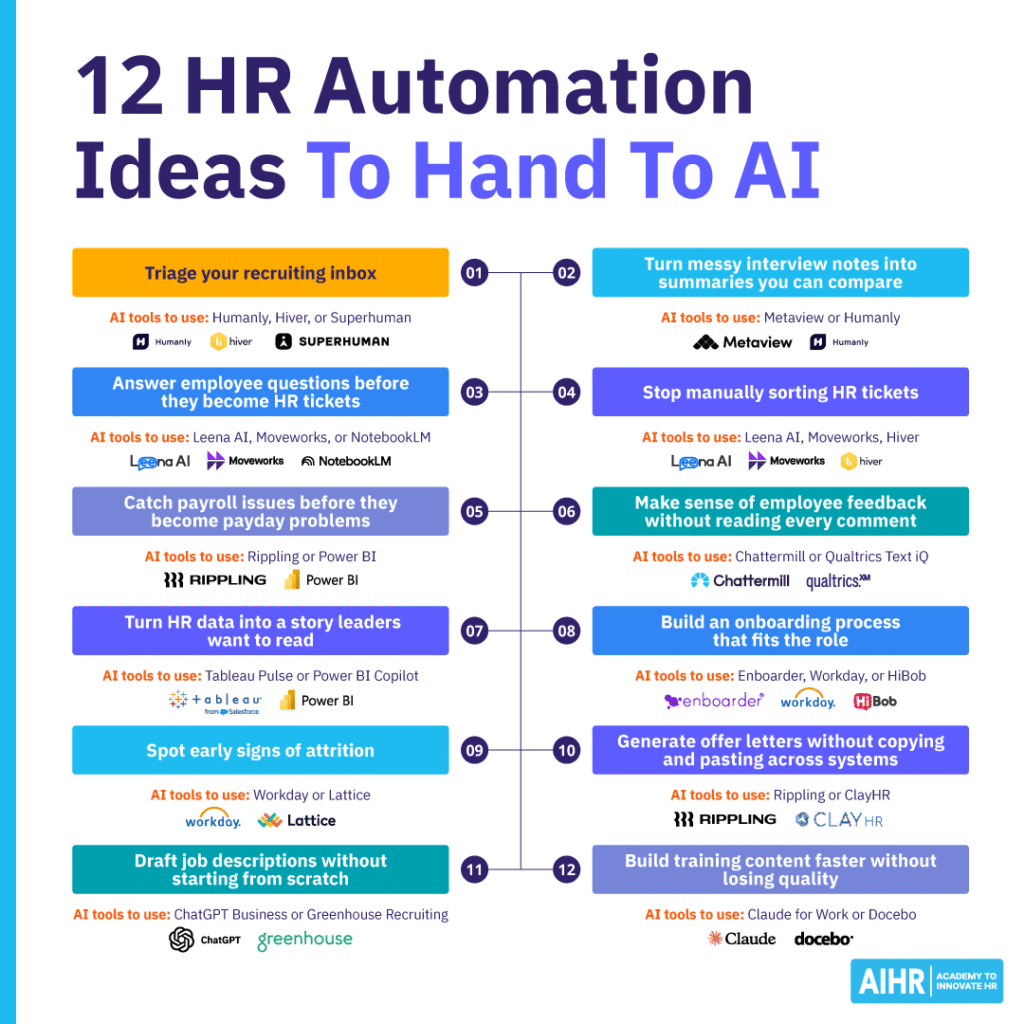
9. Spot early signs of attrition (before it becomes a resignation)
People rarely quit out of the blue; signs typically appear earlier but are often ignored. AI can help identify patterns across engagement, compensation, mobility, and manager changes. The goal isn’t to label someone as a flight risk. The goal is to spot where support may be needed.
Potential indicators include declines in engagement, compensation gaps, reduced internal mobility, manager changes, and tenure patterns. These insights help HR and managers intervene earlier.
AI HR tools:
- Workday: Workday can also help you connect talent, mobility, performance, and workforce data so HR can spot patterns that may affect retention.
- Lattice: To track engagement, performance, and AI-powered people insights that may point to retention risks, use Lattice.
10. Generate offer letters without copying and pasting across systems
Offer letters sound simple until you’re checking five systems to make sure every detail matches. AI can generate offer letters from approved templates and flag inconsistent details before they go out. That helps reduce rework, prevent errors, and speed up hiring.
AI HR tools to consider
- Rippling: You can use Rippling to automate offer letter and document workflows using connected employee, payroll, and HR data.
- ClayHR: Use ClayHR to generate AI-powered offer letters, personalize templates, route approvals, and manage the offer workflow from the same HRIS and ATS platform.
11. Draft job descriptions without starting from scratch
Job descriptions can take longer than expected, especially when hiring managers provide limited input. AI can create a first draft based on role requirements, job architecture, skills, and existing templates. HR can then refine the language, check for bias, and align the content with employer branding.
AI HR tools to consider
- ChatGPT Business: ChatGPT Business can turn role requirements, skills, and hiring manager notes into a clear first-draft job description you can then refine for accuracy, bias, and employer brand voice.
- Greenhouse Recruiting: Use Greenhouse Recruiting’s AI job post description suggestions to draft job descriptions from a few role details, then review and customize the copy before publishing.
- GPTZero: Once a job description has been drafted with AI, run it through an AI detector like GPTZero to flag passages that read as overly machine-generated, so HR teams know where a more human, on-brand edit is needed before publishing.
12. Build training content faster without losing quality
L&D teams often create workshop materials, manager guides, training outlines, and employee resources. AI can generate first drafts, summarize source materials, and adapt content for different audiences, giving L&D Specialists more time to focus on learning design and effectiveness.
AI HR tools to consider
- Claude for Work: Use Claude for Work to turn source materials, SME notes, and policy documents into first-draft training outlines, facilitator guides, learner handouts, and quiz questions.
- Docebo: Docebo can help create, manage, personalize, deliver, and analyze training content in one enterprise learning platform.
How to decide what to hand over to AI HR automation
Not every HR process should be automated. Some work needs human judgment from the start, especially when it affects employee trust, fairness, privacy, or compliance. Before you choose an AI HR tool, look at the process itself. The best automation opportunities usually sit at the intersection of frequency, effort, and error risk.
How often does it happen?
Start with tasks that happen often. High-frequency work usually creates the clearest automation value because small time savings add up quickly. For example, if recruiters answer the same candidate questions dozens of times a week, AI can help draft replies, sort messages, and route requests faster.
The same applies to employee policy questions, interview scheduling, and HR ticket routing. These tasks are good starting points because they’re visible, repeatable, and easy to measure before and after automation.
How long does it take?
Next, look at how much time each task takes from start to finish. A task that takes 20 minutes may not look urgent if it happens only a few times a week, but the total effort can still be significant.
Track the time HR spends gathering information, switching between systems, checking details, writing drafts, and following up. This helps you spot work that feels “small” but quietly drains capacity. Good examples include creating offer letters, summarizing survey comments, building onboarding plans, and turning HR data into leadership updates.
How often does it go wrong?
Speed isn’t the only reason to automate. Some of the strongest use cases come from reducing avoidable errors. Manual data entry, copy-pasting between systems, inconsistent document creation, and repeated handoffs all increase risk. Payroll checks, offer letter details, employee record updates, and reporting workflows are good examples.
AI can flag unusual patterns, missing information, and mismatched fields before they create bigger problems. HR should still review the output, but automation can help catch issues earlier and make the process more consistent.
Next steps
Start with one process that happens often, takes real time, and causes mild frustration. Measure the current effort, test one AI HR tool with a small group, and track what changes before you expand.
As you build your HR automation roadmap, review security, integrations, governance, and auditability. Ask practical questions: Does the tool connect with your HRIS and ATS? How does it protect employee data? AIHR’s Artificial Intelligence for HR, Digital HR 2.0, and People Analytics certificate programs can help HR professionals build the skills to evaluate, implement, and govern AI automation responsibly.