
AI in the workplace examples show how artificial intelligence is already part of everyday work. Stanford’s 2026 AI Index found that 88% of organizations used AI (and 70% used generative AI) in at least one business function in 2025. These examples make it clear that AI has quickly become the norm in workplaces everywhere.
For HR, this raises the stakes. AIHR’s own research shows that 65% of HR teams already demonstrate strong buy-in, awareness, and advocacy for AI use. Your role is to help employees use AI safely, confidently, and productively. This article explains what AI in the workplace means, provides examples of it across different functions, and how to use it responsibly.
Contents
What is AI in the workplace?
7 examples of AI in the workplace by function
Benefits of AI in the workplace
How AI is used in the workplace
HR’s role in AI adoption: Closing the readiness gap
FAQ
What is AI in the workplace?
AI in the workplace is the use of artificial intelligence to complete, speed up, or improve work tasks. This can mean a chatbot answering routine questions, an AI model predicting sales leads, or an AI agent handling a multi-step workflow with limited human input.
AI in the workplace now goes far beyond chatbots. What began with automation and generative writing has expanded into predictive analytics, workflow support, and AI agents. Gallup’s Q2 2026 data shows that 47% of U.S. employees say their organization has integrated AI tools, and 52% use AI directly in their roles. Additionally, employees who use AI for three or four purposes report a 66% positive productivity impact.
HR doesn’t need to own every tool, but you do need to understand how AI changes roles, skills, privacy, and trust. This starts with knowing what AI looks like across the business.

7 examples of AI in the workplace by function
These examples of AI in the workplace show how the shift plays out across functions, not just in theory.
Example 1: Human Resources
AI-powered recruitment tools like Ongig can help draft and improve job descriptions, and its Text Analyzer can flag biased or exclusionary language and suggest clearer alternatives before a draft reaches a Hiring Manager.
These tools can also support compliance checks. For example, Ongig can help teams include salary and equal employment opportunity (EEO) sections where required. In the past, this required a manual pass against a checklist. For a deeper look at AI-assisted résumé screening, HR analytics, and HR self-service assistants, see AIHR’s guide to AI in HR.
Example 2: Customer service and support
AI chatbots and virtual agents can answer routine questions and pass complex requests to people. Zendesk’s Intelligent Triage, for instance, reads incoming tickets and detects topic, sentiment, language, and defined entities, such as product names.
Those labels help route tickets to the right team based on the workflow rules a company sets, and give agents useful context before they open the ticket. Generative AI can also turn ticket data or bullet points into draft knowledge base articles, though admins must still review and publish the final content.
Example 3: Sales and marketing
AI helps sales and marketing teams rank leads and personalize outreach at a scale manual work can’t match. Salesforce’s Einstein Lead Scoring compares current leads with past conversion patterns and shows which fields influenced each score.
The company’s Einstein Send Time Optimization, on the other hand, uses engagement data to predict when each contact is more likely to engage with a message. At the same time, HubSpot’s AI lead scoring and AI email writer can help teams prioritize contacts, and move from a blank email to a first draft faster.
Example 4: Operations and finance
AI-powered analytics tools spot trends or anomalies in company data, such as a sales dip or unusual spend pattern. As such, finance teams no longer have to scan every report line by line.
QuickBooks AI-powered Report Insights highlights changes in profit-and-loss or balance sheet reports, and can show the size of the change, explain what changed, and point users toward possible drivers. In finance, robotic process automation (RPA), which is software that follows rule-based steps, can handle invoicing, data entry, and purchase order matching.
As AI use spreads across the workplace, HR needs the practical knowledge to guide adoption, evaluate risks, and help employees use AI responsibly. Build AI fluency to help you move from scattered experimentation to more informed, purposeful use.
AIHR’s Artificial Intelligence for HR Certificate Program will help you:
✅ Understand how AI works and where it can add value across HR
✅ Write effective prompts and apply GenAI to everyday HR tasks
✅ Assess privacy, bias, accuracy, and other risks before using AI outputs
✅ Identify high-value use cases and develop a structured approach to AI adoption
💡 Explore the AIHR Demo Portal to preview lessons, tools, and resources, and discover what you can learn next.
Example 5: IT and cybersecurity
AI supports IT and security teams through anomaly detection, fraud identification, and threat monitoring, since manual review alone can’t keep up with the sheer volume of alerts.
CrowdStrike’s Charlotte AI Detection Triage analyzes, prioritizes, and summarizes security detections. Security teams set the guardrails, and analysts focus on the incidents that need human judgment. This helps teams spend less time sorting false positives and more time responding to real threats.
Example 6: Meetings and internal communication
AI meeting assistants like Otter.ai and Microsoft Copilot now transcribe conversations and summarize what was discussed. They also assign follow-up actions directly from what was said. Otter.ai’s latest version drafts a recap of the meeting automatically instead of leaving that to whoever took notes.
Copilot works similarly inside Teams, surfacing decisions and next steps without anyone needing to type during the call. Writing up notes and chasing follow-ups often got skipped when meetings ran back-to-back. Now that happens automatically in the background, before anyone even leaves the call.
Example 7: Personal productivity
Employees in any role can use large language model (LLM) tools like ChatGPT or Claude to draft a first-pass outline, as an LLM is an AI tool trained to understand and generate text. Instead of starting with a blank page, you can create a structured draft in minutes.
The same applies to long call transcripts and lengthy documents. Instead of re-listening to an hour-long call or reading a 40-page report end-to-end, you can use AI to summarize the discussion and highlight what needs attention.
But while it can turn an hour of manual review into a few focused minutes, it doesn’t replace human judgment. Someone still has to review the output and decide what matters.
Benefits of AI in the workplace
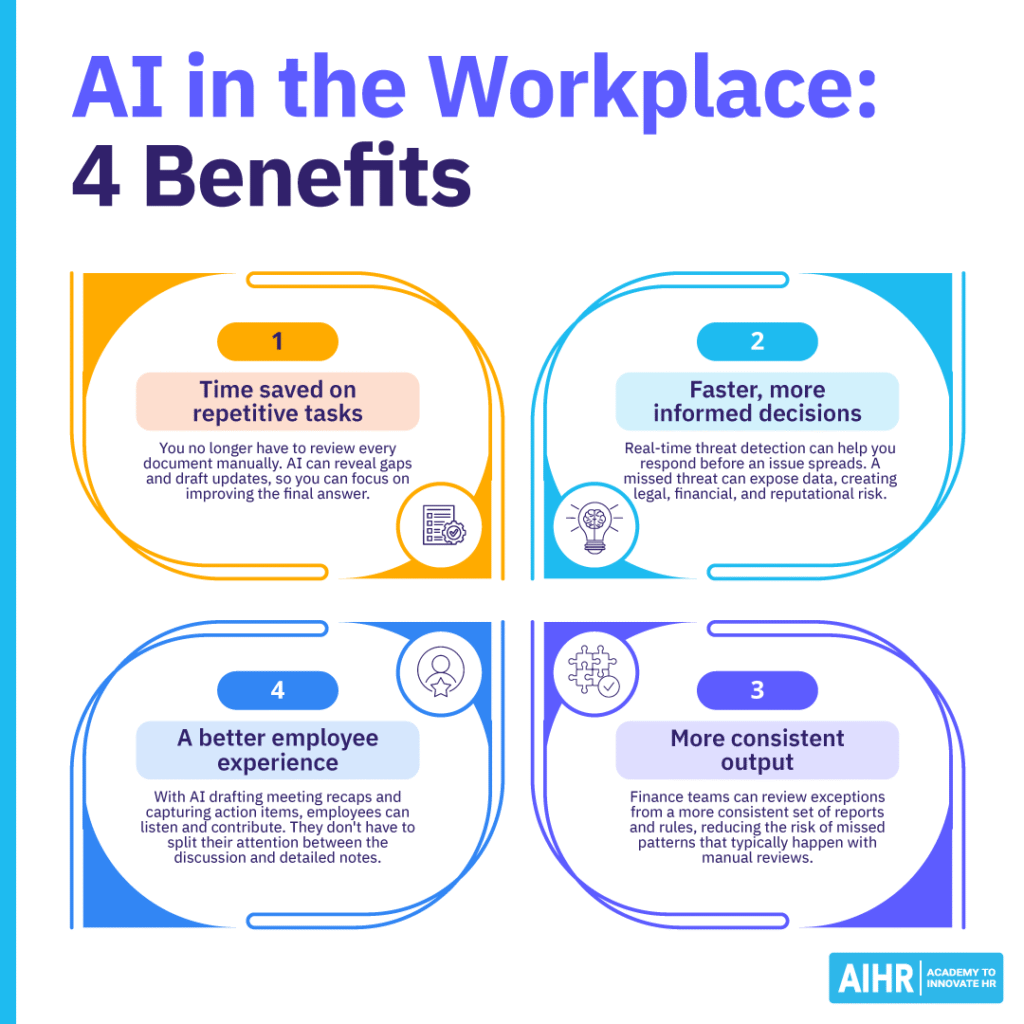
The benefits of AI in the workplace show up most clearly when you trace them back to specific tasks, such as:
- Time saved on repetitive tasks: A support team no longer has to review every knowledge base article manually to find outdated content. AI can reveal content gaps and draft updates, so people spend more time improving the final answer.
- Faster, more informed decisions: In cybersecurity, real-time threat detection can help teams respond before an issue spreads. A missed threat can expose data and create legal, financial, and reputational risk.
- More consistent output: Finance teams can review exceptions from a more consistent set of reports and rules, reducing the risk of missed patterns that typically happen with manual reviews.
- A better employee experience: With AI drafting meeting recaps and capturing action items, employees can listen and contribute. They don’t have to split their attention between the discussion and detailed notes.
Remember, however, that these benefits don’t appear automatically. Employees and managers alike need training, clear use cases, and human oversight. AI can make mistakes, miss context, and produce biased or inaccurate output, and can’t replace the institutional knowledge of experienced employees.
How AI is used in the workplace
Most of the time, the use of AI in the workplace starts with the people doing the work, not with the executives approving the budget. While conversations about AI adoption in the workplace assume change flows down from the boardroom, HR’s own experience tells a different story.
AIHR’s collaboration with Lightcast found that recruiters, training specialists, and HR generalists are the ones testing AI tools first, with leadership following rather than leading. The numbers show demand for AI skills in HR job postings has grown 66% year over year, the fastest growth of any function tracked, ahead of marketing (50%), finance (40%), education (18%), and research (9%).
Because that demand is so heavily concentrated in frontline roles, talent acquisition postings mention AI skills at nearly four times the average rate, and employers are paying a 32% salary premium for HR staff who bring AI skills.
This bottom-up pattern is why traditional change management struggles to keep up with AI adoption in the workplace. When you wait for a polished, centralized rollout plan, employees have usually already found their own tools and workarounds, and by the time leadership finishes the planning cycle, competitors have moved on.
Instead of directing every step, the HR leaders getting this right set guardrails for safe experimentation, then let practitioners test, adapt, and share what actually works.
Why most AI adoption in the workplace still fails to scale
Even with strong grassroots adoption, most organizations haven’t turned that energy into results that the business notices. AIHR’s research found that 95% of generative AI pilots fail to deliver a measurable impact, and while 78% of organizations now use AI somewhere in the business, only 6% report meaningful returns from it.
The gap between an employee getting value from AI and the organization getting value from AI is what AIHR refers to as the AI chasm: the point where scattered experimentation must become a deliberate, resourced priority rather than something people pursue on their own time.
Crossing that chasm comes down to five things most organizations are still missing: a clear definition of the value AI should create, a prioritized set of use cases, the infrastructure to support them, skills built at scale rather than in pockets, and alignment across teams on what success actually looks like. Miss even one of these, and experimentation tends to stay exactly that, with no path to becoming a real capability.
HR’s role in AI adoption: Closing the readiness gap
HR’s role in AI adoption starts with closing the gap between how HR feels about AI and how ready HR actually is to use it. AIHR’s research across 334 HR teams found that the gap is wide. 65% of HR teams show strong buy-in for AI, and 66% already have policies and oversight in place, indicating enthusiasm.
But looking on the practical side, and the picture changes: only 30% have a clear strategy or prioritized use cases, just 29% feel confident in their data and tech infrastructure, and only 35% feel they have the skills to use AI responsibly in daily work. It is evident that HR doesn’t have an adoption problem; there is a readiness issue at play.
Where HR’s AI readiness falls short
Closing that gap starts with HR’s own expertise. AIHR’s research on the foundational skills HR needs to lead with AI points to three areas worth building on purpose.
1. Deep HR expertise
AI can spot patterns in data, but it can’t decide what those patterns mean for your people, and it can’t weigh a candidate’s potential against how well they’ll fit your culture. Those are judgment calls, and they depend on the same experience and organizational knowledge that made HR valuable long before AI showed up.
When a tool flags someone as a flight risk, the HR professionals who add the most value are the ones who ask what the model is actually seeing and what it might be missing, instead of taking the output at face value.
2. A practical understanding of how AI works
You don’t need to code, but you do need to know enough to ask good questions: what data trained this model, where might bias show up, and when does a decision need a human in the loop before it goes any further.
Teams that build this kind of literacy, called AI fluency, can evaluate vendor claims honestly and hold their own in conversations with IT, rather than sitting quietly while decisions get made around them.
3. Disciplined, responsible use
This means choosing tools because they solve a real problem, not because they’re new, building in review at the moments that matter most, and being upfront with employees about where and how AI shapes decisions that affect them.
None of this happens without HR leaders setting the tone. When you ask informed questions, model responsible use yourself, and give your team room to build these skills, you give AI adoption in your organization its best shot at moving past the pilot stage and becoming a real part of how HR works.
Next steps
The examples above point to one pattern: AI creates value when it removes repetitive work and helps people make better decisions. In HR, your role goes beyond personal productivity. You can help employees build relevant AI skills, use approved tools correctly and responsibly, and maintain human judgment in sensitive decisions.
If you need to build your AI in HR skills and improve your AI fluency, consider taking AIHR’s Artificial Intelligence for HR Certificate Program, which teaches practical AI skills for HR work, including responsible use and human oversight. If you’re still exploring, use the AIHR Demo Portal to see what AI-enabled HR development can look like.
FAQ
AI in the workplace examples span nearly every function. AI can triage customer tickets, score sales leads, flag financial anomalies, draft meeting recaps, write job descriptions, and summarize long documents. It can also help employees create first drafts, organize notes, and review large amounts of information faster.
AI is used to automate repetitive tasks, support decisions, and improve communication. It can handle routine workflows like ticket routing or invoice matching. It can also help employees analyze data, draft content, summarize meetings, and decide which work needs human attention.
The benefits include time saved on repetitive tasks, faster decisions, more consistent output, and a better employee experience. These benefits depend on training, clear use cases, and human oversight, as employees still need to review AI output before they use it.