

Claude is a great option for HR professionals looking to leverage AI to improve processes and efficiency, but what’s the difference between Claude’s skills, projects, and artifacts? According to AIHR’s AI readiness research, only 35% of HR professionals are confident they have the skills to integrate AI into their daily workflows.
So, where should you start? AIHR experts Suhail Ramkilawan, Senior HR Solutions Advisor, and Marijn Verdult, Digital Growth Lead, share practical ways you can start using all three for your daily HR workflows.
Contents
What are Claude skills, projects, and artifacts?
Where to start: Claude skills, projects, or artifacts?
How to choose the right Claude feature for your HR task
HR examples of when to use Claude skills, projects, or artifacts
How to set up a Claude skill, project, or artifact for your HR work
AIHR’s best practices for using Claude skills, projects, and artifacts
What are Claude skills, projects, and artifacts?
Claude skills, projects, and artifacts solve different problems. Marijn explains: “Every chat comes down to: Do you want an answer in the chat, or do you want the AI to produce something for you?” Our experts unpack what each of these can deliver based on what you want as the output:
What are Claude skills?
A Claude skill is a reusable set of instructions that teaches Claude how to complete a task. Think of it as an evolution of the copy-and-paste prompt library. Once you’ve built a skill, you don’t need to explain the same requirements in every chat.
For example, you could create a skill for drafting HR communications in your organization’s preferred tone and format. Claude can then apply those instructions when they’re relevant to your request. This makes skills useful for recurring tasks that need a consistent approach.
What are Claude projects?
A Claude project gives ongoing work a dedicated space. You can keep related chats, reference documents, and project instructions together.
For example, you might create a project for your annual performance review cycle. You could add your performance philosophy, competency framework, calibration guidance, and manager resources. This shared context means you don’t have to start from scratch in every conversation.
What are Claude artifacts?
A Claude artifact is different because it’s an output rather than a reusable set of instructions or workspace. It’s a deliverable Claude creates separately from the main conversation. For HR, that could be a document, checklist, one-pager, presentation, or another structured output. You can also continue discussing the work with Claude while refining the artifact.
Skills, projects, and artifacts are also different from Claude Cowork and Claude Code, as they’re agentic tools designed to complete more complex, multi-step work. If you want to explore Claude Cowork and Claude Chat for HR, consider AIHR’s Claude for HR mini course (available through Full Academy Access).

Where to start: Claude skills, projects, or artifacts?
If you’re new to Claude for HR, you don’t need to learn every feature at once.
“In terms of impact, I’d say start with an artifact, then move to skills, then projects. I recommend using artifacts first, because you can learn to use them in five minutes, and instead of chatting back and forth, the AI is already doing the actual work for you.”

Once you use Claude regularly, you’ll start spotting tasks you tend to repeat. That’s when skills become useful. They help you apply the same instructions without having to rebuild your prompt each time. Projects come next, when your work needs ongoing context and organization. They can keep related conversations and resources together across a longer piece of work.
There’s also a natural progression among the features. A one-off artifact could eventually become a repeatable skill, and over time, that work could develop into a shared internal tool. For example, you might start by creating a compensation benchmarking view as an artifact. If you need it regularly, you could turn the process into a skill and refine it for wider team use.
Knowing when to use the correct AI feature can make your HR work more efficient. Develop broader AI skills, so you can apply these tools thoughtfully across HR workflows, and keep adapting as the technology evolves.
AIHR’s Artificial Intelligence for HR Certificate Program gives you the practical knowledge to:
✅ Use GenAI tools such as Claude, ChatGPT, and AIHR Copilot for relevant HR use cases
✅ Apply Claude effectively to HR work and choose the right AI tool for different challenges
✅ Design stronger prompts that produce higher-quality outputs while using AI responsibly
✅ Identify opportunities and develop an AI strategy that supports successful adoption
💡 Check out the AIHR Demo Portal to preview lessons and explore the learning experience before you enroll.
How to choose the right Claude feature for your HR task
According to AIHR’s experts, you don’t need a complicated framework to choose between Claude skills, projects, and artifacts. Suhail and Marijn recommend the following guide to help you:
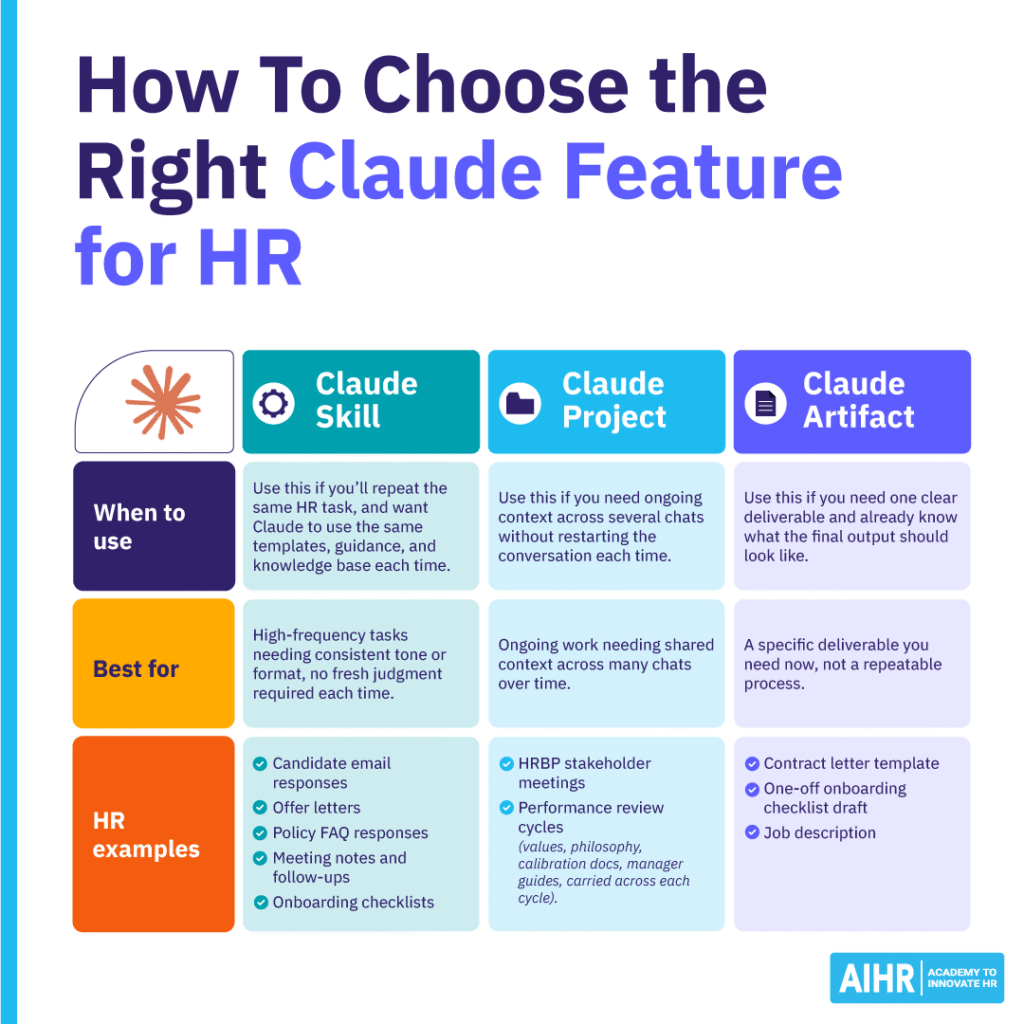
When to use Claude skills
Use this if you’ll repeat the same HR task, and want Claude to use the same templates, guidance, and knowledge base each time.
Suhail says, “For repeatable HR documents or processes, policies, job descriptions, and similar standardized material, a skill works well, because your knowledge base is clear and doesn’t need to be re-fed every time. Those skills could also live inside a project, clustered together (for instance, under ‘HR documents’ or ‘HR processes’), so you get the benefit of both.”
For example, you could build a skill to draft job descriptions using your company’s standard structure and tone, then refine it as your requirements change. Claude has a built-in skill creator that will show you how to create a skill based on what you want to achieve.
When to use Claude projects
If you need shared, ongoing context across multiple chats without restarting the conversation each time, you should use a project.
Suhail gives performance management as an example: “A project structure would work well for performance management review cycles, as it gives you continuity and shared context, so you don’t need to restart the conversation/context from scratch each time.
“Given that most organizations run performance cycles quarterly, half-yearly, or yearly, this also allows you to come back to the last moment easily.”
When to use Claude artifacts
A Claude artifact is best if you need one clear deliverable and already know what the final output should look like (e.g., an offer letter template or onboarding checklist).
“Artifacts are likely already being used, but you might not know it. Each time you engage with AI and ask it to create something, you’re creating an artifact.”

Suhail also flags that projects and skills can overlap because they can contain standing instructions. Use repeatability as your deciding factor. If you’ll repeat the task, create a skill, but if you need ongoing context for a piece of work, use a project.
HR examples of when to use Claude skills, projects, or artifacts
The easiest way to understand Claude skills vs projects vs artifacts is to connect them to real HR tasks. Below are some examples:
Claude feature | Best for | HR examples |
Skill | High-frequency tasks needing consistent tone or format, no fresh judgment required each time | – Candidate email responses – Offer letters – Policy FAQ responses – Meeting notes and follow-ups – Onboarding checklists. |
Project | Ongoing work needing shared context across many chats over time | – HRBP stakeholder meetings – Performance review cycle (values, philosophy, calibration docs, manager guides, carried across each cycle). |
Artifact | A specific deliverable you need now, not a repeatable process | – Contract letter template – One-off onboarding checklist draft – Job description. |
Skills and artifacts can work particularly well together. For example, you can create a skill that follows your job description standards, then ask Claude to deliver each finished job description as an artifact. This keeps the conversation focused while giving you a separate output to review and refine.
Your approach may change when creating an HR process from scratch. If, for instance, you’re designing a performance review process for the first time, you should start with an artifact and use it to develop the initial framework.
Once you have useful material worth retaining, you can create a project. Add your framework, manager guidance, review questions, and other relevant documents as the process develops. This approach avoids creating a complex workspace before you know what information you actually need.
The same principle applies to smaller HR tasks. A one-off onboarding checklist might begin as an artifact, but you later create similar checklists for every new role, and that repeatable process could become a skill. Your existing HR processes also affect how you should use Claude.
“What matters for HR professionals is that your starting point shapes what you need,” says Suhail. “If a performance review process already exists but conversations aren’t landing the way you want, you don’t need to rebuild the whole framework.”
“You just need a set of questions for managers to ask. How AI gets used will look different depending on what’s already in place, but the underlying principles and AI fluency matter regardless.”
How to set up a Claude skill, project, or artifact for your HR work
Once you’ve chosen the right feature, keep the setup simple by starting with the information Claude needs to do useful work.
Building a Claude skill
- Start with a task you’ve already done more than once, or know you’ll repeat in the future.
- Gather two to three real examples of the output you want; Claude works better when given concrete examples rather than abstract instructions.
- Ask Claude directly: “Help me turn this into a skill”, and its built-in skill creator will walk you through how to structure it.
- Test your skill on a real, live task, and refine anything that isn’t quite right (such as tone, structure, or missing context) rather than treating it as a one-and-done setup.
HR tip
Don’t expect the first version to be perfect. Your real-world use will show you which instructions need more detail.
Starting a Claude project
- Open a new chat and select “Project” or click “New Project” from the sidebar.
- Name it clearly and specifically (e.g., “Performance Review Cycle”), so it’s easy to locate
- Upload core reference documents upfront, i.e., the material you’d otherwise re-explain every session (e.g., add last year’s board presentation when preparing this year’s people metrics deck).
- Add project-level custom instructions if there’s a consistent tone or structure you want across every chat inside it.
- Treat a project like a folder, and drop relevant knowledge, shared context, and instructions into it over time.
HR tip
Treat the project as a dedicated workspace for one area of ongoing work, and avoid filling it with unrelated HR tasks simply because they’re handled by the same team.
Using a Claude artifact
- Input what you want to be turned into an artifact. This may include using what you’ve just created in a chat or uploading a document.
- Ask Claude to “Create this as an artifact.”
- Specify the output format you want, such as a Word document, a PowerPoint slide, or a branded PDF.
- You can keep chatting to Claude while it creates the artifact.
HR tip
The more specific you are about the deliverable, the easier it is to get a useful first version.
AIHR’s best practices for using Claude skills, projects, and artifacts
AIHR’s experts recommend that once you’ve started using the features, these few habits can make your workflows more consistent.
Build a skill for genuinely repeatable work
If you regularly give Claude the same instructions, turn them into a skill. Marijn describes failing to use skills for repeatable work as one of the most common missed opportunities, adding: “If you have a repeatable task, build a skill for it.” Even an occasional recurring task may justify a skill if the instructions are detailed.
Treat a skill as a living resource
Don’t treat your first version as finished. “If you don’t fix the skill, it will repeat the same mistake next time,” says Marijn. “There’s effectively no ceiling on how much a skill can be refined. Even skills I’ve iterated on 10 times still have room to improve.” When an output misses the mark, identify why, then update the instructions to make the next result stronger.
Give repeatable work a skill’s home
Projects can include instructions, but that doesn’t make every recurring workflow a project. If a task started inside a project and you now repeat it regularly, move the reusable process into a skill, and keep the project focused on the ongoing context.
Specify the output format before asking for an artifact
Tell Claude what you want it to produce. For example, don’t simply ask for an employee benefits guide. Instead, specify whether you need a Word document, presentation, one-pager, or another format. Clear instructions reduce unnecessary revisions and help Claude produce something closer to your intended deliverable.
Next steps
Claude skills, projects, and artifacts become more useful when you match each feature to the right HR task. Start with one real workflow. Create an artifact, identify what you repeat, and build reusable instructions from there.
Building AI fluency takes practice. If you’re keen on upskilling in this area, consider AIHR’s Artificial Intelligence for HR Certificate Program , as it can help you develop practical AI skills and apply them responsibly across your HR work.