

An employee cost calculator is a handy tool HR teams can use to understand what each employee actually costs, compare workforce spending across departments, and make better hiring and budgeting decisions.
This article explains what employee costs include, how to calculate them, and why this data can help you make better business decisions. You’ll also find a free employee cost calculator to help you run your own numbers.
Contents
What is the true cost of an employee?
What goes into the cost of an employee?
How to calculate the cost of an employee
Free employee cost calculator (Excel template)
Why employee cost data matters for HR
FAQ
What is the true cost of an employee?
The true cost of an employee goes beyond their base pay, although that usually makes up a significant portion. It also includes what an employer must spend to keep that person working, such as payroll taxes, benefits, equipment, overhead, and one-time expenses like hiring and onboarding.
In other words, an employee’s base pay or basic salary refers only to the fixed part of their total compensation. The full cost of employing someone is much broader.

What goes into the cost of an employee?
Let’s look at the elements that make up the total cost of an employee. The exact mix depends on your organization, location, industry, and role. For example, employer taxes and social security contributions differ by country, state, and employment type.
The following components should typically be part of your employee cost calculation:
- Base salary + variable compensation: Whether someone earns an hourly wage, monthly salary, or annual salary, base pay forms the foundation of any employee cost calculation. Make sure you annualize hourly and monthly wages so you can compare costs accurately. Many employee cost calculator examples also include guaranteed or expected variable pay, such as allowances, bonuses, and commissions.
- Employer payroll taxes: In the U.S., employer payroll taxes typically include Social Security and Medicare taxes, Federal Unemployment (FUTA) Tax, and state unemployment taxes, depending on the organization and location. Exact rates and requirements vary, so always check the rules that apply where the employee works. In Europe, employer social contributions and wage-related taxes also differ by country, which can significantly affect total labor costs.
- Benefits: The costs of employee benefits depends on the employee’s benefits package and local requirements. Some benefits are mandatory, while others are discretionary. Mandatory benefits are costs the organization must provide by law or regulation. Discretionary benefits are optional and depend on the employer’s policies.
Depending on where the employee works, benefits may include:- Paid Time Off (PTO)
- Parental leave
- Health insurance
- Retirement or pension plans
- Training and skills development funding
- Meal vouchers, which are a common employee benefit in France
- Equipment: Every employee needs equipment to do their job. This too varies depending on the industry and role they’re in. Typical equipment costs are laptops, office or workspace, phones, software licences, company clothing, security equipment, and tools people need to perform their duties.
- Overhead: Overhead includes the ongoing costs of supporting an employee. This can include administrative, HR, IT, payroll, legal, and compliance costs, as well as the time these teams spend on payroll, employee relations, legal questions, and workforce administration.
Together, these elements make up the recurring annual cost of an employee. To make your calculation more complete, you should also include relevant one-time expenses, such as:
- Hiring costs: These may include external recruiter fees, a referral bonus, candidate sourcing costs, interview time, assessment software and reference check expenses, or a combination of these expenses.
- Onboarding costs: Onboarding goes beyond simply using an onboarding tool to automatically guide new hires through the process. It also takes time and effort from HR, the hiring manager, team members, and sometimes other employees across the organization. Getting a new employee fully productive also requires training, guidance, time, and involvement from co-workers. Knowing a role’s time to productivity can help you estimate these costs more accurately.
- Replacement buffer: No matter how solid your recruitment process is, people can always leave prematurely for one reason or another. If that happens, the organization needs to find and onboard a replacement. Set aside a role-specific amount that reflects what it may cost to replace an early leaver.
Did you know?
In the U.S., total employer compensation costs for civilian workers averaged $49.32 per hour worked, compared to $46.60 for private industry workers, and $66.41 for state and local government workers, according to the U.S. Bureau of Labor Statistics.
How to calculate the cost of an employee
Because employee costs depend on location, industry, role, and employee type, there is no single formula that works for every organization. However, you can use the following step-by-step approach to estimate the true cost of an employee, starting with annual recurring expenses.
Step 1: Start with the base pay + variable compensation
Take the employee’s base salary and add any variable compensation, such as bonuses, commissions, or allowances. Use this number as the starting point for your calculation.
Step 2: Add employer payroll taxes
Add the payroll taxes that apply in the employee’s location. In the U.S., this typically includes the employer share of Social Security and Medicare taxes, also known as FICA, as well as federal and state unemployment taxes.
Step 3: Add benefits costs
Add the cost of the employee’s benefits package. This may include health insurance, paid time off, retirement contributions, parental leave, training, or other benefits your organization provides.
Step 4: Add equipment costs
Include costs for equipment, software (licenses), workspace, security equipment, tools, company clothing, etc.
Step 5: Add overhead costs
Administration teams, lawyers, IT and HR teams all work continuously to ensure the operational side of having a workforce keeps running. Add the subsequent legal, payroll, compliance, and other expenses to your calculator.
Then there are the one-off expenses to take into account.
Step 6: Add hiring, onboarding, and replacement cost
As mentioned in the previous section, every employee comes with hiring and onboarding costs. There may also be a replacement cost if they leave earlier than expected.
Include costs such as recruiter fees, referral bonuses, assessment tools, interview time, onboarding support, training, and time to productivity.
Step 7: Total it up
Add all recurring and one-time expenses to calculate the employee’s total cost.
Employee cost calculations help HR understand the true cost of hiring, employing, and retaining people. With stronger people data skills, you can use these numbers to support budgeting, workforce planning, and business cases.
AIHR’s People Data & Business Insights Certificate Program teaches you to:
✅ Analyze and interpret HR data with more confidence
✅ Apply HR metrics frameworks to connect people data to strategy
✅ Build HR dashboards and reports in Excel and Power BI
✅ Turn workforce data into insights leaders can use
💡 Check out the lessons in AIHR’s Demo Portal for a clear idea of what you’ll get.
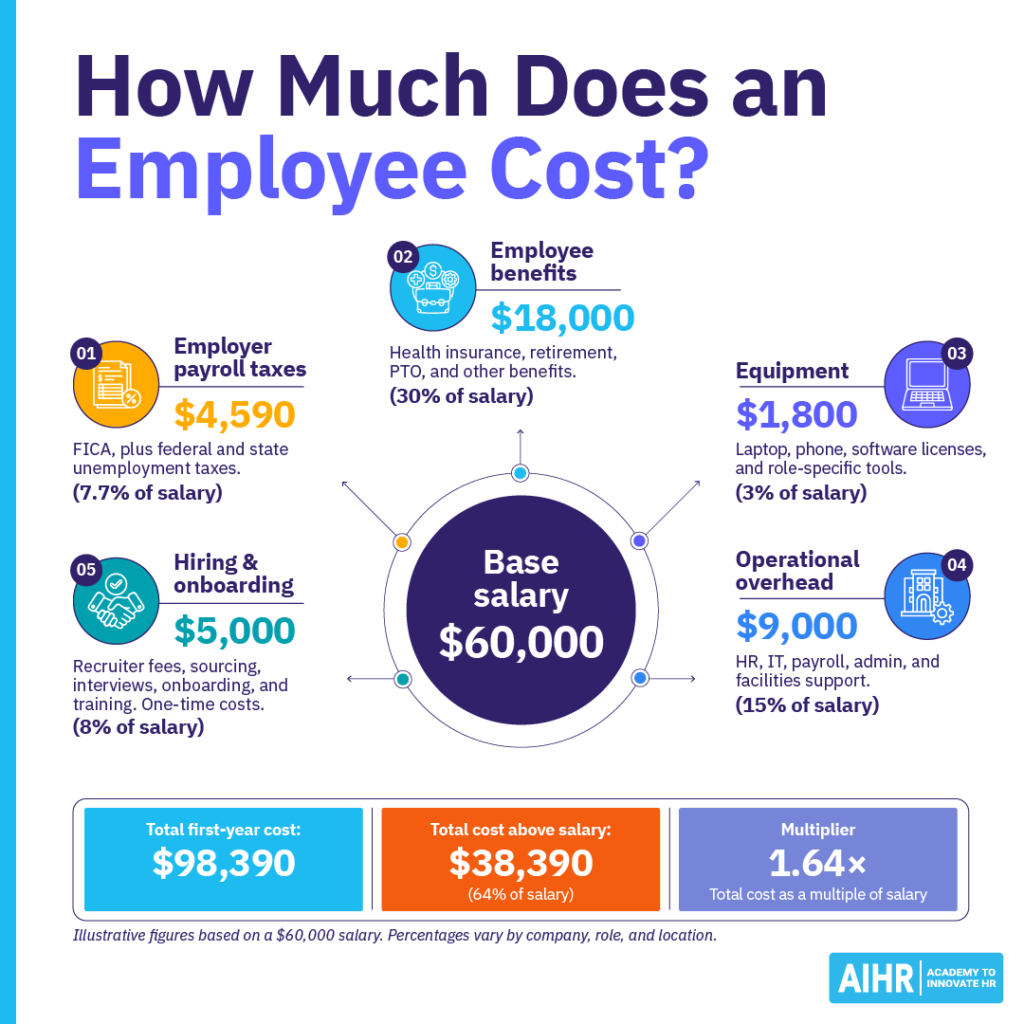
Employee cost calculation example
The cost of employing an employee varies by per state or county, but here’s an example of what this calculation could look like.
- Agreed base salary: USD 50,000
- Employer payroll taxes (FICA) at 7.65%: USD 3,825
- Benefits at 30%: USD 15,000
- Equipment at 3%: USD 1,800
- Overhead at 15%: USD 9,000
Total annual recurring cost: USD 93,390, or about 1.56 times the base salary.
On top of the recurring cost, budget for one-time expenses in the employee’s first year:
- Hiring and onboarding: USD 5,000
Total employee cost, including recurring and one-time expenses: USD 98,390, or about 1.64 times the base salary.
On top of this, you may want to set aside a replacement buffer, a role-specific provision for the risk that a new hire leaves early and has to be replaced. Treat it as a separate contingency rather than part of the baseline cost, since it only applies if turnover happens.
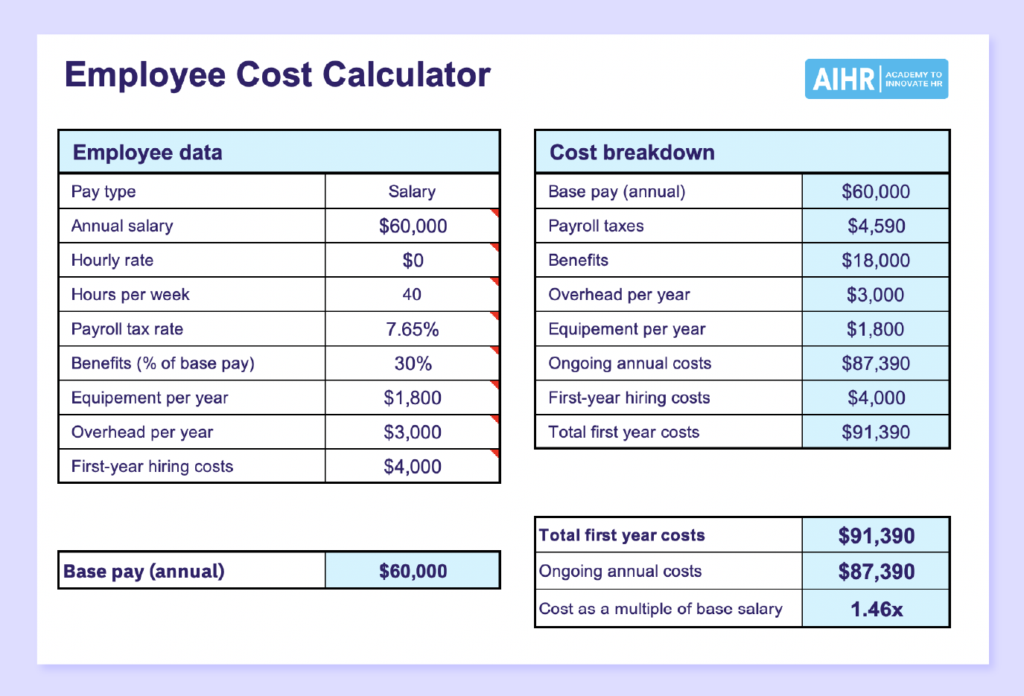
Free employee cost calculator (Excel template)
Use this free employee cost calculator to estimate the true cost of a role without building your own spreadsheet. Enter the employee’s pay, adjust the tax, benefits, and overhead fields, and use the results to support budgeting, hiring, and workforce planning.
Why employee cost data matters for HR
Employee expenses are often one of the largest parts of an organization’s operating budget. An employee cost calculator helps HR teams get a more accurate view of workforce spending, so they can:
- Carry out headcount and labor cost budgeting: Understanding your cost per employee helps you compare spending across departments, spot unnecessary workforce expenses, and plan hiring budgets more accurately.
- Benchmark cost per hire: If you include one-time expenses such as hiring, onboarding, and replacement costs in your employee cost calculator, you can benchmark your organization’s cost per hire more accurately.
- Make the ROI case for retention: When you know the annual cost of keeping an employee and the likely cost of replacing them, you can build a stronger case for investing in retention strategies.
- Support workforce and scenario planning: Effective strategic workforce planning depends on accurate information about what it takes to hire, employ, and retain people.
- Build offer and promotion business cases: Accurate employee cost data helps you compare the cost of promoting an existing employee with hiring an external candidate. This can help you decide which option makes more sense for the role, team, and budget.
Next steps
Start by reviewing how your HR team currently calculates employee costs. If you don’t have a structured process yet, use the free employee cost calculator in this article to build a clearer view of workforce spending. If you already have one, check whether it includes all recurring and one-time expenses.
To strengthen your ability to work with HR data, explore AIHR’s People Data & Business Insights Certificate Program. It helps HR professionals build practical skills in HR metrics, dashboards, Excel, Power BI, and turning people data into clear business insights.
FAQ
To calculate the cost of an employee, add their base salary, variable compensation, employer payroll taxes, benefits, equipment, and overhead. For a more complete calculation, include one-time expenses such as hiring, onboarding, and replacement costs.
The total cost of a $20-an-hour employee depends on how many hours they work, where they are located, which payroll taxes apply, and what benefits and equipment they need.
To estimate the annual base pay, multiply $20 by the number of hours worked per week, then by the number of weeks worked per year. Then add payroll taxes, benefits, equipment, overhead, and any one-time expenses.
The cost of a W-2 employee depends on their pay, employer payroll taxes, benefits, equipment, overhead, and role-specific expenses. The total will vary by state, benefits package, and employment setup.
The true cost of an employee beyond salary includes recurring expenses such as payroll taxes, benefits, equipment, and overhead. It can also include one-time expenses like hiring, onboarding, and replacement costs.