

An FTE calculator takes the guesswork out of workforce planning and grounds it in coherent data. With over 28 million people employed part-time in the U.S., the full-time equivalent is one of the most useful workforce metrics for consistently understanding staffing levels. It helps HR teams translate mixed schedules into an accurate picture of labor capacity, making it easier to plan headcount, budgets, and benefits.
This article breaks down what a full-time equivalent is and why HR teams rely on it. It also includes a simple FTE calculator in Excel to turn hours into clear staffing numbers.
Contents
What is FTE?
How to calculate FTE
FTE calculator Excel template
Why HR teams use FTE calculations
FAQ
What is FTE?
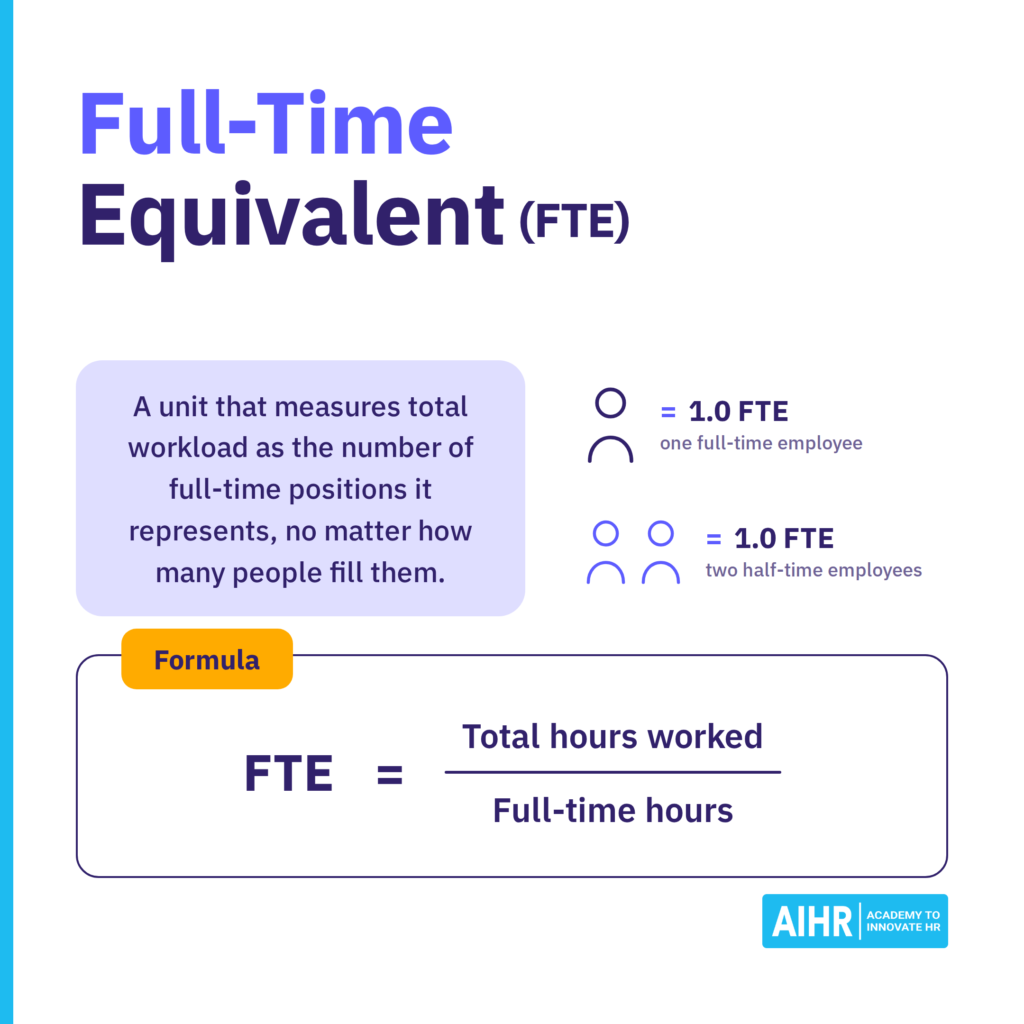
FTE stands for full-time equivalent. Organizations use it to convert total workforce hours into a single standard unit, which puts part-time and full-time staff on one comparable scale.
For example:
- 1.0 FTE = one full-time employee
- 0.5 FTE = 50% of a full-time schedule
- 0.75 FTE = 75% of a full-time schedule

FTE vs. headcount
Although FTE and headcount both count employees, they measure different things and are not interchangeable.
Here are the key differences:
Measures labor capacity based on hours worked
Counts individuals on the payroll
Tallies part-time employees proportionately
Tallies every employee as one person, regardless of hours worked
Expressed as decimals, or fractions of a full-time schedule
Expressed as whole numbers
Useful for workforce planning, labor cost budgeting, productivity measurement, benefits allocation, and meeting compliance thresholds such as the Affordable Care Act (ACA) and Paycheck Protection Program (PPP).
Useful for gauging organizational size, headcount reporting, and spotting staffing trends
FTE calculations help HR turn mixed work schedules into a clearer view of workforce capacity. To use metrics like this well, HR needs the skills to interpret people data and connect it to planning, budgeting, and business decisions.
AIHR’s People Data & Business Insights Certificate Program teaches you to:
✅ Analyze and interpret HR data with more confidence
✅ Apply HR metrics frameworks to connect people data to strategy
✅ Build HR dashboards and reports in Excel and Power BI
✅ Turn workforce data into insights leaders can use
💡 Check out the lessons in AIHR’s Demo Portal for a clear idea of what you’ll get.
How to calculate FTE
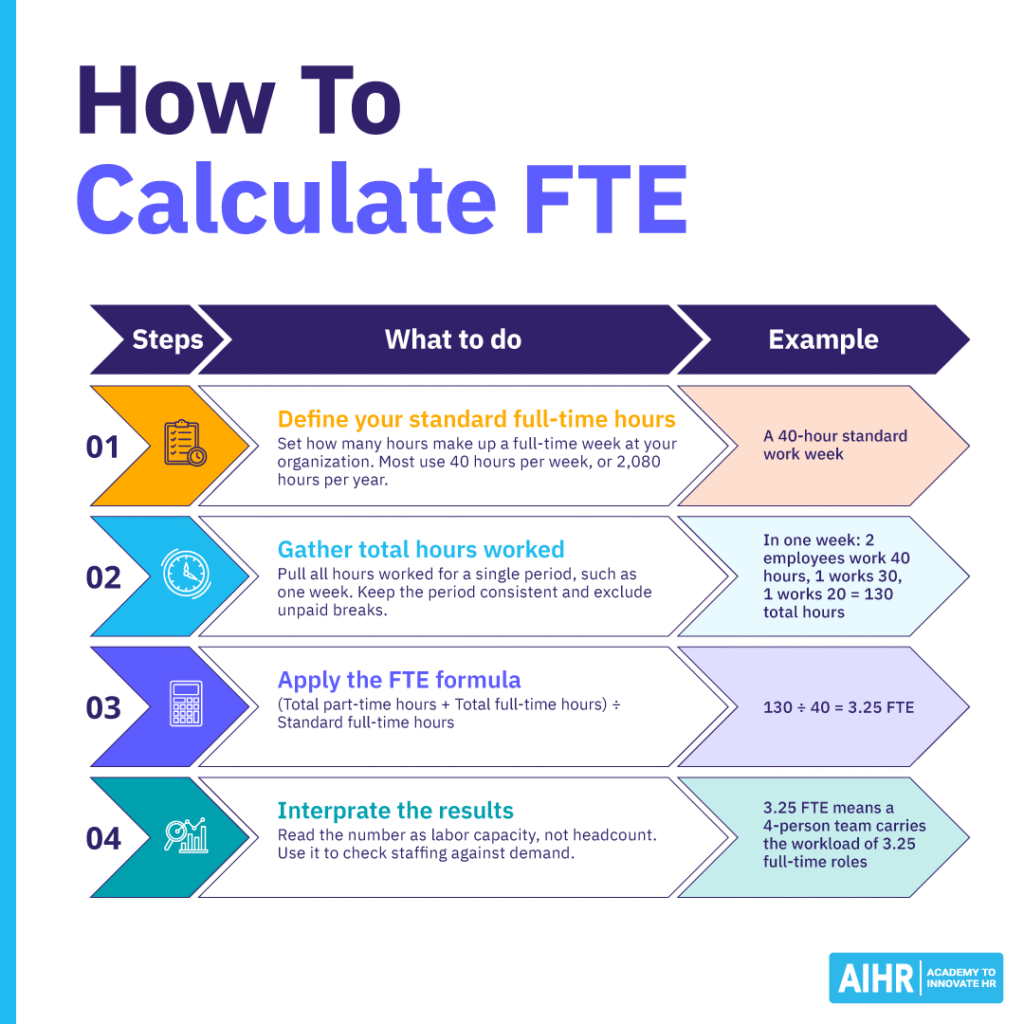
To calculate FTE, divide the total hours worked by your standard full-time hours for the same period. Follow these four steps:
Step 1: Define your standard full-time hours
Decide how many hours make up a full-time work week at your organization. Most companies use 40 hours per week, which equals 2,080 hours per year. This number becomes the benchmark you measure everyone else against.
Step 2: Gather total hours worked
Pull the total hours worked from your timekeeping system for a single period, such as one week, one month, or a pay period. Exclude unpaid breaks. Convert any minutes to decimal hours, so 15 minutes becomes 0.25 hours.
Keep the period consistent. Your total hours and your standard full-time hours have to cover the same window, or the result won’t make sense. Weekly hours are divided by weekly full-time hours, monthly by monthly, and so on.
Step 3: Apply the FTE formula
Add up all hours worked, then divide by your standard full-time hours for that period:
FTE Formula = | (Total part-time hours + Total full-time hours) |
Standard full-time hours |
Step 4: Interpret the result
Read the number as labor capacity, not headcount. A result of 3.25 FTE means your team carries the workload of 3.25 full-time roles. Use it to check whether your budget and staffing line up with actual demand.
FTE calculation example
Here’s an FTE calculation for a four-person team at a company with a 40-hour work week. In one week:
- Two employees work 40 hours
- One works 30 hours
- One works 20 hours
That’s 130 total hours. Divide 130 by 40, and you get 3.25 FTE. So four people make up the team, but their combined labor capacity equals 3.25 full-time roles.
You can also check the math person by person:
- 2 full-timers × (40 ÷ 40) = 2.0 FTE
- 1 employee × (30 ÷ 40) = 0.75 FTE
- 1 employee × (20 ÷ 40) = 0.5 FTE
- Total = 3.25 FTE
Calculating FTE by week, month, or year
The same team lands on the same FTE in any period, as long as your hours and your full-time standard cover that period. Here’s how the four-person team looks across all three:
Week
40
130
130 ÷ 40 = 3.25
Month
173.33 (2,080 ÷ 12)
563.33
563.33 ÷ 173.33 = 3.25
Year
2,080 (40 × 52)
6,760
6,760 ÷ 2,080 = 3.25
What FTE doesn’t tell you
FTE measures how many full-time hours of labor you have, not how well those hours are used. It says nothing about performance, output quality, or cost on its own. Two teams can share the same FTE and still run very differently, one steady and well-paced, the other stretched thin or covering gaps with overtime. Read FTE as a measure of capacity, then pair it with productivity, budget, and scheduling data to see the full picture.
Did you know?
The labor market in the U.S. has changed over the past few decades, with about 7.5 million more people working part-time now than in 1990. An Indeed study showed that the industries with the highest percentage of part-time job postings were beauty and wellness (67.2%), personal care and home health (54.2%), retail (47.5%), food prep and service (46.7%), and sports (46.2%).
FTE calculator Excel template
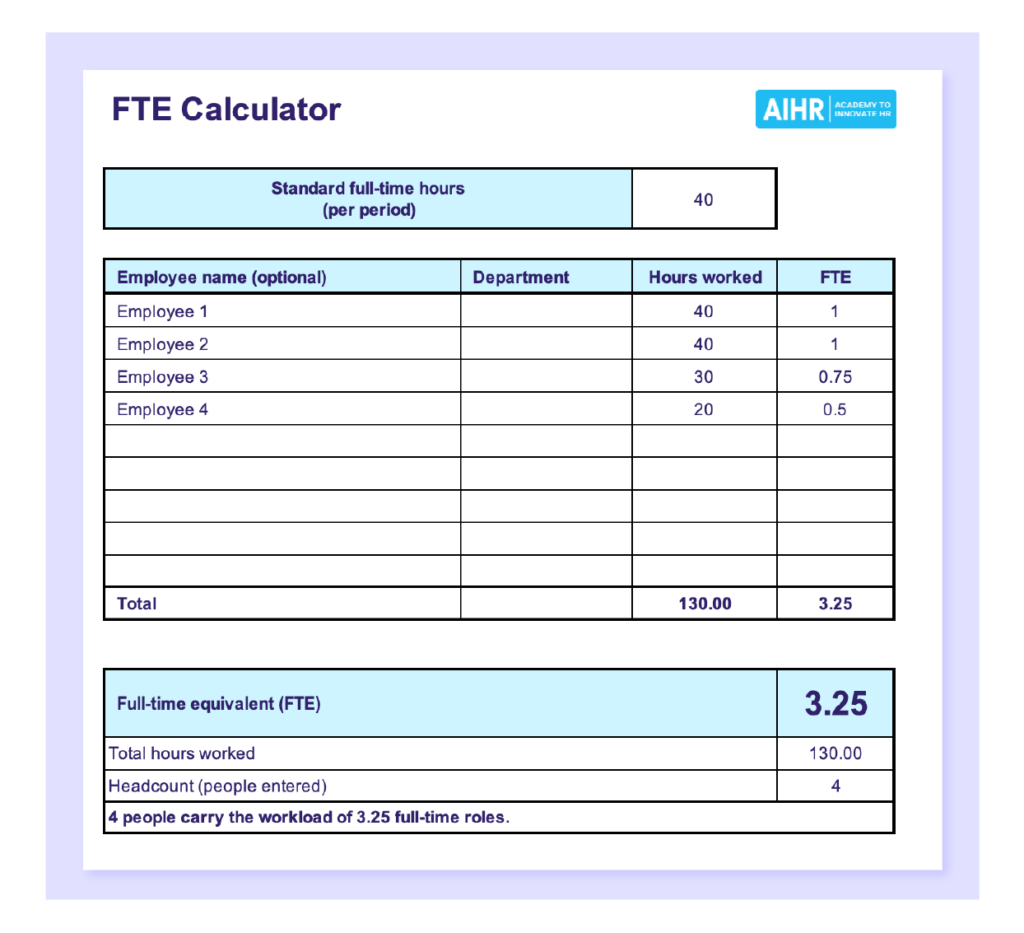
To help get you started in using an FTE calculator, we’ve provided a downloadable FTE calculator template that makes it easy to accurately convert employee work hours into full-time equivalents and support more informed, data-driven staffing decisions:
Why HR teams use FTE calculations
Since FTE calculations give a more realistic view of workforce size and workload than headcount alone, they are useful in many HR processes, such as:
- Workforce planning: FTE provides an accurate picture of available labor by accounting for full-time, part-time, and contingent workers within a single framework. This makes it easier to plan schedules more accurately, spot staffing gaps, and forecast hiring needs.
- Labor cost budgeting: You can calculate the expected cost per FTE for a team, project, or the entire organization. Then you can see how adjusting schedules or adding new roles or part-time staff will affect your total labor capacity and costs, helping you avoid under- or over-budgeting.
- Scenario planning: FTE allows you to run through different staffing scenarios that help you make more informed hiring and scheduling decisions for growth, seasonal demand, hiring freezes, or budget cuts. For example, you can see the outcome of replacing two contractors with one full-time hire or reducing a team’s FTE from 10.0 to 8.0.
- Benefits planning: Knowing how many full-time equivalents your workforce represents provides a solid basis for predicting costs, setting consistent benefits eligibility rules, and planning for enrollment. It also helps you see how staffing levels affect benefits obligations, including the Affordable Care Act (ACA)-related requirements in the U.S.
- Productivity analysis: FTE calculations turn labor hours into a standard unit, making it more straightforward to compare revenue, output, and efficiency across roles, teams, and time periods. They can also indicate whether a team is operating efficiently, underutilized, or overextended. For example, if output increases faster than FTE, efficiency is most likely improving.
- HR reporting: HR reports are easier to compare across teams, locations, and time spans when work hours are measured with one consistent method. FTE calculations are also useful for standard HR dashboards, as they support metrics such as revenue per FTE and cost per FTE. This means producing more accurate reports to share with leadership and being able to justify hiring or restructuring.
- Comparing staffing levels across teams or departments: FTE puts every team on the same scale, despite mixed schedules, enabling direct comparison of hours worked. For instance, one team can have fewer employees than another team but have a higher FTE. This standardization establishes the means for determining whether any teams are overstaffed or carrying a larger workload, validating decisions about schedule changes, work redistribution, or hiring.
FTE also sharpens the HR to employee ratio, which measures whether HR staffing is keeping up with the organization’s size and complexity across business units or locations with varying schedules. You can calculate the ratio on raw headcount, but using FTE gives a truer picture when teams work mixed schedules:
HR to employee ratio (%) = | (Number of HR staff in FTE / Total number of employees in FTE) | x 100 |
Next steps
HR professionals who understand FTE and know how to use an FTE calculator can more confidently assess workforce capacity, compare staffing levels, and make smarter budgeting and resource-planning decisions.
To strengthen your data-driven decision-making even further, consider enrolling in AIHR’s People Analytics Certificate Program. It will help you build practical analytics skills so you can turn workforce data into actionable insights that support better hiring, scheduling, productivity, and strategic workforce planning. You’ll also build some of the most in-demand HR capabilities, which can lead to higher pay.
FAQ
FTE means full-time equivalent. It’s a way to measure workload or staffing in full-time units instead of just counting people. (1.0 FTE equals one full-time employee.)
To calculate FTE, divide the total hours worked by all employees by the number of hours in a full-time schedule for the period you’re measuring.
Weekly FTE = total weekly hours ÷ 40
For example, in a 40-hour work week:
• 3 employees working 20 hours = 60 hours
• 2 employees working 40 hours = 80 hours
• Total = 140 hours per week
Divide 140 by 40, and you get 3.5 FTE.
One FTE equals one full-time schedule. In a standard 40-hour work week, that’s 40 hours per week, or 2,080 hours per year (40 × 52). If your organization sets full-time at a different number, such as 37.5 hours, use that instead.
If your organization defines full-time as 37.5 hours per week, then 37.5 hours equals 1.0 FTE. If your standard full-time workweek is 40 hours, then 37.5 hours equals 0.9375 FTE, or about 0.94 FTE.
FTE 0.8 refers to a role that is scheduled for 80% of a full-time schedule. In a standard 40-hour workweek, it equates to 32 hours per week.