

A well-built HR tech stack has considerable benefits for both HR professionals and employees in companies of all sizes. It can improve productivity and effectiveness, decrease costs, and simplify the recruitment process, helping the organization achieve its goals. Getting there takes more than picking popular tools, though.
Building the right stack means matching software to your organization’s size, goals, and existing systems, then making sure everything works together instead of creating more work. Let’s dive into all you need to know about building an HR tech stack.
Contents
What is an HR tech stack?
Why you need a solid HR tech stack
HR tech stack: The common software categories
HR tech stack examples
AI in the HR tech stack
How to build an HR tech stack
What is an HR tech stack?
An HR tech stack is a set of integrated software, platforms, and apps that improve and expand HR functions. These tools digitalize certain tasks to help HR professionals better manage their workloads across different areas of Human Resources, such as recruitment, benefits administration, and performance management.
The right HR technology reduces manual work and makes it easier to manage employee information across the organization. It also gives HR more time to focus on work that requires judgment, collaboration, and strategic input.
Why you need a solid HR tech stack
An effective HR tech stack helps HR teams work more efficiently and deliver a better experience across the employee lifecycle. Key benefits include:
- Improving your effectiveness as an HR professional: Automating repetitive tasks gives you more time to focus on strategic work, such as workforce planning, employee development, and manager support. It also makes it easier to use HR data to guide decisions.
- Enhancing digital employee experience: Employees expect workplace technology to be simple and easy to use. A well-designed HR tech stack makes common tasks more convenient, from requesting leave to accessing benefits or learning resources.
- Reducing errors and improving accuracy: Manual processes increase the risk of mistakes, especially in areas like payroll and employee records. Digital tools can standardize workflows and reduce repeated data entry.
- Creating better access to HR data: Connected HR systems give you a clearer view of your workforce. This can help you spot patterns, track important metrics, and make more informed decisions.
- Supporting compliance and risk management: HR technology can make it easier to maintain records, document processes, and apply policies consistently.

HR tech stack: The common software categories
Building a successful tech stack requires finding the right combination of tools. A technology solution exists for almost every HR responsibility, and there are plenty of vendor options. You just need to find what works best for your HR team.
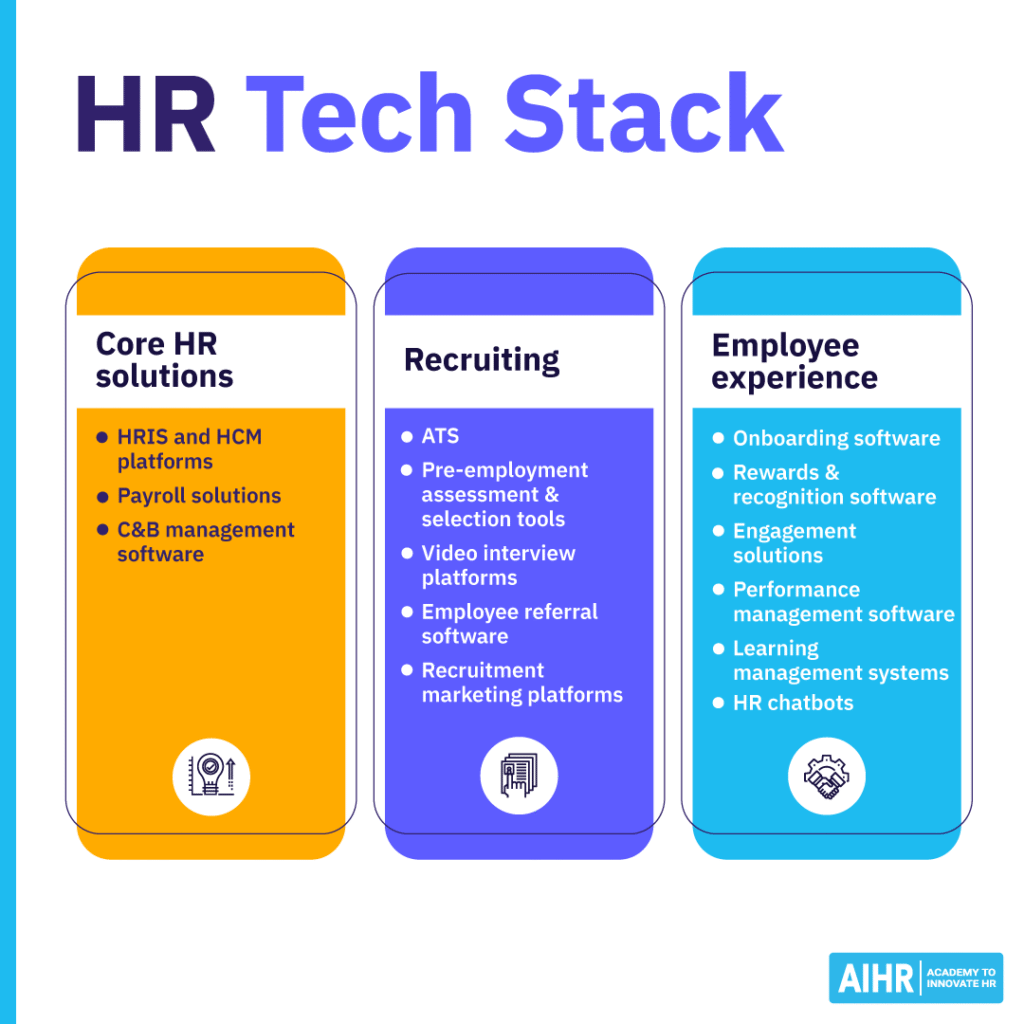
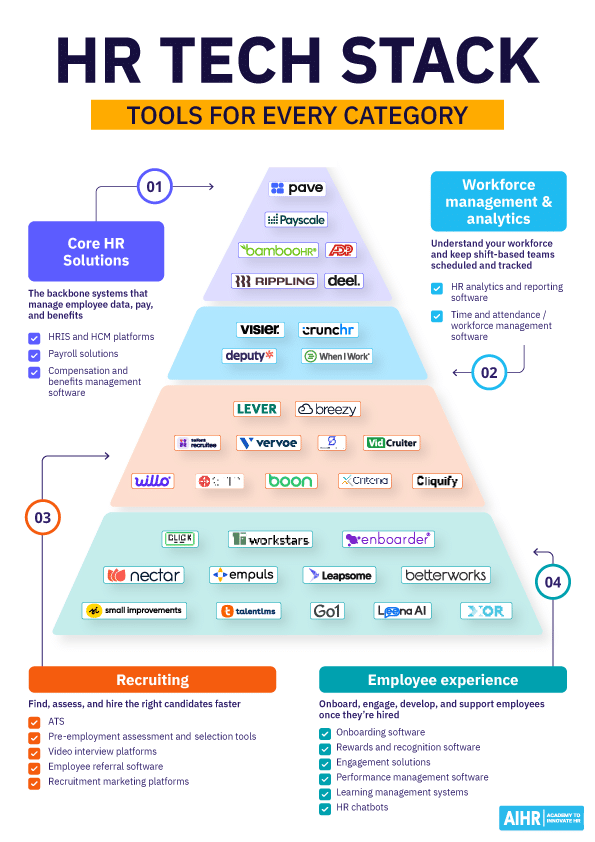
Listed below are four main software categories, their subcategories, and examples of vendors in the space. This is by no means an exhaustive list, as the HR tech space is booming and new solutions are emerging every day.
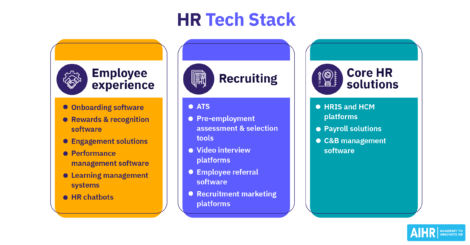
Core HR solutions
These solutions enable comprehensive management of fundamental HR information and processes. They are the backbone of your Human Resources technology stack.
Human resources information systems (HRIS) and human capital management (HCM) platforms
HRIS and HCM platforms are a set of technologies that standardize, maintain, and manage employee information and HR policies and procedures.
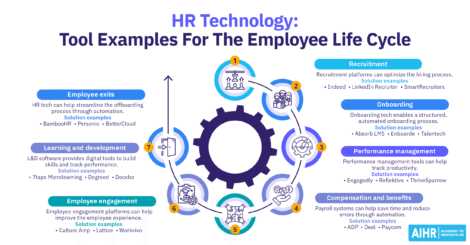
- Bamboo HR is an all-in-one HR software for small and medium-sized businesses. It integrates well with other tools and is very user-friendly.
- Deel is built for managing global and remote teams, with compliance, contracts, and HR workflows that adapt automatically across 150+ countries. It supports employees, contractors, and EOR workers on one platform.
Payroll solutions
Payroll software automates and manages on-time payments to employees while ensuring accuracy and compliance with applicable tax and financial regulations.
- Rippling can coordinate with all your HR data and run payroll in 90 seconds. It works internationally and handles all deductions and forms of payment.
- ADP offers payroll processing globally for organizations of all sizes and also integrates with other HR systems.
Compensation and benefits management software
This type of software helps develop and manage pay structures and increases with data-driven information. It also ensures that employee pay and benefits are appropriate, equitable, and competitive.
- Pave combines real-time compensation data with structured planning workflows to help you benchmark pay, run merit cycles, and communicate total rewards clearly to employees. It draws on live market data from thousands of companies to support consistent, defensible pay decisions.
- Payscale is an easy-to-use software that offers choices based on company size for small businesses to global enterprises. This customizable solution houses your survey data and provides quarterly updated salary market data.
Choosing HR technology is only part of the challenge. HR also needs the skills to improve processes, design better digital experiences, and help people adopt new tools successfully.
AIHR’s Digital HR 2.0 Certificate Program helps you develop the skills to:
✅ Analyze and optimize HR processes before introducing automation
✅ Design digital employee experiences that make HR services easier to use
✅ Implement digital change initiatives and support successful adoption
✅ Develop the digital expertise needed to lead HR technology initiatives
💡 Explore the AIHR Demo Portal to preview lessons, tools, and resources, and discover what you can learn next.
Workforce management and analytics
These solutions help you understand your workforce and keep it running day to day. One side turns HR data into decisions. The other keeps shift-based teams scheduled and their hours tracked accurately.
HR analytics and reporting software
Consolidating HR and business data in one place lets HR teams answer workforce questions on hiring, retention, skills, and organizational design without building reports by hand.
- Visier is a workforce intelligence platform that unifies HR, talent, and business data into pre-built metrics covering headcount, turnover, compensation, and internal mobility. It’s used by more than 160 Fortune 500 companies and integrates with major HRIS platforms like Workday and SAP SuccessFactors.
- Crunchr consolidates data from multiple HR systems into a single, GDPR-compliant source of truth, with an intuitive drag-and-drop interface built for HR teams without a dedicated analytics function. Enterprise companies use it for fast time-to-value on workforce dashboards.
Time and attendance/workforce management software
Scheduling, time tracking, and labor law compliance fall under this category, particularly for shift-based and hourly workforces.
- Deputy combines scheduling, time tracking, and compliance in one platform, with GPS or facial-recognition clock-ins and automatic enforcement of state-specific overtime and break rules. It connects with 300+ POS and payroll systems and is used by over 390,000 workplaces.
- When I Work focuses on shift-based scheduling and time tracking with an employee-first mobile experience, letting staff swap shifts and clock in from their phones. It’s aimed at small and mid-sized businesses running hourly teams.
Recruiting
Recruiting technology automates and streamlines processes for finding, attracting, and hiring talent.
Applicant tracking systems (ATS)
An ATS helps log and monitor job applicants. Recruiters can filter and analyze these records throughout the hiring process.
- Lever is enterprise-grade software with an accessible platform that centralizes the processes of finding, interviewing, and hiring candidates. It syncs with Microsoft 365 and Google Calendar and offers flexible reporting and advanced analytics.
- Breezy has an intuitive, visual interface and simplifies recruiting with a comprehensive range of functions that automate tedious tasks. It integrates easily with other HR tools and systems and works well for small and mid-sized organizations.
- Recruitee is on a mission to empower teams with the best tech tools to hire better together. The collaborative hiring platform offers multiple functions that help organizations source, identify, and hire the best candidates.
Pre-employment assessment and selection tools
These tools help you conduct consistent assessments of candidates’ skills beyond just their resume to hire the most qualified person for the job.
- Vervoe is an AI technology-driven platform that offers customized assessments based on real-world scenarios for all industries. Tests include multiple-choice and free-text questions, and candidates are ranked by their skills that align with the position.
- Criteria offers a wide range of science-backed pre-employment assessments, including cognitive ability, personality, and skills-specific tests, so you can tailor evaluations to different roles. Its analytics and reporting help you compare candidates objectively and make data-driven hiring decisions.
Video interview platforms
Platforms for video interviewing allow hiring managers to conduct interviews remotely and save valuable time. Video interviewing can be done in real-time or pre-recorded.
- VidCruiter can be used as a live video conferencing platform, or candidates can record their responses to predetermined questions. Questions are displayed in a written format or through an audio recording of the interviewer. This product integrates with multiple HR tools and systems, and the interview format and schedule are customizable.
- Willo is an easy-to-use interface for pre-recorded video interviews with a variety of features and plans to suit businesses of all sizes. With interviews accessible 24/7, candidates can respond at their convenience. People in over 130 countries use Willo, and the platform is fully GDPR compliant.
Employee referral software
This is a tool for managing employee referral programs and encouraging staff to participate in this advantageous method of sourcing candidates.
- ERIN automates the entire employee referral lifecycle, from submission to eligibility checks to bonus payouts, and lets employees refer candidates in seconds by text, email, or QR code. It integrates directly with your ATS and HRIS and uses AI to prompt employees toward open roles that their network is likely to fit.
- Boon offers several plans that can be set up quickly and used without any training. It’s designed for any type of business and operates as a stand-alone or to supplement existing hiring tools. Employees and candidates stay up-to-date with automated, customizable messages throughout the process.
Recruitment marketing platforms
A recruitment marketing platform augments businesses’ talent acquisition strategies with digital marketing. It helps develop employer branding and promote job advertising with content marketing, social media, etc.
- SmartDreamers is state-of-the-art software that consolidates and automates all aspects of candidate sourcing and employer branding for data-driven results. Products are scalable, and multiple sub-accounts can be configured for global teams to access. It’s equipped with enterprise-grade security and is GDPR compliant.
- Cliquify helps companies showcase their culture with storytelling to connect with potential candidates through social media. It equips HR leaders with templates and AI-powered content to attract talent and diversify hiring. Applicant tracking system integration is supported but not required.
Employee experience
Building a strong, affirming culture by engaging employees through positive experiences.
Employee onboarding software
This type of software automates the process of welcoming and training new hires.
- Click Boarding streamlines preboarding and onboarding with task management, workflow automation, and electronic forms, so HR teams can standardize the new hire experience across departments and locations. It integrates with major HRIS and ATS platforms, including SAP SuccessFactors and SmartRecruiters.
- Enboarder is a versatile, easy-to-use platform that works for both in-house and remote employees. It’s fully customizable and can transition employees at every level. A report center allows you to track the success of your onboarding program with the right metrics.
Employee rewards and recognition software
Employee rewards and recognition platforms promote well-being and appreciation by acknowledging employees’ achievements and granting rewards for special occasions.
- Nectar includes peer appreciation and traditional top-down recognition and allows employees to acknowledge each other within Slack or Microsoft Teams. It also incorporates award options that can be selected directly from Amazon.
- Workstars offers a highly customizable platform so businesses of all sizes can create their own reward systems. International organizations can add various languages and currencies with no set-up fees.
Employee engagement solutions
An employee engagement solution helps build a healthy culture that draws employees to your organization and motivates them to invest their best effort.
- Empuls supports continuous communication with a social intranet to connect distributed teams. Its modern interface is easy to adopt and includes features such as recognition, pulse surveys, and people analytics.
- Leapsome joins performance, learning, and engagement in one intuitive platform for office-based, hybrid, or remote workplaces. Its customizable questionnaires and surveys are developed with data science, psychology, and best practices.
Performance management software
Software for performance management supports the routine of conducting regular performance reviews with optimal methods and a view of how employees make an impact on the company.
- Betterworks is intuitive software for performance management and goal-setting with customization options for dashboards and administrative access. It offers feedback, coaching, and recognition methods and helps your workforce discover professional development opportunities.
- Small Improvements runs self-service software with multiple options for ongoing performance management. Its lean, 360-degree feedback and performance reviews help organizations create and achieve results without having to micro-manage employees.
Learning management systems
These systems offer training opportunities on various topics and skills and a way to track employees’ participation.
- TalentLMS helps growing companies launch training quickly, with AI-assisted content creation, gamification, and learning paths that scale as your team grows. It’s fully customizable and easy to manage without a dedicated administrator.
- Go1 is a subscription service that provides access to a comprehensive learning and development library of learning resources. It has solutions for small to enterprise businesses and offers personalized service to help customers find the right content in the correct format.
HR chatbots
Typically, HR chatbots use AI and natural language processing to handle HR functions and promptly answer many of the questions employees and candidates have while using an HR interface.
- Leena AI uses agentic AI to resolve employee requests across HR, IT, and finance in one conversational interface, rather than just answering FAQs. It integrates with major enterprise systems and can operate through Slack, Teams, or voice.
- XOR automates candidate screening and interview scheduling through a customizable chatbot on your careers site. It integrates with major ATS platforms and lets candidates respond by phone, desktop, or SMS.
HR tech stack examples
The right HR tech stack depends on your company’s size and stage of growth. A 20-person startup and a 2,000-person enterprise may use similar types of HR technology, but their needs will look very different.
The number of tools, the level of specialization, and when you introduce each system usually change as the company grows. Here’s what an HR tech stack can look like at three common stages.
Startup or small business (under 50 employees)
At this stage, HR is usually one person with several responsibilities, so the priority is consolidation over specialization. A lean stack typically covers:
- An HRIS/HCM platform to centralize employee records and policies
- A payroll solution, often included within the HRIS rather than managed separately
- An ATS to manage the small number of open roles at any given time.
Dedicated HR analytics, employee engagement tools, and standalone learning management systems (LMS) usually come later. At this size, spreadsheets or built-in HRIS reporting often cover the organization’s needs.
Growth stage (50 to 500 employees)
As headcount grows, gaps start to show up in specific areas rather than across the board, so this is typically when companies add point solutions on top of their core HR foundation:
- Compensation and benefits management software, as pay decisions become more complex and spreadsheets create greater risk
- Time and attendance software, particularly for companies with hourly or shift-based roles
- A performance management tool to formalize reviews as the organization adds more reporting layers
- Employee engagement and recognition tools, as maintaining culture informally becomes more difficult
- Video interview and pre-employment assessment tools, as hiring volume increases.
Enterprise (500+ employees)
At this scale, the stack usually matures from “a tool per function” to “a connected system,” with HR analytics and integrations becoming priorities in their own right:
- HR analytics and reporting software to turn data from different HR tools into useful insights
- A learning management system to standardize training across a larger, more distributed workforce
- HR chatbots to handle a higher volume of routine employee questions
- Recruitment marketing platforms, as employer branding becomes a more established HR function
- Deeper integrations between existing tools, since disconnected systems can create more friction as the organization grows.
AI in the HR tech stack
AI isn’t a separate piece of software you buy. It’s increasingly built into the tools you already have. Your ATS may already screen resumes with it. Your analytics platform may already use it to flag flight risk.
You can see this across several HR tech categories. Vervoe and Criteria use AI to score candidates against job-specific scenarios. Visier and Crunchr use it to identify patterns in turnover and engagement. Pave uses AI-assisted job matching to compare roles with live market data. Leena AI uses AI to answer routine employee questions before they reach HR.
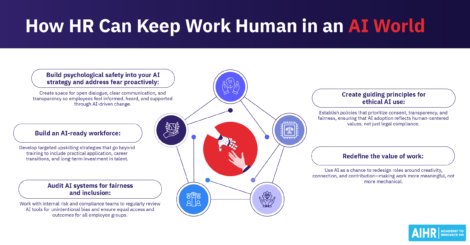
Before you adopt or expand an AI feature, ask the vendor how it handles your employee data, where that data goes, and what fairness testing the tool has undergone. Then look at the practical value. Does it save HR time, or add another review step? AI can support HR decisions, but a person should still make the final call, especially when a decision affects someone’s job or pay.
How to build an HR tech stack
Building an effective HR tech stack takes time and involves several steps. Here’s a process to guide you:
1. Audit your HR processes and prioritize what you need
Meet with stakeholders inside and outside HR to review current processes and identify gaps. You’ll likely uncover more needs than your budget can cover, so rank them by urgency and take senior leadership priorities into account.
For example, an attendance tool may be more important than an ATS if you’re not hiring heavily. If hiring is a bigger priority, the opposite may be true.
Separate your must-haves from your nice-to-haves. Focusing on core requirements instead of every feature a vendor offers helps keep your RFPs on track.
2. Research your options and check integrations
Narrow your options based on your organization’s size and price range. Start with reviews and peer input, then schedule demos or free trials to see how the features work in practice.
While researching, ask vendors directly about integrations with the tools you already use. If your systems can’t communicate with each other, your stack can become counterproductive. HR and employees may end up managing separate tools for every process.
3. Focus on ease of use and adoption
Since the goal is efficiency, your tools need to work smoothly and be easy for HR and employees to use. Make sure adequate support is available, especially if you don’t have in-house IT expertise.
It also helps to build your own digital dexterity. Staying current on how new tools work and what they can do puts you in a better position to support adoption across the organization.
4. Address security, compliance, and platform architecture
Your technology must protect sensitive data and comply with applicable laws. If you operate in Europe, your vendor needs to be GDPR-compliant.
Make sure any AI or algorithms a vendor uses are transparent and regularly audited. Favor cloud-based platforms with strong self-service options, and ask vendors directly about data residency and encryption.
5. Build an HR tech stack for international teams
If your organization operates across borders, your stack needs to handle multi-currency payroll, localized onboarding, and country-specific compliance requirements.
Some countries require employee data to stay within their borders. This can rule out certain vendors, so it’s worth accounting for these requirements from the start instead of retrofitting them later.
6. Keep evolving your stack
Once your stack is launched, review how well it’s working. As your organization grows, adds remote hires, or expands into new markets, your needs will change, and your tools should keep pace.
Next steps
Building an HR tech stack takes time to research, evaluate, and implement. Once the right tools are in place, they can make your workload easier to manage and give you more time to focus on strategic work and stronger relationships with your team.
As your organization grows, keep reviewing your stack instead of treating it as a one-time project. If you want to build your expertise further, the Digital HR 2.0 Certificate Program covers this type of work, from auditing HR processes to evaluating and implementing new tools. It can help you build the skills to take a more active role in your organization’s HR tech strategy.