
Many free HR tools now include AI-powered features, so it’s important to choose tools that save time and support your workflow while still protecting organizational and employee data.
Free HR tools: What to look for
Free HR tools can support many day-to-day tasks, from drafting emails to organizing notes and creating HR materials. But they should make work easier, not add extra complexity.
Before adding an (AI-powered) tool to your workflow, check whether it helps you solve a clear problem and fits how you already work.
Look for tools that are:
- Easy to use: The tool should be simple enough to use without a long setup process.
- Relevant to HR work: It should support common HR tasks, such as drafting, scheduling, note-taking, reporting, onboarding, employee communication, or research.
- Safe for your use case: Avoid adding confidential employee data, sensitive business information, or personal information unless your organization has approved the tool.
- Clear about AI use and free-plan limits: Check what you can use for free, such as monthly credits, file uploads, searches, templates, or users. For AI tools, also check what data the tool stores or uses.
- Easy to replace or upgrade: A free tool should not lock you into a process that becomes hard to manage later.

Best free HR tools for saving time
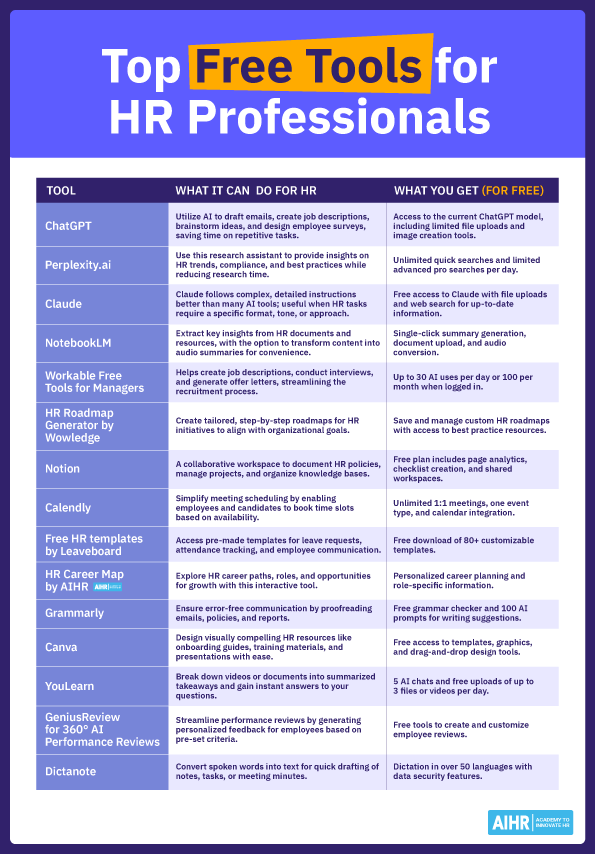
The infographic below highlights free (AI) tools HR professionals can use to save time on research, communication, planning, scheduling, design, documentation, and performance management tasks.
Use it as a starting point to explore which tools fit your role, workflow, and organization’s policies.
How HR professionals can use free tools effectively
Free tools work best when you use them for specific, low-risk tasks. AI-powered tools can help you move faster, but they still need human review, context, and judgment.
Here are practical ways to use them:
- Draft faster, then edit carefully: Use generative AI tools to create first drafts of emails, job descriptions, survey questions, or policy summaries. Then review for accuracy, tone, inclusivity, and company context.
- Speed up research: Use AI-powered tools to explore HR trends, compare practices, or gather ideas. Always verify important claims with original, reliable sources before using them in HR decisions.
- Organize HR work: Use project management or note-taking tools to track onboarding tasks, meeting notes, employee engagement actions, or policy updates.
- Improve scheduling and communication: Scheduling tools can reduce back-and-forth emails for interviews, check-ins, and team meetings.
- Create simple HR materials: Design, template, and AI-assisted content tools can help you make onboarding guides, training handouts, presentations, and internal communication assets.
- Protect sensitive information: Do not upload confidential employee data, medical information, compensation details, performance records, or internal documents unless the tool has been approved by your organization.
Free HR tools can make your work more efficient, especially when they include AI features that reduce manual tasks. Start small, test them on non-sensitive work, and keep using the ones that save time without creating extra risk.