Building a strong onboarding process means creating role-specific learning paths, keeping content up to date, and tailoring the experience to different functions and levels. However, this can be hard to achieve when 62% of HR professionals say their teams are operating beyond normal capacity. Additionally, 57% don’t have enough staff to handle their workload.
AI can close this gap. It can help you bypass time-consuming manual work by generating and personalizing onboarding content at scale, and keeping it current as roles change. This can, in turn, shorten the time to productivity. This article explores what AI in employee onboarding looks like in practice, the problems it solves, and how to start applying it.
Key takeaways
- AI in employee onboarding automates repetitive admin tasks, allowing you more time to focus on work that requires a human touch.
- AI-powered personalization (e.g., adaptive learning paths, role-specific content, and real-time support) improves new hire engagement from day one.
- Successful implementation relies on clean data, clear content, change management, and human review. In short, AI amplifies your onboarding process but doesn’t replace it.
Contents
What is AI in employee onboarding?
AI in employee onboarding: Key benefits
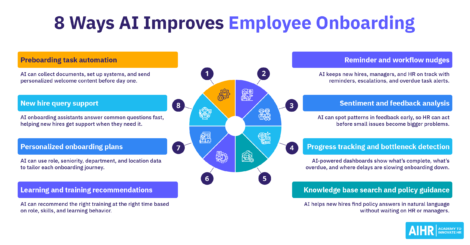
8 use cases and examples of AI in employee onboarding
10 steps to automate employee onboarding
Types of automated employee onboarding software to use

What is AI in employee onboarding?
AI in employee onboarding refers to using artificial intelligence tools to automate, personalize, and support tasks across your preboarding and onboarding processes. It’s a layer of intelligence you can weave into your existing HR workflows, systems, and tools, to create tailored employee experiences.
At a high level, AI in employee onboarding collects and processes data from HR systems, job roles, onboarding workflows, and employee inputs. It identifies patterns, likely needs, or gaps based on role, department, location, or prior experience. It then triggers customized recommendations, automated actions, or instant responses.
In a real-life scenario, this looks like a new hire receiving a customized onboarding checklist on their first day, with a 24/7 chatbot available to answer policy questions. At the same time, HR gets a real-time dashboard showing who’s completed what, and where people may be stuck.
What AI in employee onboarding can do
AI can support your entire onboarding cycle in the following ways:
- Document collection: AI tools auto-populate forms, flag missing information, and route documents for e-signature.
- Workflow triggers: Automated sequences kick off when a new hire accepts an offer, begins preboarding, or completes a milestone.
- Chat-based support: AI-powered onboarding assistants instantly handle benefits queries, IT questions, and policy clarification FAQs.
- Training recommendations: Based on job role and skills data, AI can suggest relevant material, courses, and learning paths.
- Reminders and nudges: Automated prompts keep new hires and managers on track without you having to chase anyone.
- Progress measurement: AI surfaces bottlenecks in real time, so you can step in and address issues to prevent a new hire from falling behind.
Traditional vs. AI-powered onboarding
Traditional onboarding is manual, manager-dependent, and largely one-size-fits-all, whereas AI-powered onboarding is dynamic, data-driven, and scalable. Below are some other key differences between the two:
How it works
Relies on manual HR work, fixed checklists, emails, and manager follow-ups.
Uses AI and automation to support tasks, answer questions, personalize workflows, and track progress.
Pros
- Feels more human and hands-on
- Can work for smaller, simpler organizations
- No advanced HR tech required.
- Reduces manual admin work
- Speeds up repetitive tasks
- Improves consistency and compliance
- Enables personalized onboarding at scale
- Gives new hires faster access to info without adding to HR burden
- Helps HR track progress in real time.
Cons
- Time-consuming for HR and managers
- Hard to scale across teams or locations
- Risk of delays, missed steps, and inconsistent experiences
- Limited visibility into progress and bottlenecks.
- Depends on accurate content and clean data
- Can feel impersonal if overused
- Requires setup, training, and change management
- May raise privacy and integration concerns
- Still needs human oversight for sensitive issues.
AI in employee onboarding: Key benefits
When deployed thoughtfully, AI delivers measurable improvements across the onboarding experience, both for your new hires and HR team. These include:
Less manual work for HR
AI helps reduce the administrative burden of onboarding by automating tasks such as document collection, workflow triggers, and routine messages. This allows you more time to focus on the parts of onboarding that need a human touch, such as building relationships, answering sensitive questions, and helping new hires feel supported from the start.
Faster completion of repetitive tasks
AI can help accelerate employee onboarding by automating tasks that would normally require HR to step in manually, such as setting up IT access, sending forms, or enrolling employees in compliance training. This speeds up the process, minimizing delays and helping new hires become fully set up without unnecessary waiting periods, or wasted time.
More consistent onboarding across teams and locations
The use of AI makes it easier to deliver a more standard, consistent onboarding experience across different departments, teams, managers, offices, countries, and even regions. This means every new hire will have access to the right steps, information, and reminders, helping reduce gaps in the process and creating a more reliable experience company-wide.
Better personalization
AI can help adjust onboarding journeys based on each new hire’s role, department, seniority, location, and even how quickly they’re learning. This makes onboarding more relevant to each individual employee, which can improve employee engagement and help people absorb information at a pace that works for them. This level of support can also drive retention and reduce turnover.
Faster access to information for new hires
AI-powered onboarding assistants can provide new hires with immediate, informative answers to their questions, eliminating the need to wait for an email reply or to catch a manager at the right time. This helps new employees solve minor problems more quickly and reduces the uncertainty that often comes with starting a new job and integrating into a new work environment.
Improved compliance
AI can support compliance by tracking required tasks and sending reminders when a new hire still has to complete something (e.g., a new hire onboarding survey or new employee questionnaire). This reduces the risk that a new hire will miss steps in legally required onboarding activities and helps companies stay more organized and consistent in regulated areas.
Better visibility into onboarding progress
AI gives HR teams access to real-time dashboards that provide a clear picture of new hire task completion, engagement signals, and areas where new employees may be getting stuck. This makes it significantly easier for you to spot problems early and use data to improve the onboarding process before small issues turn into bigger ones.
Smoother employee experience from day one
A well-designed AI-supported onboarding process can make the first days and weeks of a new hire’s employee journey feel less overwhelming by properly structuring the process. This improves the onboarding experience, and inspires confidence in HR and the organization as a whole. It’s also likely to minimize new hire turnover and boost your employer brand.
Faster time to productivity
AI can shorten the time it takes for new hires to become productive by tailoring onboarding to each individual’s role and needs. For instance, companies like IBM have reported cutting ramp-up time by 50%, while automated onboarding processes can increase new hire productivity by over 70%. This shows the direct business value of getting onboarding right.
Build the skills you need to use AI to improve the employee onboarding process, boosting EX, your employer brand, and employee retention at the same time.
AIHR’s Artificial Intelligence for HR Certificate Program will help you:
✅ Understand the different types of AI, including purposes and benefits
✅ Apply an AI adoption framework to transform workflows and processes
✅ Apply advanced prompting techniques and adapt to your role
✅ Learn best practices for using Gen AI safely, securely, and ethically
8 use cases and examples of AI in employee onboarding
AI onboarding is not a single feature but a set of capabilities that address different parts of the onboarding journey. Here are the eight use cases that illustrate these distinct capabilities:
Use case 1: Preboarding task automation
Imagine that a new hire accepts your company’s job offer, and before their first day, all relevant documents and systems are ready. They also already have a personalized welcome message in their new email inbox. This is one way AI can automate preboarding workflows, provision system access, and send customized welcome content. In doing so, it helps ensure your new hires arrive on day one with everything they need to dive into their new job and work environment.
Real-life example
ServiceNow AI Agents can streamline onboarding by autonomously handling core tasks. These include creating accounts, granting email access, tracking laptop and badge deliveries, and guiding new hires through paperwork such as tax and direct deposit forms. They also offer 24/7 chat support through Slack or Microsoft Teams, and manage benefits enrollment and compliance by prompting employees to complete required selections and training on time.
Use case 2: New hire query support
AI-powered onboarding assistants (e.g., HR chatbots and virtual AI agents built into your HRIS or intranet) can answer the questions new hires may have in their first weeks on the job. These include queries on compensation and benefits, leave policies, IT support, and payroll, which chatbots can answer instantly. With 32% of employees relying more on AI tools than on their coworkers to answer their questions, a well-designed AI assistant is especially important in ensuring your new hires get the answers they need whenever they need them.
Real-life example
ADT uses Oracle Cloud HCM’s Onboarding Assistant AI agent, which it says guides new hires, and provides step-by-step support and 24/7 access to answers and resources during onboarding. Oracle’s product documentation also shows the assistant can answer FAQs, offer contextual guidance for journey tasks, and provide access to relevant onboarding resources.
Use case 3: Personalized onboarding plans
No two roles are the same, so it follows that onboarding for new hires in different roles should be different as well. Generic onboarding treats a senior software engineer and a junior customer service rep the same way, but AI can help you shift away from that. By pulling data from your HRIS (e.g., roles, seniority, departments, and locations), AI tools can help build dynamic onboarding journeys tailored to each new hire, without HR having to manually configure each one.
Real-life example
According to Workday, Workday Onboarding Plans can serve recommendations tailored to each new hire and their role, and support personalized preboarding and onboarding experiences. Workday also features Nissan, which says Workday Journeys “revolutionized” its onboarding experience through a tailored design that supported employees from day one.
Use case 4: Learning and training recommendations
AI-powered learning management system (LMS) integrations can analyze each new hire’s role, skills profile, and learning behavior, then surface the right training content at the right time. The system builds a progressive sequence, starting with what each new hire needs most and adapting as they go. This allows you to avoid overwhelming new hires with a series of training modules in week one.
Real-life example
Ecolab uses Workday Extend and Workday Orchestrate to build a more personalized, scalable onboarding learning experience. In Workday’s customer story, Ecolab says it supports thousands of new hires annually. In a three-month pilot with 200 new hires, it saw a 77% increase in on-time completion of learning plans, and 58% of learners completed ahead of schedule.
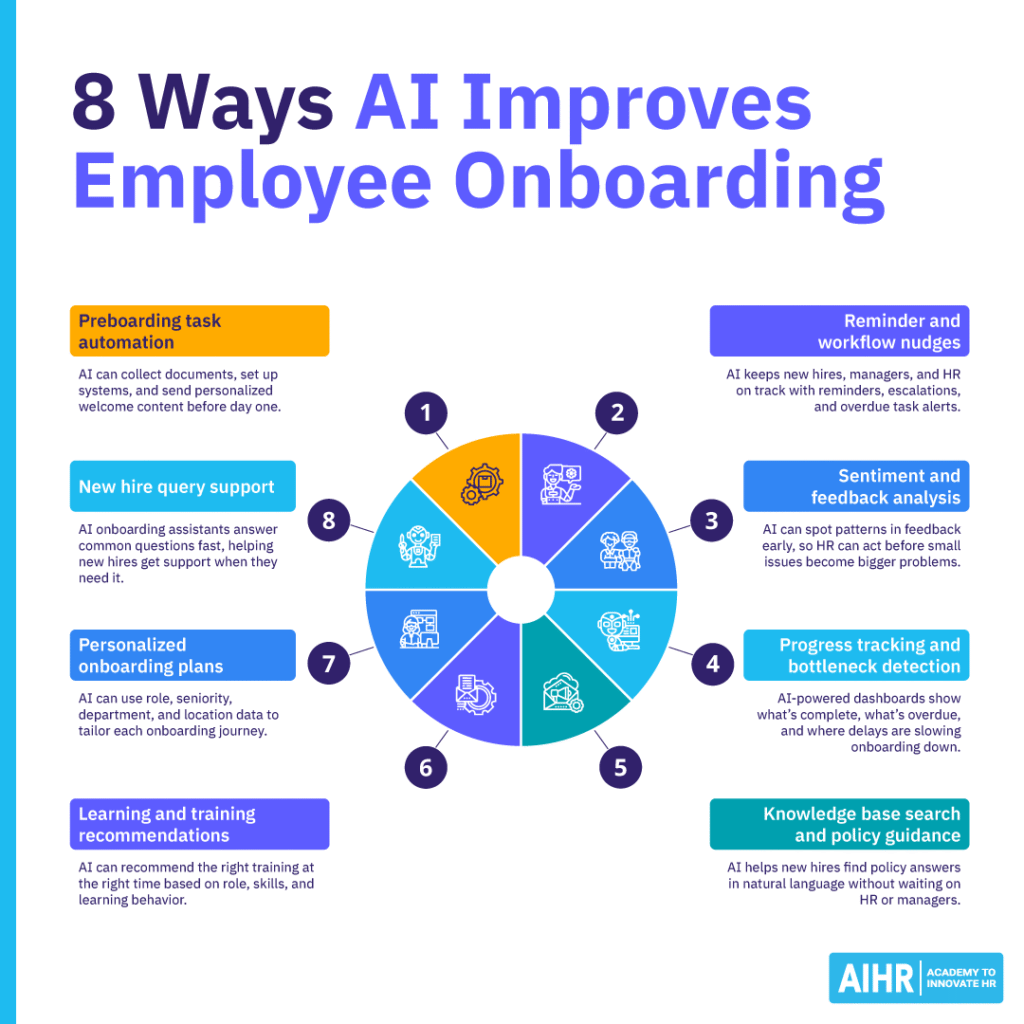
Use case 5: Reminder and workflow nudges
Human error can interrupt and delay the onboarding process. A manager could forget to schedule a week-one check-in, or a new hire could miss a compliance module. AI-driven nudges are a good solution to this issue, as they can keep everyone on track. They do so by automatically sending reminders, escalating incomplete tasks, and flagging overdue items to HR. These tools also help new hires stay on schedule and keep managers accountable without you having to intervene.
Real-life example
Oracle provides a concrete example in its Onboarding Assistant and Journeys documentation. It says the assistant offers “reminders and nudges” for pending tasks, so required steps are completed on time. It also documents that organizations can configure email reminders to either the employee or line manager when a journey or task remains incomplete.
Use case 6: Use employee listening tools to spot disengagement before it spreads
AI tools can analyze employee pulse survey responses, open-ended feedback, and even interaction trends to reveal how new hires are feeling. Natural language processing (NLP) can identify patterns in sentiment data that would take HR hours to manually review. For example, if a cohort of new hires is consistently reporting confusion about their roles in week two, you’ll know about it in real time, not just at their three-month review.
Real-life example
Culture Amp uses onboarding and offboarding surveys to capture feedback across the employee life cycle, and its AI tools can synthesize survey feedback, summarize comments, and break responses into sentiment, topics, and trends. A public company example is Sharesies, which used Culture Amp during onboarding and through regular check-ins to understand how employees were feeling.
Use case 7: Progress tracking and bottleneck detection
AI-powered employee onboarding platforms can generate live dashboards that show exactly where each new hire is in their journey. This includes what’s complete, what’s overdue, and where delays lie. For instance, if the IT provisioning stage consistently takes two days longer than it should, this will show up in the data. This means your HR team can shifts from reactive firefighting to proactive prevention.
Real-life example
ADT uses Oracle HR Help Desk analytics to identify and resolve process pain points, reducing employee support tickets and improving responsiveness. Another example is ServiceNow’s HR Onboarding Executive Dashboard, which gives HR teams real-time visibility into onboarding progress. This includes overdue activities, average time taken for onboarding activities, and the number of open cases before and after day one.
Use case 8: Knowledge base search and policy guidance
New hires typically spend a lot of time searching for relevant information on topics like the expense reimbursement policy, parental leave entitlement, and requesting time off. An AI-powered knowledge base search that connects to your organization’s existing documentation can provide the right answer instantly in natural language. This reduces pressure on HR and managers, and gives your new hires the autonomy to find what they need, when they need it.
Real-life example
Oracle offers AI Agents for Guided Journeys where organizations can upload policy documents, contractual agreements, and government regulations, then let employees ask questions in chat and receive targeted responses sourced from those documents. ServiceNow provides a similar model with AI Search and Virtual Agent: employees can ask questions in natural language and get personalized results drawn from internal and external sources across channels. (Oracle Docs)
10 steps to automate employee onboarding
Automating employee onboarding will save your team time in the future, but setting it up is not a ‘one and done’ task; it’s a ‘build, measure, improve’ cycle. Here’s a step-by-step guide on how to approach it:
Step 1: Assess your current onboarding process
Pick a single, low-risk application (e.g., NLP on pulse survey comments). Trying to AI-enable everything at once stalls adoption and erodes trust. Instead, choose something with existing feedback and visible action gaps. For instance, you could run AI on the last three pulse surveys’ open-text comments to identify the top five recurring themes by team. Then, share just two themes per team with managers to keep focus and avoid overwhelm.
Step 2: Identify high-value tasks to automate
Focus on tasks that are high-frequency, repetitive, and prone to error, such as document collection, access provisioning, and compliance training enrollment. Starting with these areas will help make the onboarding experience smoother for new hires, HR, and managers. It will also free up time for you to shift your focus from admin tasks to more strategic HR work.
Step 3: Separate rules-based automation from AI use cases
Not everything needs AI. Simple if-then workflows, such as sending a welcome email, are usually better handled through standard automation rules. AI, on the other hand is more useful for tasks that need personalization, pattern recognition, or natural language support. Making this distinction early can streamline workflows and minimize unnecessary spending.
Step 4: Audit your content and data
AI is only as good as the information you give it. Outdated policy documents, incomplete employee data, and messy HRIS records will hamper any AI tool you choose. Auditing and cleaning up your content and data before automating your onboarding process will ensure any automation you implement is more accurate, reliable, and useful from day one.
Step 5: Choose the right software stack
Collaborate with your colleagues in the IT department to evaluate and shortlist potential AI tools and platforms based on how well they integrate with the company’s current HRIS, the strength of their AI features, and their ability to scale. Even strong tools can result in more problems if they don’t fit well into your organization’s existing systems and HR processes.
Step 6: Build role-based onboarding journeys
Use the data from your HRIS to design different onboarding journeys for key roles or departments. It’s important, however, not to try to build everything at once but to start with your highest-volume or most complex hire types. A phased approach will make the project easier to manage, and help you learn what works and what doesn’t before expanding further.
Step 7: Pilot with one team or at one onboarding stage
Before you scale up onboarding automation, run a controlled test with one team or at a specific stage of onboarding. This lets you identify content gaps, integration issues, and user experience problems without affecting all your company’s new hires. A smaller pilot also makes it easier to gather feedback quickly and fix issues before a company-wide rollout.
Step 8: Train HR and managers
Even the best AI onboarding tools or systems can fail if managers don’t understand how they work or what’s expected of them. To prevent this from happening at your company, build a short training session into your rollout plan to give new hires clear guidance. This helps ensure the technology supports the process rather than creating confusion or leading to inconsistent use.
Step 9: Measure results
Track time to productivity, 90-day retention rates, new hire satisfaction scores, and onboarding task completion rates. Measuring these onboarding metrics eliminates guesswork with useful, accurate data, and doing so regularly helps you prove business impact to key stakeholders. It also helps you pinpoint where the onboarding process still needs improvement.
Step 10: Improve and scale
Use the data from your pilot to refine new hire onboarding content, workflows, and AI settings. Then, gradually roll out the process to more teams and role types, gathering feedback from more people before implementing it company-wide. Treating scaling up as a gradual process will help you keep improving the quality of onboarding as adoption grows.
Types of automated employee onboarding software to use
Automated employee onboarding software falls into five main categories, but the right stack for your organization depends on your existing tech infrastructure, budget, and the biggest gaps in your current processes. Here’s a helpful breakdown:
HRIS and HCM platform
- Manages employee data, trigger onboarding workflows, handle document collection and e-signatures, and integrate with payroll and benefits
- Many now include built-in AI features for task automation and reporting.
Dedicated onboarding platform
- Purpose-built to manage the onboarding experience
- Handles the end-to-end onboarding journey with workflow automation, task assignment, progress tracking, and new hire portals.
AI chatbots and onboarding assistant
- Handles new hire queries, guides employees through onboarding steps, and provides instant access to policy information
- Available 24/7 without the need for HR involvement.
Employee experience and feedback platform
- Captures new hire sentiment, runs pulse surveys, and uses AI to analyze feedback patterns
- Uses these patterns to surface early engagement signals that predict retention risk, giving you the data to intervene before problems escalate.
Identity, access, and IT provisioning tool
- Automates the setup of system access, device provisioning, and security credentials
- Integrates with your HRIS to trigger automatically when you create a new hire record.
Next steps
AI in employee onboarding works best when treated as a capability, not a shortcut. The real goal is not to automate everything but to remove friction, support new hires faster, and free you up to focus on what needs judgment, empathy, and human connection. As the tech matures, you’ll get the most value from AI in onboarding if you build the right skills alongside the right systems.
This is why capability-building matters as much as tool selection. If you want to use AI more confidently across onboarding and other HR workflows, AIHR’s Artificial Intelligence for HR Certificate Program is a practical place to start. It imparts skills that will help you move from experimenting with AI in employee onboarding to applying it in a more structured, scalable way.