

With AI growing more prevalent in HR, you’ve probably already started to integrate AI tools into your work. One such tool is Perplexity in HR, which has been described as “an alternative to traditional search engines and an all-in-one research assistant”, and boasts 45 million active users on its website and app.
While ChatGPT, Gemini, Copilot, and Claude are good at churning out simple responses, Perplexity is known for being able to handle more complicated requests with greater nuance. This article explores how you can maximize Perplexity’s efficiency for HR, with five high-impact use cases, as well as several example prompts, to point you in the right direction.
Contents
What is Perplexity AI, and why are HR teams using it?
Where Perplexity adds the most value across the HR function
5 high-impact Perplexity use cases for HR
How to write effective Perplexity prompts for HR work
5 AI use risks every HR professional should know about
FAQ
Key takeaways
- Unlike standard chatbots, Perplexity AI searches the web in real time, and delivers summarized answers complete with citations.
- Key applications include tracking employment law updates, benchmarking C&B, conducting talent and competitor intelligence, and analyzing workforce trends.
- You can use the BRIEF Framework to ensure your prompts are clear and structured, so you’re more likely to get the result you want.
- However, it’s important to remember that AI can frequently hallucinate or reflect bias, so you should always verify sources and citations yourself.
What is Perplexity AI, and why are HR teams using it?
AI in HR is quickly becoming the norm, with SHRM reporting that 73% of HR Directors and more senior HR professionals have incorporated AI use into their work. As an HR professional, you’ve likely already explored or integrated popular tools like ChatGPT, Gemini, Copilot, and Claude into your daily work. So what sets Perplexity apart?
Perplexity is not simply a chatbot that generates text from training data. It’s an AI-powered answer engine that uses advanced AI to search the web in real time, gathers insights from high-quality sources, and distills this information into clear summaries with numbered citations. With a retrieval-first approach, every answer it provides is based on live, credible sources
HR work can be research-heavy (e.g., compliance, benchmarking, sourcing intel, and policy work) but under-resourced. With leadership increasingly expecting more strategic output, Perplexity AI for HR is an attractive option for HR teams to streamline and lighten their workload.
Perplexity offers a free version in addition to Perplexity Pro ($17 per month), which includes access to Perplexity Computer, the latest AI models, deeper sourcing, and Spaces. Perplexity Max ($167 per month), on the other hand, allows users to work with massive datasets and files, use the Perplexity Model Council, and access the most advanced AI reasoning models.

Where Perplexity adds the most value across the HR function
You know what Perplexity is and how it works, but when should you use it? Here are some aspects of HR that could benefit from its application:
Research-heavy work
The main drawback with certain AI tools for HR is that when you ask a question, you get a general answer. But in terms of research on topics like labor law updates, salary benchmarking, workforce trends analysis, and vendor and HR tech evaluation, you’re likely seeking high-quality research papers and reports.
Perplexity stands out among other HR tools for its ability to dig these out, present the information to you, and include citations if you want to read more.
Drafting and synthesis
Perplexity for HR adds great value when drafting and synthesizing content for specific target audiences. For example, it can help you write a job description for a specialist role, develop learning materials for an employee training program, and create executive briefs. It can also summarize long policies and reports into formats suitable for leadership to review.
Talent intelligence
Recruiters and Talent Acquisition teams can benefit from Perplexity’s functions when it comes to tasks like researching company history, talent-market mapping, and identifying competitor hiring patterns. A major benefit of the tool is that threads can be downloaded as a PDF or DOC, including sources, and easily edited and shared with other team members.
5 high-impact Perplexity use cases for HR
Let’s explore some high-impact Perplexity AI use cases in the context of Human Resources.
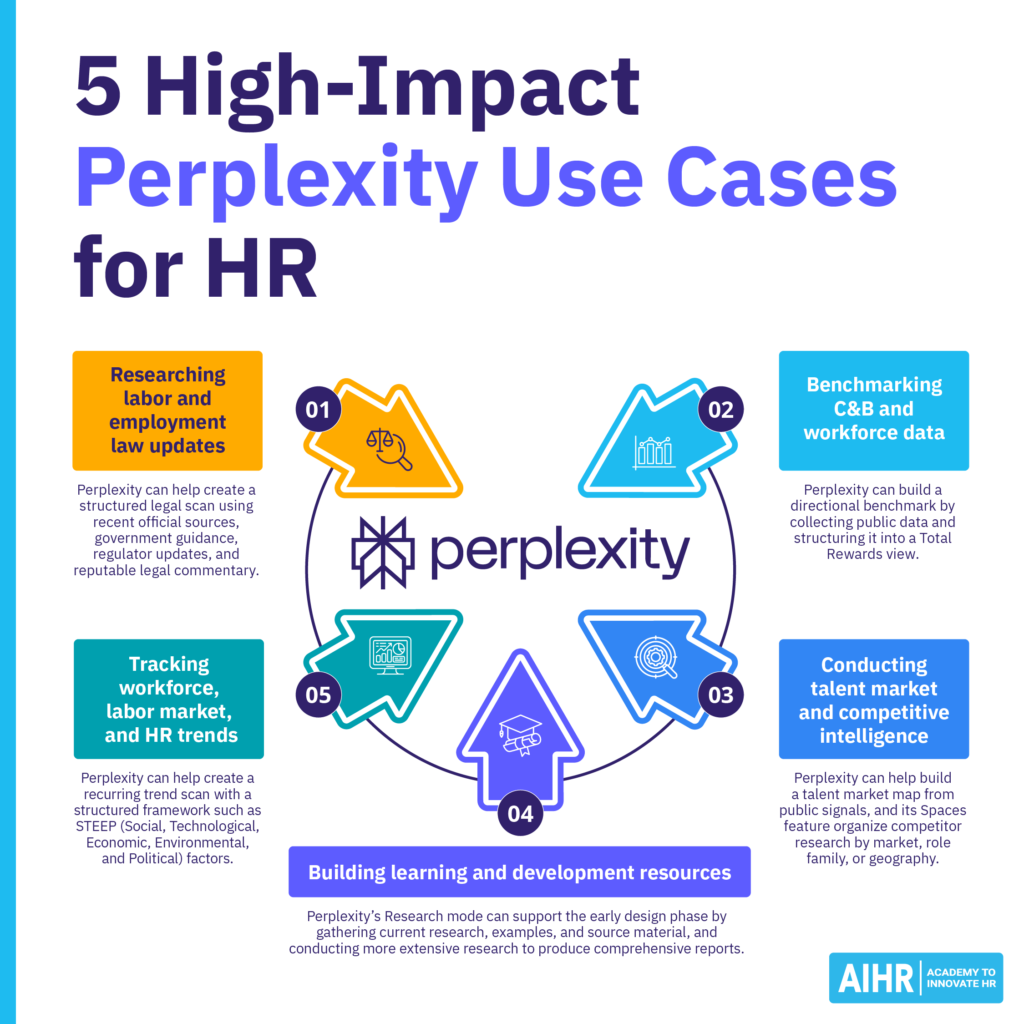
1. Researching labor and employment law updates
HR pain point: HR professionals are often expected to monitor changing rules across jurisdictions. This may include pay transparency laws, paid leave mandates, AI-in-hiring regulations, or remote work requirements. The challenge is not just finding information, but working out what’s changed, whom it applies to, when it takes effect, and what HR needs to do next.
How Perplexity addresses it: Perplexity can help you create a structured legal scan using recent official sources, government guidance, regulator updates, and reputable legal commentary. Prompt it to organize findings by jurisdiction, effective date, employer size, employee group, and required HR action. This is useful for first-pass research before you involve legal counsel or update internal policies.
What to watch for: Legal research is high-risk. Always click through to the cited source and confirm the information against official guidance or qualified legal advice. Treat Perplexity’s output as a research brief, not a legal interpretation.
2. Benchmarking compensation, benefits, and workforce data
HR pain point: HRBPs and Total Rewards practitioners often need to compare C&B and workforce practices across roles, industries, regions, and company sizes. This usually means reviewing multiple salary guides, government data sets, job postings, and industry reports. The main challenge is in building a usable benchmark from sources that may use different job titles, seniority levels, pay definitions, and sample sizes.
How Perplexity addresses it: The AI can build a directional benchmark by collecting public data and structuring it into a Total Rewards view. This means looking beyond base pay and including bonus potential, benefits, career development, and other parts of the employee value proposition (EVP). It can also flag outdated or inconsistent public data, before you decide whether to buy licensed survey data.
What to watch for: Public benchmarks are directional, not a substitute for licensed compensation survey data, internal pay equity analysis, or local legal review. Be especially careful when sources mix base pay, commission, and total compensation.
Obtain the right mix of AI fundamentals, prompting skills, and responsible judgment to explore topics faster, compare sources, and support better-informed decisions.
AIHR’s Artificial Intelligence for HR Certificate Program will help you:
✅ Understand how AI tools work and where they can add value across HR
✅ Write effective prompts that produce more accurate, relevant outputs
✅ Apply generative AI to practical HR tasks across different domains
✅ Use AI responsibly by considering safety, privacy, and secure usage
3. Conducting talent market and competitive intelligence
HR pain point: Recruiters, sourcers, and Talent Acquisition teams must understand where talent sits, which competitors are hiring, what skills are in demand, and how to position roles effectively. This is difficult when information is scattered across job boards, company career pages, LinkedIn, funding announcements, news articles, and industry reports.
How Perplexity addresses it: Perplexity can help you build a talent market map from public signals. You can use it to identify companies hiring for similar roles, compare role requirements, summarize employer positioning, and prepare a sourcing brief. Spaces can also help you organize competitor research by market, role family, or geography.
What to watch for: Public hiring signals can be incomplete. A company may advertise roles for pipeline building, employer branding, or future hiring needs. Verify active vacancies on company career pages before acting on the findings.
4. Building learning and development resources
HR pain point: L&D and People Development professionals often need to design training on fast-moving topics. This means researching current practices, finding examples, structuring learning outcomes, and creating practical exercises. Here, the risk is producing a course outline that looks complete but doesn’t connect to business goals, behavior change, or measurable outcomes.
How Perplexity addresses it: Perplexity’s Research mode can support the early design phase by gathering current research, examples, and source material, and conducting more extensive research to produce comprehensive reports. You can use it to support the Analysis and Design stages of the ADDIE model, then add your own learning objectives, activities, assessments, and business context.
What to watch for: Perplexity can help with research and structure, but it won’t automatically produce a classroom-ready learning experience. You still need to validate sources, tailor examples to your organization, define assessment criteria, and make sure the content reflects your AI policy.
5. Tracking workforce, labor market, and HR trends
HR pain point: HRBPs and People Strategy teams need to track changes in the labor market, skills demand, workforce expectations, and HR practices. The challenge here is separating meaningful signals from opinion pieces, vendor claims, and one-off stories.
How Perplexity addresses it: Perplexity can help create a recurring trend scan with a structured framework, such as STEEP (Social, Technological, Economic, Environmental, and Political) factors. This helps you look beyond HR trends, and connect external changes to workforce risks, skills needs, and business decisions. You can also use Spaces to keep weekly or monthly research threads organized by topic.
What to watch for: Trends are easy to overstate. Prioritize sources with clear data, transparent methods, and recent publication dates. Be cautious with content that relies mainly on predictions, opinions, or vendor-owned survey samples.
How to write effective Perplexity prompts for HR work
Prompt design is an essential skill that you should master if you want to use AI tools in HR effectively. The BRIEF framework can help ensure every prompt you write gets you the best, most accurate results in the shortest time. Here’s an overview of the framework:
- Background: Provide context by explaining the “why” behind your request, so the AI tool understands what you need and the purpose it must serve.
- Request: Your request should clearly state what you need, and the desired outcome you’re looking for. Always include a goal and a specific role, such as “how to help an [HR Business Partner] prepare for a leadership meeting on [data privacy]”.
- Instruction: Specify how you want the output to be structured, including its tone (e.g., casual vs. formal), and any formatting or style preferences.
- Expectation: Offer an example or description of the output you’re looking for to help the AI understand what the final result should look like. For example, you should tell the AI whether you want a bulleted list, table, paragraph, or something else.
- Focus: Perplexity AI prompts must outline key priorities, constraints, or specific details the AI should consider while completing the task, such as “use sources from the last six months”.
Avoid vague prompts like “tell me about HR employment policies”, and enter structured prompts like “show me changes to parental leave employment policies in [France] with citations and sources from the last 12 months, using a bulleted list format”.
5 AI use risks every HR professional should know about
Here are some key risks to be aware of, whether you’re using Perplexity for HR or any other AI tool in your HR function.
- Data privacy and confidentiality: Don’t enter private, personal information into any AI tool, unless you’re certain it offers a data-handling guarantee. This includes employee names, résumés, salary bands, and any other sensitive or confidential information.
- Hallucinations and source quality: One of the biggest problems with AI is its tendency to hallucinate, and provide you with incorrect details or cite the wrong source. Always click through to each source to ensure the information attributed to it actually exists.
- Bias: Another concern with AI is it can have inherent biases that reflect bias in its sources. This can have a detrimental impact on hiring, promotion, and pay decisions, negatively influencing workforce morale and company reputation.
- Compliance: Never treat AI-generated answers to questions on laws and regulations as sound legal advice. Always verify answers with primary sources or qualified counsel.
- Over-reliance: Perplexity for HR, along with other AI tools, function as research tools, and shouldn’t replace human oversight or judgment. You and your team members should always be the key decision makers.
Next steps
Use Perplexity for high-impact HR tasks to save time, improve efficiency, and develop more comprehensive documents, policies, and learning resources. You can get the most out of it by ensuring your prompts follow the BRIEF framework each time.
Experiment with the free version of Perplexity to see how you can integrate it into your daily work tasks, and cement its value before upgrading to the Pro version. If you’re keen to improve your AI knowledge and skills in the context of HR, consider enrolling in an online course or certificate program like AIHR’s Artificial Intelligence for HR Certificate Program.
FAQ
Perplexity is one of the best AI tools for HR professionals across different departments. It searches the Internet in real time, gathers data from top-tier sources, and provides users with a clear summary with numbered citations. This allows it to answer complex questions that require nuance, which many other AI tools are unable to do.
Perplexity and ChatGPT have different benefits and limitations. The one that’s best for you depends on your intended AI tool use. Perplexity is favoured for fast-sourced research, fact-checking, and compliance-heavy cases. ChatGPT tends to be better for generating ideas and content, and providing answers to simpler questions. You can use both; for instance, Perplexity can provide verifiable sources and research, and ChatGPTcan help organize this information into your desired format (e.g., a Word document).