AI workforce planning can help you forecast talent needs more precisely, close skills gaps more quickly, and align people decisions with business strategy. 93% of Fortune 500 CHROs have already started integrating AI technologies and related tools to enhance their processes.
HR juggles multiple priorities, and traditional planning processes often can’t provide sufficient support. AI, on the other hand, can help you forecast workforce needs more accurately and make talent decisions more quickly and confidently. This article looks at how AI can boost workforce planning, how to go about it, and useful tools you can use for AI workforce planning.
Key takeaways
- AI workforce planning combines AI and data analytics to forecast workforce needs, identify skills gaps, and evaluate staffing scenarios more accurately.
- AI-driven workforce planning helps you plan smarter and act faster, from better forecasting to real-time staffing optimization.
- To ensure responsible AI implementation in workforce planning, start with clear business goals, fix your data foundations, choose practical use cases, and build ethical guardrails.
- Explore AIHR’s Artificial Intelligence for HR Certificate Program to obtain hands-on skills you can apply to your HR function immediately.
Contents
What is AI workforce planning?
The benefits of AI in workforce planning
Potential risks of AI workforce planning
How to use AI for workforce planning: 6 steps
7 best AI-driven workforce planning tools
AIHR resources for HR professionals embracing AI

What is AI workforce planning?
AI workforce planning uses AI and data analytics to forecast workforce needs, identify skills gaps, and model different staffing scenarios. This helps you make faster, more accurate decisions about hiring, reskilling, and redeploying people.
In traditional workforce planning, HR and finance spend weeks pulling data from multiple systems, combining spreadsheets, and running manual analyses. AI replaces this manual work by automatically pulling data from your HRIS, ATS, L&D platforms, and external labor market sources.
Next, algorithms forecast talent supply and demand, predict movement (e.g., turnover or internal mobility), and analyze emerging skills patterns. With AI, you can run more advanced forecasts, spot risks earlier, and make data-based recommendations that align people’s decisions with current business needs.
The benefits of AI in workforce planning
Here’s how using AI in workforce planning can benefit your HR team, as well as the organization and its employees:
More predictive forecasting
AI uses historical data and external signals to forecast workforce needs more accurately. These signals include market demand, hiring trends, retirement patterns, and turnover drivers. This helps you anticipate:
- Who’s likely to leave in the next six to 12 months
- Which skills will become scarce or critical
- Where internal mobility may naturally create supply
- What hiring demand will look like under different business conditions.
This level of precision is especially valuable when headcount decisions have long lead times or involve hard-to-fill roles.
More realistic scenario planning
With AI-driven workforce planning, you can test dozens of scenarios before recommending a path forward, such as:
- “What happens to our nursing capacity if attrition rises by 8%?”
- “If we open a new distribution center, what will hiring and training costs look like?”
- “What if automation reduces manual tasks in finance by 25%?”
These simulations help you assess the impact of workforce planning decisions before they happen, reducing risk and increasing strategic clarity.
Real-time operational efficiency
AI can detect shift imbalances, staffing shortages, or overtime spikes faster than traditional tools. These features are especially useful in industries such as healthcare, retail, logistics, and manufacturing, as they can lead to lower labor costs, prevent burnout, ensure more consistent service levels, and facilitate smoother operations.
Potential risks of AI workforce planning
Besides the benefits, it’s crucial to be aware of the potential risks of AI workforce planning. These include:
Bias and discrimination risks
If models are trained on historical data containing biased patterns, such as fewer promotions for underrepresented groups, AI may replicate those patterns. To prevent this, you must regularly audit both the input data and model outputs for adverse impact on protected groups.
You must also keep humans in the loop for high-stakes decisions (e.g., layoffs, promotions, or succession planning), with clear guidelines that AI can inform but not replace human judgment. Finally, update policies and training, so managers understand how to use AI outputs responsibly and challenge them when they appear unfair.
Risks related to transparency
If you can’t explain why a model recommends certain actions, leaders and employees may not trust or accept the outcomes. To minimize this, prioritize AI tools that offer clear explanations of key drivers behind recommendations, not just a score or label.
Work with data to translate technical outputs into plain language that business leaders can understand (e.g., “This role is at risk due to demand decline in X region”). Document how you use each model in decisions, what data it relies on, and where its limits are. Then, use this to train HRBPs, line managers, and executives, so they know when they can trust AI insights.
Regulatory and legal risks
If AI-driven decisions lead to unequal treatment or can’t be explained, you risk non-compliance with anti-discrimination and data privacy laws. To avoid this, work closely with legal, IT, and data teams to establish a governance framework before rolling out AI tools. In this context, their responsibilities would be:
- Legal: Review use cases and ensure compliance.
- IT and security: Ensure vendors meet security standards, only collect what’s necessary, and implement strong access controls.
- Data: Maintain technical documentation, monitor models for drift and bias, and log changes to models and data sources.
- HR: Ensure robust vendor due diligence that covers compliance claims, data handling, and auditability, not just functionality and price.
Together, these steps create an audit trail and clear ownership, which reduces the risk of fines, litigation, and reputational damage if your AI use is challenged.
Master AI to boost workforce planning and other HR functions
Learn to use AI efficiently in workforce planning and other HR functions, so you can empower your team to do the same and make decisions more quickly and confidently.
AIHR’s Artificial Intelligence for HR Certificate Program will teach you to:
✅ Streamline HR projects and advance decision-making with AI
✅ Apply an AI adoption framework to transform HR workflows and processes
✅ Use AI to elevate people analytics and transform talent acquisition
How to use AI for workforce planning in 6 steps
Below is a clear, practical six-step framework you can follow to begin adopting AI in your workforce planning efforts.
Step 1: Clarify business goals and questions
Before picking any AI tool, ask: “What problem are we trying to solve?” Always tie AI to business strategy to maximize ROI for your organization.
Other questions to ask include:
- Where will growth come from in the next 12 to 24 months?
- Which roles or skills will be mission-critical?
- Where are we currently understaffed or overstaffed?
- Which workforce risks could threaten business goals?
These questions will guide the models, data requirements, and scenarios you’ll test later.
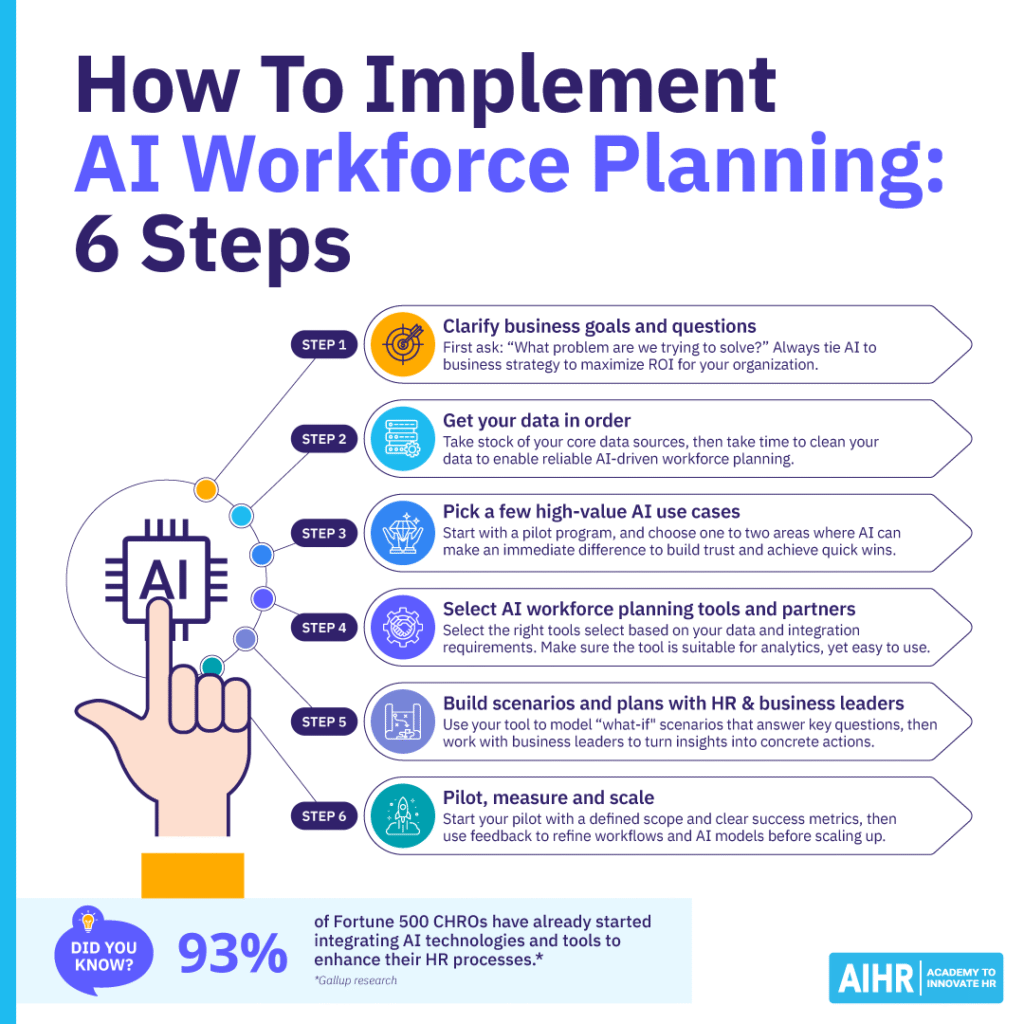
Step 2: Get your data in order
Take stock of your core data sources, then take time to clean your data to enable reliable AI-driven workforce planning.
Core data sources include:
- HRIS and ATS (headcount, org structure, job histories)
- L&D (skills, training, certifications)
- Performance management data
- Payroll and financial planning data
- External labor market benchmarks.
What to focus on when cleaning your data:
- Remove duplicates
- Standardize job titles
- Fill missing values
- Validate skills and competency frameworks.
While time-consuming, this step is foundational and can save time and prevent headaches. Clean, consistent data helps AI workforce planning produce accurate forecasts and reliable recommendations, so you can trust the insights and make better people decisions.
Step 3: Pick a few high-value AI use cases
Start with a pilot program, and choose one to two areas where AI can make an immediate difference.
Potential candidates include:
- Attrition prediction for critical roles
- Forecasting demand for essential skills
- Skills inference (AI analyzes employee histories and learning data to detect hidden or emerging skills)
- Capacity planning for a specific plant, region, or function.
A focused pilot builds internal trust and generates quick wins. You can then make any further revisions prior to a larger rollout.
Step 4: Select AI workforce planning tools and partners
Select the right tools based on your data and integration requirements. Make sure the tool is suitable for analytics while being easy to use.
When selecting tools, look for:
- Strong integrations with HRIS/ATS
- Bias mitigation and explanation features
- Scenario modeling capabilities
- Clear audit trails for compliance
- User-friendly dashboards.
Step 5: Build scenarios and plans with HR and business leaders
Use your tool to model “what if” scenarios that answer key questions, such as:
- “What if we automate 20% of repetitive tasks in customer support?”
- “How will graduate hiring trends impact our engineering pipeline?”
- “What if we consolidate operations into two regional hubs?”
Then, work with business leaders to turn insights into concrete actions, such as:
- Hiring plans
- Redeployment strategies
- Reskilling programs
- Location strategy adjustments
- Cost forecasts.
Step 6: Pilot, measure and scale
Begin your pilot with a well-defined scope and clear success metrics, then utilize employee and manager feedback to refine workflows and AI models. You can then scale up and expand this to the rest of the organization.
Success metrics could include:
- Forecast accuracy (compared to actuals)
- Vacancy days in critical roles
- Improvement in time to fill
- Overtime reduction
- Contractor spend reduction
- Reskilling program participation.
7 best AI-driven workforce planning tools
If you’re wondering what AI tools are useful for workforce planning, here are seven trusted platforms you can consider:
-AI-driven people analytics and planning
-Prebuilt models to forecast headcount%2C turnover%2C hiring needs%2C and skills gaps
-An AI assistant%2C Vee%2C that answers workforce questions in natural language.<%2Fp>
-Deep HR-focused analytics out of the box
-Strong library of predefined metrics and dashboards
-Good for HR and business leaders who want ready-made insights.<%2Fp>
-Best suited to mid–large organizations with mature data
-Implementation and data integration can be complex
-Less attractive for smaller firms that don’t need a people analytics platform.<%2Fp>
-Uses AI-guided planning and the TM1 engine to model workforce demand%2C costs%2C and scenarios.<%2Fp>
-Very strong for integrated HR and finance modeling
-Handles complex%2C large-scale scenarios
-Good fit where FP%26A leads workforce planning.<%2Fp>
-Steep learning curve and technical complexity
-Often requires specialist support
-UX feels more finance-centric than HR-native.<%2Fp>
-AI-enabled workforce planning with real-time cost impact analytics
-Scenario modeling integrated with Workday HCM.<%2Fp>
-Strong choice if you already use Workday HCM
-Continuous planning capabilities
-Unified view of headcount and costs.<%2Fp>
-Higher total cost of ownership
-Requires structured training and rollout.<%2Fp>
-Strategic workforce planning%2C workforce analytics%2C and skills insights integrated with SAP.<%2Fp>
-Strong for large global organizations
-Deep integration across ERP and HR.<%2Fp>
-Complex implementation
-May feel heavy for companies not using full SAP stack.<%2Fp>
-Predictive and generative AI capabilities embedded in HCM.<%2Fp>
-Unified AI-enabled HCM suite
-Strong skills and talent intelligence features.<%2Fp>
-Designed for large enterprises
-Change management and implementation can be demanding.<%2Fp>
-AI-driven planning and forecasting connected to financials
-Integration with Power BI and Excel.<%2Fp>
-Excellent for Microsoft-stack organizations
-Flexible modeling for integrated business planning.<%2Fp>
-Requires strong internal analytics skills
-Configuration can be resource-intensive.<%2Fp>
-Deep-learning skills intelligence for forecasting%2C mobility%2C and reskilling.<%2Fp>
-Excellent fit for skills-based workforce planning
-Very strong talent intelligence capabilities.<%2Fp>
-Focuses more on talent than cost planning
-Requires robust HR data and change management.<%2Fp>
AIHR resources for HR professionals embracing AI
If you’re looking to build your confidence and capabilities with AI, AIHR offers several helpful resources:
Certificate programs / online courses
Aihr’s Artificial Intelligence for HR Certificate Program will teach you how to integrate AI into workforce planning and broader HR functions. You’ll learn how AI can streamline processes like recruitment, talent management, and employee learning with tools like AI-driven résumé screening, personalized L&D recommendations, and predictive analytics for turnover and retention.
The program emphasizes the importance of balancing technological efficiency with a human-centered approach to ensure employees feel valued even as automation increases. You’ll also learn about design thinking, how to design better employee experiences, and how to drive business value.
Useful articles and resources
The following AIHR Blog articles can help increase your knowledge of AI’s applications in HR:
- AI in HR: A Comprehensive Guide
- AI and Automation in HR: Impact, Adoption and Future Outlook
- AI for Performance Reviews: Tools & Strategies for Smarter Talent Decisions
Next steps
Start by making AI workforce planning a concrete roadmap. Clarify the business questions you must answer, audit and clean your core HR data, and pick one or two high-impact pilot use cases (e.g., attrition prediction in critical roles). In parallel, involve legal, IT, and data teams to define governance, guardrails, and vendor criteria, helping you avoid compliance or security problems.
Next, select tools that integrate with your existing HR stack, build scenarios with business leaders, and track clear success metrics. Use the lessons from your pilot to refine models, update processes, and scale. For structured guidance, AIHR’s Artificial Intelligence for HR Certificate Program can help you build the skills you need to lead this shift.