The role of AI in employee engagement is growing quickly, but not everyone is succeeding in maximizing its potential. More companies are investing in AI, but just 1% believe it’s fully integrated into workflows. They collect feedback but struggle to turn it into action, causing staff to believe their input doesn’t matter and, as a result, eroding engagement.
AI won’t fix such issues on its own, but it can close the gap between insight and action. This article covers six practical use cases, common risks to manage, and a step-by-step rollout plan HR teams can adapt — regardless of budget or tech stack.
Contents
What is AI in employee engagement?
3 benefits of AI in employee engagement
AI in employee engagement: 6 use cases
HR’s AI in employee engagement rollout action plan
How to build AI capabilities in HR
Key takeaways
- AI in employee engagement works best when it removes friction from existing processes, rather than replacing human judgment.
- The fastest wins come from NLP-powered text analysis, AI-assisted performance reviews, and self-service chatbots for routine HR questions.
- Guardrails matter more than features. Set minimum group sizes, keep humans in the loop, and tell employees what you’re collecting and why.
- Ignoring AI insights can halve engagement. The listening isn’t the intervention — closing the loop is.
What is AI in employee engagement?
AI in employee engagement uses artificial intelligence to analyze engagement signals, personalize interventions, and support HR and managers in quickly and effectively acting on workforce insights.
This differs from AI in employee experience, which spans the full employee life cycle (from recruitment to offboarding). AI in employee engagement focuses on the ongoing relationship between employees and their work. This refers to how connected, motivated, and committed they feel on a daily basis.

3 benefits of AI in employee engagement
AI doesn’t replace the human element in building engagement. It removes friction and surfaces what matters faster. Here are three practical benefits:
1. Deep insights from unstructured feedback
Natural language processing (NLP) can analyze sentiment and themes across unstructured data (e.g., survey responses, exit interviews, and meeting notes). It spots patterns across sources faster than manual review, helping you move from scattered comments to clear, prioritized signals without losing the nuance in employee language.
2. More relevant and personalized interventions
AI-powered personalization helps tailor nudges, resources, and development opportunities to individual employees based on role, tenure, feedback, and behavior. At the same time, HR can deliver targeted support. This increases uptake as staff get help that meets their needs, instead of generic programs that feel irrelevant or easy to ignore.
3. Greater capacity for managers and HR
AI in the workplace reduces administrative friction for overloaded HR departments. When AI handles scheduling, paperwork, or policy creation, managers have more time for conversations and coaching that boost engagement. Additionally, you’ll be able to offer a more personalized employee experience so each employee has their needs met.
Master AI use to drive employee engagement
Learn to use AI ethically and efficiently to boost employee engagement, so you can also drive retention, minimize turnover, and boost your company’s employer brand.
AIHR’s Artificial Intelligence for HR Certificate Program will help you:
✅ Understand the different types of AI, including purposes and benefits
✅ Apply an AI adoption framework to transform workflows and processes
✅ Apply advanced prompting techniques and adapt to your role
✅ Learn best practices for using Gen AI safely, securely, and ethically
AI in employee engagement: 6 use cases
Here are six ways HR teams are using AI for engagement today, each with tools, setup steps, and next actions. Start with one that fits your current tech stack; you don’t need enterprise software to get results.
Use case 1: Turn open-text feedback into weekly themes and actions
Many organizations collect qualitative feedback but struggle to act on it. They read comments once, store them in a slide deck, and forget about them. NLP can help summarize open-text feedback at scale and surface actionable insights.
AI tools to use
You can use your survey platform’s built-in text analytics, ChatGPT Enterprise, or Microsoft Copilot + Excel/SharePoint. If you don’t have access to these, paste anonymized comments into ChatGPT and ask it to identify themes. Do note that the free version collects data to train its models unless you opt out, so check your company’s data privacy policies before proceeding.
How to do this
Start with one source of open-text feedback, such as monthly pulse survey comments. If you don’t own the survey, ask your engagement lead for a comment export. Ensure comments include enough context for reporting (e.g., team + location or team + role family). If you don’t have comments yet, add one question to your pulse: “What should we stop, start, or continue?”
Next, set three guardrails:
- Minimum group size for reporting: For example, to protect anonymity, don’t surface results for groups that provide under 10 responses.
- A clear purpose statement: You’re using AI to identify themes in work experiences, not to evaluate individuals. Include this in your internal policy and employee communications.
- Themes: If your platform allows it, define six to eight starter themes that reflect common engagement drivers (e.g., workload, growth, recognition, leadership, collaboration, or tools/process).
What to do with the output
Run the analysis fortnightly. Identify top themes, sentiment shifts, and breakdowns by team or location. Compare results across cycles to spot trends, then turn the top one or two themes into specific actions for managers that week.
Use case 2: Detect bias in corporate communications before hitting send
Subtle language variations shape behavior. For instance, replacing masculine-coded words in job ads with gender-neutral alternatives attracts a wider talent pool. A quick AI-powered bias detection check can flag these patterns before job posts or company-wide comms go live. This helps catch exclusionary language that a busy hiring manager might miss.
AI tools to use
Some enterprise HR suites (SAP SuccessFactors, Lattice) include built-in bias checks. If yours does, start there. If not, consider dedicated tools like Textio or running text through Claude, ChatGPT, or Microsoft Copilot. For a free option focused on gendered language, Gender Decoder is a solid starting point.
How to do this
Start with high-reach, high-stakes communications: job postings, policy documents, company-wide emails, and manager templates for feedback forms or promotion criteria. Build a simple review workflow — run text through your chosen tool before publishing.
Set two guardrails:
- Human-in-the-loop review: The tool can raise flags, but a human must make the final decisions. NLP models can carry their own biases, such as over-flagging certain dialects. As such, be sure never to auto-correct without review.
- Clear scope boundaries: Limit review to outbound and company-wide content. Don’t extend it to private messages or casual Slack communications, as this would erode trust faster than biased language.
What to do with the output
Review flagged language monthly. When the tool flags a term, note the pattern. If the same exclusionary phrasing appears across multiple managers’ communications, that indicates a training need, not just an editing task. Aim for fewer flags per cycle instead of zero, as flagging every other word leads to over-correction fatigue.
Use case 3: Set up AI-powered self-service to answer recurring employee questions
Employees commonly have questions about topics such as payslips, leave applications, and travel expense reimbursement. Automating responses to these recurring questions is a quick AI win for overloaded HR teams.
AI tools to use
Most enterprise HRIS platforms now include built-in conversational assistants. Dedicated HR chatbot platforms like Moveworks use retrieval-augmented generation (RAG) to pull context-aware answers from the policy documents and datasets you provide.
If your company budget doesn’t allow for this, NotebookLM can handle generic queries — just remember to avoid sharing sensitive employee data with it.
How to do this
Pull the last six months of HR ticket data and identify the top 10 to 15 FAQs with a single, factual answer requiring no judgment. These typically cover benefits, leave policies, payroll, and IT basics. Then, build a knowledge base with clear, concise answers and links to full policies. Make sure to structure answers for accurate AI assistant retrieval.
Set the following guardrails:
- Escalation to humans for sensitive topics: Route questions about health, performance, conflict, or accommodations to a person, for instance, require judgment a chatbot can’t provide.
- Data retention policy: Define how long conversation logs are stored and who can access them to ensure data privacy and security that meets compliance standards.
What to do with the output
Review chatbot logs monthly for unresolved questions and clusters that reveal process problems. If 40% of questions are about leave policy, for example, the policy might be confusing. Update the knowledge base when policies change, and flag recurring gaps for HR operations.
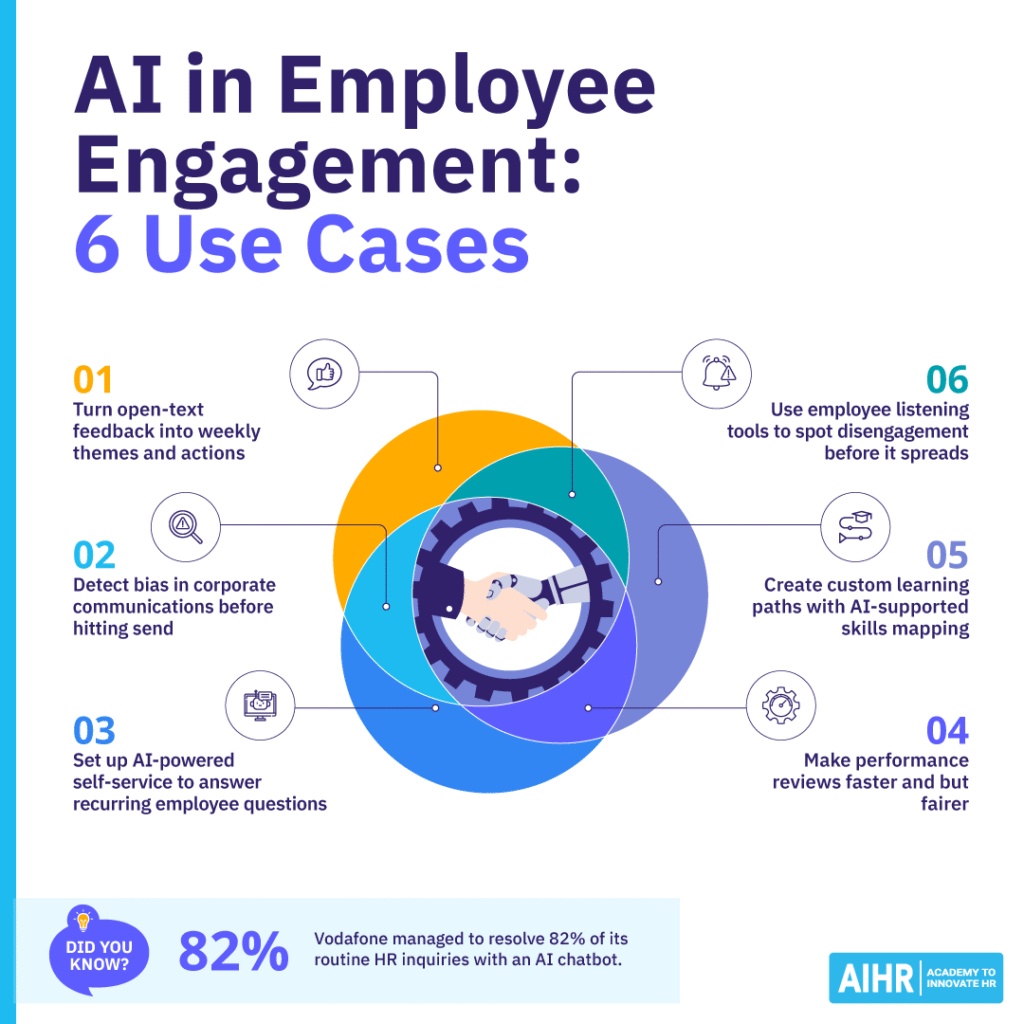
Use case 4: Make performance reviews faster but fairer
Performance reviews are high stakes. Leaving them to an individual manager’s memory and judgment makes them vulnerable to cognitive biases, which can affect ratings and cause mistakes that are hard to fix. AI can’t remove bias from performance management, but it can aggregate data from multiple sources and flag patterns a single reviewer might miss.
AI tools to use
Performance management platforms with built-in AI features (e.g., Betterworks or Culture Amp) can aggregate feedback from multiple sources over fixed periods and generate draft summaries. If you lack a platform with these features, you can manually export feedback data into a spreadsheet, then use ChatGPT Enterprise or Microsoft Copilot to do the rest.
How to do this
Gather existing data sources for each employee, such as goal/OKR tracking, peer or 360 feedback, self-assessments, and structured check-in notes. Use your AI tool to generate a draft summary of key strengths, growth areas, and patterns across the review period (not a final rating). Next, use the same prompt for every employee.
The manager then reviews the draft, adds context (e.g., how someone handled a difficult client or mentored a junior colleague), and writes the final evaluation.
What to do with the output
Once per review cycle, bring managers together to compare summary usage, check for consistency across teams, and discuss flagged patterns. Track two metrics over time: the spread of ratings by demographic group (are gaps narrowing?) and manager time per review (is the process getting faster without sacrificing quality?).
Use case 5: Create custom learning paths with AI-supported skills mapping
Building a skills ontology used to take months, raising the risk of it being outdated by the time it was ready. AI tools, however, can match employee capabilities to role requirements dynamically, keeping development paths current as roles change. They pull data from performance reviews, project history, and training records to build skill profiles.
AI tools to use
Learning experience platforms (LXPs) with built-in skills mapping (e.g., Degreed, Cornerstone, or LinkedIn Learning) use AI to match employee skills profiles to learning content and suggest personalized paths. Enterprise skills platforms (e.g., Workday, Eightfold, Beamery) build dynamic taxonomies from internal and external data and connect them to workforce planning.
How to do this
Start with a proof-of-concept on a single role family or business unit, then validate the AI’s skill and recommendations before expanding. Build a skills taxonomy with skills grouped by role family, clearly defined for consistent understanding. If you don’t have one, start with O*NET or ESCO and customize to your organization’s language.
Design for frequent updates— start simple and refine as you go. Feed in role profiles (required skills) and employee data (self-assessments, manager input, learning history). The AI will map the gap and recommend learning content to close it.
Set these guardrails:
- Employees can view and edit their skills profile: If AI infers skills from project history, employees should be able to review and correct them.
- Learning paths should be suggestions, not mandates: AI recommendations should inform development conversations, not replace them.
- Bias-check the taxonomy: Have a diverse group review skill weightings before launch, as taxonomies built from historical data can encode existing biases.
What to do with the output
Review learning path completion and skill gap closure quarterly, and track completed paths and skill level improvements in key areas. Adjust the taxonomy every six months, or whenever there are significant role changes.
Use case 6: Use employee listening tools to spot disengagement before it spreads
Annual engagement surveys reflect employee feelings from months ago, but continuous listening can close this gap. The most significant benefits of AI in the workplace lie in its application in data analysis.
AI tools to use
Enterprise listening platforms (Qualtrics, Culture Amp, Perceptyx) include built-in sentiment analysis, so start there if your organization uses one. For a lighter setup, run a monthly pulse via Google Forms, export the CSV, and summarize themes using a general-purpose LLM, if your data policy allows it.
How to do this
Start with an annual engagement baseline, then layer in short pulse surveys (monthly or quarterly) to track changes. Limit pulse surveys to 10 to 15 questions, all tied to baseline themes. If you don’t have one yet, start with five to 10 questions each month.
What to do with the output
After each cycle, identify the top two or three themes by frequency and intensity. Compare results across cycles to spot what’s shifting, then share this with management every two months.
HR’s AI in employee engagement rollout action plan
Rolling out AI for engagement isn’t a tech project—it’s a change management exercise. Here’s a practical sequence that works across organization sizes.
Before you start, check your feedback foundation. If your organization doesn’t collect regular employee feedback, pause on AI. Establish a baseline mechanism first—a monthly pulse survey with one open-text question is enough. AI can only surface insights from existing data. Without that foundation, any tool you buy becomes expensive shelfware.
Step 1: Start with one use case
Pick a single, low-risk application (e.g., NLP on pulse survey comments). Trying to AI-enable everything at once stalls adoption and erodes trust. Instead, choose something with existing feedback and visible action gaps.
What this looks like in practice: Run AI on the last three pulse surveys’ open-text comments to identify the top 5 recurring themes by team. Then, share just two themes per team with managers to keep focus and avoid overwhelm.
Step 2: Define success upfront
Ask, “What decision will this help us make faster?” and write the answer down. This could, for instance, be something like “We’ll use sentiment trends to prioritize manager coaching in Q3.”
What this looks like in practice: Agree on two success measures (e.g., time from feedback to decision and number of teams with a documented action). Next, review them every fortnight to confirm that the AI output actually speeds up prioritization.
Step 3: Set guardrails in writing
Document minimum group sizes, data retention rules, and AI usage limits (e.g., no individual evaluation). Then, share this with employees before launch.
What this looks like in practice: Publish a one-page policy stating that you won’t show results for groups of under 10 people, or use raw comments for performance reviews. Share only aggregated trends with managers, then host a 30-minute Q&A session to walk employees through it.
Step 4: Pilot for four to six weeks
Test with one or two teams or locations before launch. Gather structured feedback from HR users and managers, so you know if the AI’s output is actionable, and what’s confusing. Iterate before scaling.
What this looks like in practice: Have two departments pilot the tool for one survey cycle, and after each AI report, run a short checklist review with managers (“Do you trust this?”, “What would you do next?”, “What’s missing?”). Then, tweak the prompts and reporting format before rolling it out company-wide.
Step 5: Enable managers to act
AI can surface insights, but managers must act on them. Without enablement, dashboards get ignored. Two principles matter here: managers need to understand what the output means, and have a clear next action to take as soon as possible.
What this looks like in practice: AI flags “workload” as an increasingly negative theme in Team A’s comments. The manager receives a one-line summary and a suggested question, such as: “According to our feedback, workload is a concern — what’s one thing we could adjust this month?”
The manager then raises it at their next team meeting, agrees to a trial of asynchronous standups, and logs the action. HR, on the other hand, tracks whether the theme persists in the next cycle.
Step 6: Measure outcomes, not just usage
Track if insights led to action. Did teams that acted on AI insights see improved engagement scores the following quarter?
What this looks like in practice: Compare teams that logged at least one action tied to an AI insight versus teams that didn’t. Focus on spotting changes in a few stable measures (e.g., workload, manager support, intent to stay) over the next two pulse cycles.
Step 7: Review quarterly
Ask a few important questions: What themes recur? What’s the AI missing? Where do humans still need to override or interpret? Continuous improvement beats a perfect launch.
What this looks like in practice: Hold a quarterly review with a few managers and employee reps to validate the top themes. At the same time, adjust the taxonomy (e.g., splitting “career growth” into “internal mobility” and “learning time”), and decide on one improvement to make before the next quarter.
How to build AI capabilities in HR
The tools are ready. The hard part is to build the judgment to use them well, which requires balancing efficiency with ethics, and automation with human connection. If you want a structured pathway to build these skills, AIHR’s Artificial Intelligence for HR Certificate Program covers AI fluency, prompt design, and ethical frameworks HR teams need to apply AI confidently.
Next steps
AI can remove a lot of the noise from employee engagement work, but it doesn’t create engagement on its own. The value comes from using AI to spot patterns early and reduce admin drag. You can also turn messy feedback into clear priorities, while keeping human judgment in place for context, empathy, and decision-making.
If HR treats AI as a change program and not just another tool, you’ll get faster wins and fewer trust issues. Start small, set guardrails, and measure if insights lead to real actions and better outcomes. When employees see feedback result in visible improvements, engagement is bound to increase.