
HR leaders are under pressure to do more with less. Budgets are tight, but efficiency, talent management, and performance expectations remain high. The solution? Artificial intelligence (AI). AI can cut time to hire by 30% to 50%, lower operating costs in compensation management by 30%, and reduce hiring bias by 25%.
This article explores 15 AI hacks for HR you can use for admin tasks, recruitment and hiring, rewards and bonuses, employee onboarding, and talent management. It also discusses how you can use AI more effectively in general and what next steps you can take.
Key takeaways
- Start small with low-risk AI tools like chatbots before moving to complex applications.
- Build AI literacy in HR teams through courses, certifications, and hands-on learning.
- Collaborate with IT and data teams to ensure smooth integration and strong governance.
- Prioritize ethical use by addressing bias and maintaining transparency in AI adoption.
Contents
15 best AI hacks for HR
Admin tasks
Recruitment and hiring
Rewards, commissions and bonuses
L&D, talent management, and workforce planning
Learn how to use AI for HR more effectively
FAQ

15 best AI hacks for HR
Here are the 15 best AI hacks for HR, categorized according to different HR functions where AI can have the greatest impact:
Admin tasks
AI can automate routine HR work like answering common questions, updating employee records, and drafting standard documents and templates, so you can spend less time on paperwork and more time on strategic, people-focused work.
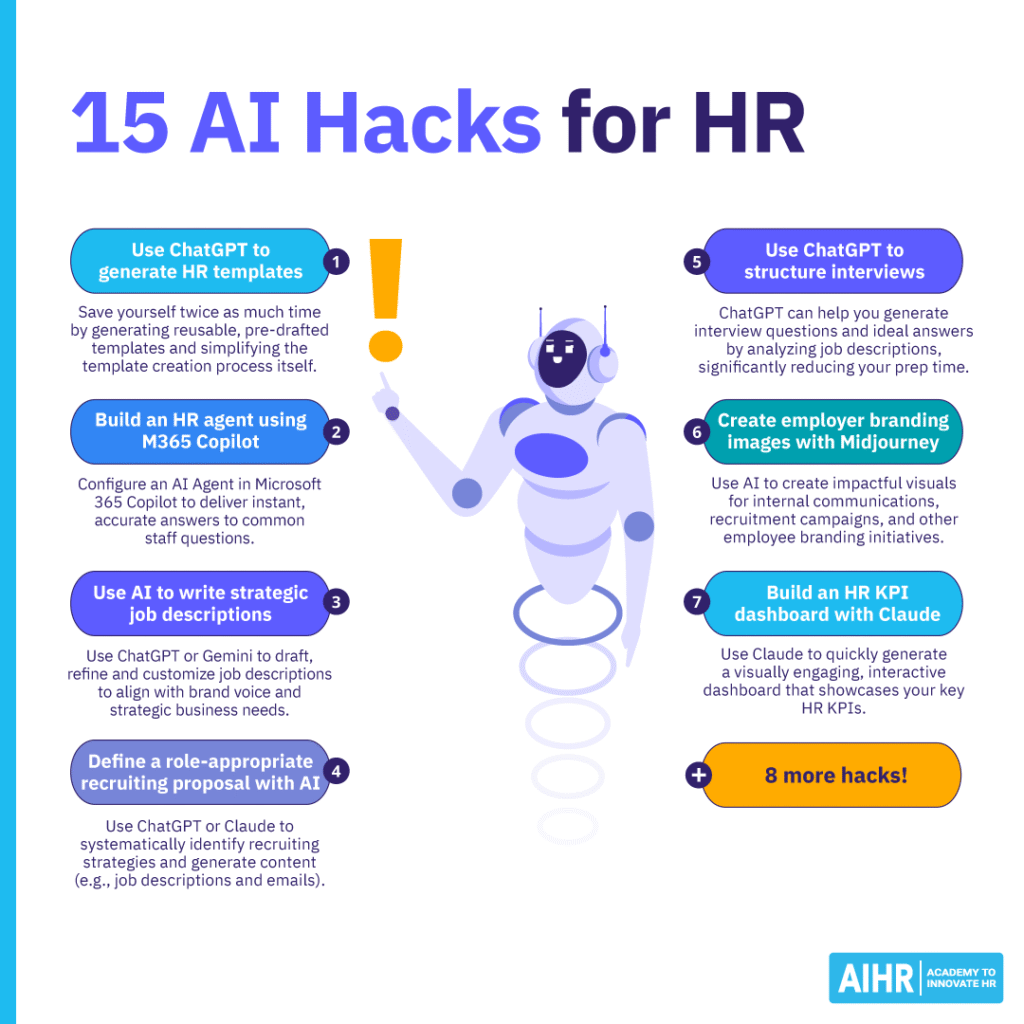
Hack 1: Use ChatGPT to generate HR templates
Save time by generating reusable, pre-drafted templates that provide a good foundation for creating content like job descriptions and job offer letters. Here are some examples of prompts you can use to build a library of templates for different HR use cases:
Example 1: Employee feedback template prompt
“Create an anonymous employee feedback template specifically for non-management staff to provide upward feedback to their immediate managers. The language must be empowering and non-confrontational, focus on constructive development, and explicitly guide employees to use the Situation-Behavior-Impact (SBI) framework for citing specific examples. It must ensure the employee feels heard and valued for their contribution to leadership development.
Structure the template into three sections:
- Manager’s strengths (e.g., communication, support, clarity of goals)
- Areas for managerial improvement (e.g., delegation, professional development opportunities, work-life balance support)
- Open-ended suggestions for team or process improvement.”
Example 2: Onboarding template prompt
“Create a detailed, day-to-day onboarding template for HR to use for a new non-exempt, unionized Factory Floor Machine Operator. The template should cover the new hire’s first week and define milestones for their first 30 and 60 days. Present it as a table with columns for:
- Activity
- Timeline (e.g., Day 1, Week 1)
- Responsible party (e.g., HR, Supervisor, Safety Trainer)
- Completion checkbox/notes.
Activities must include:
- Safety certifications
- Required equipment training
- Introduction to the union representative
- Payroll setup
- Cultural integration.
Emphasize that the onboarding activities should prioritize safety and clear communication on factory protocols.”
Hack 2: Build an HR agent using M365 Copilot
Configure an AI Agent in Microsoft 365 Copilot to deliver instant, accurate answers to common staff questions.
Step 1: Prepare the knowledge source. Gather all necessary HR documents (compensation and benefits, vacation, training, etc.), and upload these documents to a designated SharePoint repository, which will serve as the knowledge source. Ensure all intended users have read access to the SharePoint files to enforce consistent agent behavior.
Step 2: Access the agent builder. Go to M365 Copilot and select ‘Create an agent’, and use the natural language ‘describe it’ method to begin configuration.
Step 3: Define the agent’s identity. Define the agent’s purpose (for instance, ‘onboarding agent for new hires’) and name it. Specify behavior — e.g., ‘be clear and concise, provide lots of details in the reply’ — and suggest that it direct complex queries to an HR Manager. Set the agent’s communication style (e.g., ‘friendly and professional’).
Step 4: Configure and connect. Select ‘Configure’, then ‘Browse’ under Knowledge Source, then select your SharePoint site and your specific documents. You may also customize suggested user questions (this is optional).
Step 5: Deploy and test. Click ‘Create’, then update the sharing settings to allow ‘Anyone in the company’ or specific users access. Finally, click ‘Go to agent’ and test with a query (for instance, “What are my 401k benefits?”) to verify that your agent retrieves accurate, source-referenced answers.
Recruitment and hiring
AI in recruitment can speed up candidate sourcing and screening, schedule interviews, and help hiring teams compare candidates more consistently, while keeping humans in charge of final decisions.
Hack 3: Use AI to write strategic job descriptions
Use ChatGPT or Gemini to draft, refine, and customize job descriptions to align with your company’s brand voice and deliver on strategic business needs.
Step 1: Identify business gaps. Use AI to identify where a new hire could create greater business value by providing the following information:
- Your business’s current activities and any known gaps
- Existing standard operating procedures (SOPs) or systems
- What your team is currently doing.
Then, request analysis by asking the AI to “come up with a list of potential gaps that someone could fill to help create more value or build more revenue for the business”.
Step 2: Generate the job description. Next, instruct the AI to assess the gaps and “create a job description that covers all those gaps”. Note that the description must include all elements of an average job description, such as the role title, salary, and type of employment (e.g., full-time, part-time or contract).
Step 3: Review for missing information. Have the AI review the draft to ensure all critical details are included, and instruct it to notify you if anything important is missing.
Step 4: Refine to match brand voice. Customize the AI-generated job description to align with your company’s brand voice by uploading your existing brand voice guidelines, or asking ChatGPT to create one and apply it according to your instructions.
What is the coolest thing AI can do in HR?
Imagine being able to accurately predict how your team will react to a new policy or operational change before it’s implemented. By using a ‘digital twin’ — i.e., a virtual, dynamic model of your workforce — you can create a data-rich replica of your organization’s people (including skills, team structures, and communication patterns) that updates in real time.
This sophisticated model, adapted from engineering principles, acts as a living blueprint of your company’s human capital by using AI to analyze vast datasets. These include real-time data and sentiment from sources like surveys, internal communications, and employee performance metrics.
This allows you to run risk-free simulations to test ‘what if’ scenarios. For instance, you can model the impact of a new policy or a major restructuring on employee morale and productivity, predict outcomes, and identify potential risks in a virtual environment. In doing so, you can prevent time-consuming, costly mistakes.
Hack 4: Define a role-appropriate recruiting proposal with AI
Use ChatGPT or Claude to systematically identify recruiting strategies and generate specific content, such as job descriptions and welcome emails.
Step 1: Determine competitive compensation. Drill down into specifics by asking for salary data to inform your plan using a prompt such as: “What is the current competitive compensation for Python developers in San Diego? Provide current, relevant and credible URLs to validate your answers.”
Step 2: Find specific sourcing channels. Ask the AI to be specific about where to find the target candidates with a prompt like: “Where can we find Python developers to hire in San Diego? Be specific.” The AI will provide you with a list of sources with specialized leads, such as “San Diego Python Meetup”, or popular events for Python developers, like PyCon, as well as a list of local universities to partner with.
Step 3: Draft a custom job description. Use the AI to quickly draft a job description, personalizing it to your business and its location. Add your company’s URL and relevant documentation to get a more personalized description using this prompt: “Create a job description for an entry-level Python developer position at located in San Diego, referencing our website and the uploaded documents.”
Step 4: Generate outreach emails. Next, ask the AI to draft communication templates. If your company does university partnership outreach, for instance, you can prompt the AI with: “Write an email to a university (e.g., the University of California, San Diego), asking to partner with them to hire new graduates for entry-level Python developer positions at .”
Step 5: Research competitive pay and benefits. Gather information on competitive pay and benefits to ensure your job description and offer are attractive in the local market, using a prompt like: “What are competitive employee benefits in San Diego for entry-level Python developers? Validate your claims with recent and relevant URLs to credible sources.”
Step 6: Create a recruiting proposal. Use all the gathered information to ask the AI to draft a formal proposal for approval. Prompt it to “create a recruiting proposal to recruit three entry-level Python developers in San Diego in the next five months. Include key stakeholders involved in the recruitment process, an example budget, recruiting strategies, job description, employee benefits, and key performance indicators (KPIs).” Use this as a draft and tweak the wording and inputs according to business needs.
Hack 5: Use ChatGPT to structure an interview
ChatGPT can help you generate relevant interview questions and ideal answers by analyzing job descriptions and other documentation, significantly reducing your prep time.
Step 1: Generate interview questions based on your job description. If you’re interviewing for a Technical Writer role, you can input the job description text or a link to the job posting, then prompt the AI to, for instance, “create a list of relevant interview questions an HR professional at a start-up crypto company should ask based on this job description”.
These questions can dive into technicalities, such as: “What is your understanding of these terms: smart contract security vulnerabilities, gas optimization techniques, and Layer-2 scaling solutions?” This process can save time you’d otherwise spend communicating with subject matter experts, but you should also review the generated list with a lead team member, such as a Senior Technical Writer.
Step 2: Generate ideal answers. Ask the AI to generate ideal responses for the questions that you can use as a benchmark to measure candidate answers. Use a prompt like: “What are ideal answers to these questions? Include examples.”
Step 3: Bring your critical thinking to the table. Don’t just blindly use questions and answers provided by AI. Critically evaluate these based on what you know about the role, what the hiring manager is looking for from a candidate, and your own experience in hiring candidates. Adjust questions and answers to suit this specific role and needs.
Hack 6: Create employer branding images with Midjourney
Use AI to create impactful visuals for internal communications, recruitment campaigns, and other employer branding strategies.
Step 1: Input your prompt. In Midjourney, click on the ‘imagine bar’ (or use the /imagine command) and type in the description as a prompt for the image you want to generate. When structuring your prompt, write specifically what you want to imagine.
- Example: “A diverse team of four young professionals, standing in a modern, brightly lit open-plan office space at sunset, clustered around a holographic display showing complex data structures. They are actively collaborating, and pointing at the screen. Cinematic photography, shallow depth of field, golden hour lighting, vibrant colors. Landscape ratio (16:9).”
Step 2: View and evaluate images. Midjourney will create four different versions of your prompt. Click one of the four images to open the light box, where you can view and edit your image.
Step 3: Generate alternatives. If you wish to see alternatives for your image based on the same prompt, click the ‘rerun’ button. The system will process the prompt again and create four new images. The results of reruns may vary significantly in terms of colors, elements, or artistic styles.
Step 4: Use mood boards for consistency. Create a mood board by assembling a collection of images that match your brand’s style and reflect your target market to shape the aesthetic of new images generated on Midjourney. To use the mood board’s style, select ‘use in prompt’ to pull features from all images on the board to create new, consistently styled images. Then, add a simple prompt, such as ‘business meeting’.
Step 5: Use a single image as a style reference. You can also pull the style from a single, previously generated image to ensure consistency in new images. Select a specific image you like and drag it into the ‘style reference’ area, then write your new prompt (e.g.,, “friendly female recruiter meeting with candidate”). Midjourney will now apply the style of the referenced image to the next image it creates.
Rewards, commissions and bonuses
Using AI in this area can reduce errors by checking eligibility rules, spotting anomalies, and generating clearer payout summaries, making reward decisions faster and easier to audit.
Hack 7: Build an HR KPI dashboard with Claude
Use Claude to quickly generate a visually engaging, interactive HR dashboard that showcases your key HR performance indicators (KPIs).
Step 1: Set up and upload data. Log in, then in Settings, click Capabilities and make sure ‘artifacts’ is toggled on. This allows the dashboard to be displayed. Next open a new chat and drag and drop your HR data file (e.g., CSV or Excel) into the chat window.
Then, ask Claude to analyze the data and suggest effective visualizations or metrics for a comprehensive HR dashboard. Do note that Claude has data volume limits and may not accept files over 30MB in size, or with more than 1,000 rows.
Step 2: Generate the dashboard. Next, prompt Claude to create a visual representation of the dashboard with interactive elements.
- Example: “Create an interactive dashboard data visualization as an HTML artifact. Include charts showing key metrics, filters for date ranges, and interactive elements (e.g., hover effects and clickable sections). Make it visually modern with a clean layout. Only use data from the file I have uploaded, and ensure it is 100% accurate. Do not invent facts.”
Step 3: Refine and implement. Use further prompts to adjust the design. For instance, you could ask for a dark theme or another specific color theme. Click the ‘download’ button to save the dashboard as a single, shareable HTML file.
Master AI hacks to propel your HR function forward
Learn to use AI hacks to take your HR team to the next level, and support them with continuous learning, efficient tools, and cross-department collaboration.
AIHR’s Artificial Intelligence for HR Certificate Program will help you:
✅ Understand the different types of AI, including purposes and benefits
✅ Apply an AI adoption framework to transform workflows and processes
✅ Apply advanced prompting techniques and adapt to your role
✅ Learn best practices for using Gen AI safely, securely, and ethically
Hack 8: Write an employee handbook using ChatGPT
Use ChatGPT to draft an employee handbook by using specific prompts to generate your outline and tailored policies.
Step 1: Establish ChatGPT as an HR expert. Use a specific ‘act as if’ prompt to establish ChatGPT’s role as an HR expert, such as: “Act as a seasoned Human Resources expert and corporate policy consultant with deep knowledge of compliance and best practices for small to mid-sized businesses.”
Step 2: Generate the handbook outline. Provide the AI with the necessary business context to generate a relevant structure using a second prompt that details your business (e.g., “I run a payroll SAAS business”) and requests a staff handbook outline. ChatGPT will provide an outline that starts with a welcome message and the company mission and vision, followed by sections for different company policies and practices.
Step 3: Draft specific policies. Use follow-up prompts to get the AI to draft specific policies that fit into the generated outline, such as: “Draft a customer service policy that would fit into your outline above.” Use this draft as a foundation, and thoroughly review all policies before distributing the handbook company-wide.
Hack 9: Create employee training videos with AI
Use Jenni AI to create engaging and effective employee training videos with minimal effort, covering everything from scriptwriting to final editing.
Step 1: Write your script. Provide the AI writer with your central topic, key points to cover, and your intended audience to generate well-organized narration scripts. Use prompts to refine your script to optimize explanations and create an engaging video.
Step 2: Generate or upload visuals. Use the tool’s AI art generator to create visuals by providing prompts that describe the scene, subject matter, and image style to produce high-quality images for your video. The tool enables you to generate matching graphics to show progression or step-by-step processes. Alternatively, you can upload your own images or video clips.
Step 3: Generate the voiceover. You can now generate a natural-sounding voiceover, or add your own audio file. Select the style that fits your video (e.g., friendly, upbeat, serious, or professional). Use Advanced speech editors to insert pauses or adjust pacing on the fly without re-recording, and add custom emotions and rhythms to enhance your voice-over. Alternatively, you can clone your own voice to use in the video.
Step 4: Edit the video. Once all the assets are ready, use editing tools to split, cut, crop, and resize your video. You can also apply transitions, such as fade-in and fade-out, for the audio, use the auto-subtitles tool, and customize text to add dynamic captions throughout your video.
How to build better prompts for AI in HR
When it comes to GenAI, the more specific, the better. For example, instead of prompting: “Write a rejection email for a candidate”, add more detail regarding the context and tone you want for the email.
Your improved prompt may sound something like this: “Write a polite, empathetic rejection email for a candidate who made it to the final interview stage but was not selected for the Content Marketing Manager role. Use a professional tone, and thank them for their time at the end of the email.” This will enable your organization to leave a better impression on candidates, which builds your employer brand.
Check out AIHR’s Gen AI Prompt Design for HR mini course to help you write better AI prompts.
L&D, talent management, and workforce planning
You can use AI to identify skill gaps, recommend learning paths, and aid in workforce forecasting using business and people data, helping teams plan proactively instead of reacting late.
Hack 10: Use AI to analyze employee surveys
Turn long, messy survey comments into clear themes, sentiments, and action points for HR using Gemini or Claude.
Step 1: Export the data. Export your survey (especially open-ended answers) to Excel/CSV. Keep simple columns such as Department, Question and Comment, and remove obvious identifiers, including names and email addresses.
Step 2: Paste comments into AI. Work on one question at a time and paste 50 to 150 comments per batch into the AI. Use a clear, detailed prompt like the one below.
- Example: “You are an HR analytics partner. Here are open-ended comments from our employee survey: [paste comments].
- Group them into 5 to 8 themes
- Estimate employee sentiment (positive/neutral/negative) per theme
- Add 2 to 3 example quotes per theme
- End with 5 concrete action recommendations for HR and managers.
Step 3: Turn results into ready-made outputs. Ask AI to repackage the findings as follows:
- For leaders: “Create a one-page executive summary with key risks and quick wins.”
- For managers: “Write talking points to explain these results to their teams.”
- For employees: “Draft a short update on what we heard and what we’ll do next.”
Hack 11: Use AI for HR surveys
Use Gemini to create a variety of surveys for different departments, and generate the related communications. If you’re putting together an employee engagement survey, for instance, you can take the following steps:
Step 1: Define the project. You can create a personalized employee engagement survey by specifying the target department with a prompt like: “Create an employee engagement survey for a marketing department.”
Step 2: Refine your questions. Be even more specific by asking for a survey for certain types of team members or new hires within the marketing department. Always specify the exact number of questions you require (“generate a 30-question survey”) and iterate your questions as needed.
Step 3: Add a rating scale. Include a rating scale for your answers (e.g., rating them on a scale of one to five) so you can store and analyze the survey data in your company’s HRIS.
Hack 12: Create persuasive presentations with Gamma AI
Use Gamma AI to quickly transform boring, data-heavy presentations into compelling stories.
Step 1: Start by inputting content. Begin by clicking ‘Create New with AI’s help. ’ Then, import a document or web page, or paste in up to 18,000 words of text, and the AI will create the outline. When pasting, set the AI’s goal to expand on rough ideas, bullet points, or summarize long text.
Step 2: Customize generation. Set your parameters before generating a draft. Choose your desired level of detail, from minimal to very detailed (e.g., ‘concise’ is good for live presenting), then select a theme or custom brand colors. Next, select AI images to avoid rights issues, and specify a maximum number of slides.
Step 3: Refine your story and narrative flow. Use Gamma’s Agent (the chat function) to make adjustments. For instance, you can ask it to shift the focus with a prompt like: “Reduce the emphasis on personal stories and instead, focus on the practical preparation steps.”
Step 4: Integrate external data. You can incorporate external sources directly into your deck, complete with a citation. Generate a slide from a URL in the Agent window by entering the web address, then ask it to summarize the article and add a new slide based on its key concepts.
How is AI designing the future of work?
AI is shifting companies from job-based structures to skills-based talent marketplaces. Using employee skills mapping, AI can match staff to projects, regardless of job title. Leading organizations like Mastercard have already adopted this approach to identify internal mobility opportunities, drive satisfaction and retention, and create a more agile, flexible workforce.
Hack 13: Create infographics to illustrate processes with Venngage
Explaining complex business processes with words alone can be tricky. Venngage uses AI to instantly create customized infographics, saving time and helping you visualize complex HR processes.
Step 1: Input your topic into the AI generator. Go to the Venngage homepage and select Infographics, then provide a specific topic or requirement for your design. For instance, if you want to visualize your recruitment steps, type in a prompt for a “hiring process flowchart/infographic for a company” to generate an infographic in seconds.
Step 2: Edit and customize the infographic. Click ‘Edit this infographic’ to open the online template editor for customization. Double-click on any text to edit the content, and use the available widgets to enhance the visual appeal of your design. You can add logos and photos. Once the design is complete, download your infographic.
Hack 14: Visualize your data with Napkin AI
Use Napkin AI to instantly transform text into clear, impactful visual graphics in seconds to help you better communicate key concepts and elevate your presentations.
Step 1: Input summarized content. Sign-up and navigate to a new document in Napkin AI. Paste in your text (use an AI tool like ChatGPT or Gemini to summarize the key concepts of your data first), then give your document a title.
Step 2: Generate visualizations. Hover over the entire block of text until the Lightning symbol appears, then click the Lightning symbol to generate a visualization of your data; the AI will create multiple distinct diagrams for your text. To visualize only a part of your content (such as the first key point), highlight that specific portion of text and click the Lightning symbol again.
Step 3: Customize your graphic. Click on a graphic to scroll through, and select a different graphic style or appearance that best suits your presentation. Next, click on specific text within the graphic to modify it for accuracy or clarity. You can change the color, font style, and other visual elements to align with your brand or presentation theme.
Step 4: Export and integrate. Once you’re done, highlight the entire graphic you wish to use, click the ‘download’ button, and select the desired file type for export. You can now import graphic into your presentation or report.
15. Build a succession plan faster with AI talent mapping
Use ChatGPT (or Microsoft Copilot) to aid in talent mapping and succession planning, based on your current role, skills and performance data. This will help determine who can step up, what they’re missing, and how to close the gaps.
Step 1: Pull together the right inputs. Start by exporting a simple list of critical roles, incumbents, and potential successors. Add what you already have (performance ratings, potential flags, key skills, certifications, mobility, and career interests). Keep it in one table so the AI can “see” the full picture in one go.
Step 2: Ask AI to create your shortlist and risk view. Paste the table and prompt the AI to “suggest 1 to 3 successors per role, rate readiness (ready now / in 6 to 12 months / in 12 to 24 months), and flag single points of failure (roles with no viable backup)”. Next, tell it to show its reasoning in plain language, based only on the data you provided.
Step 3: Generate targeted development plans, not generic training. For each “6 to 12 months” or “12 to 24 months” successor, ask AI to create a gap plan with the two to three most important skill gaps, one on-the-job stretch assignment, one shadowing/coaching action, and one measurable milestone per quarter. Keep it practical (what they will do at work) instead of focusing on a list of courses.
Learn how to use AI for HR more effectively
To use AI for HR more effectively, focus on a few key strategies that unlock its full potential. First, invest in AI fluency by taking short courses, attending webinars, or completing certifications to build a solid foundation in AI for HR.
Begin experimenting with low-risk tools, such as chatbots for employee FAQs or scheduling assistants, to gain confidence before moving into more complex applications like recruiting or strategic workforce planning. At the same time, stay updated by subscribing to HR and tech newsletters and attending industry events to keep pace with AI advancements and regulations.
You can also register for AIHR’s Artificial Intelligence for HR certificate program, an online, self-paced program you can complete in a total of 35 hours. You’ll learn to master prompt design and use generative AI effectively in HR, as well as develop an impactful AI strategy to ensure seamless, confident AI adoption across your HR department.
FAQ
AI can automate mundane administrative tasks, such as payroll and document management. It can also streamline résumé-screening, provide interview assistance, and analyze and predict candidate success, helping you significantly improve recruitment efficiency. Additionally, AI can personalize benefits, conduct pay equity analysis, suggest performance-based rewards, design onboarding, and personalize learning paths for individual employees. Finally, it can predict skills gaps, identify high-potential individuals, and flag potential attrition risks.
AI can free professionals from repetitive, time-consuming tasks, enabling them to focus on more strategic initiatives. This will likely improve data-driven decision-making and overall employee experience. Furthermore, AI’s capabilities in predictive analytics can lead to better hiring outcomes, reduced turnover, and a more skilled workforce. However, successful and widespread adoption of AI depends on HR teams’ ability to develop AI literacy, collaborate with IT, and prioritize ethical considerations to mitigate biases and ensure fairness and transparency.