

Employee application form design becomes far more strategic when you consider the relevant hiring data. Executive hires cost an average of $35,879 and take up to 57 days to fill (90 days in some cases). At the same time, once hiring cycles exceed 40 days, candidate drop-off rates increase by 12%.
The root issue is often misalignment stemming from inconsistent or incomplete candidate data. An employee application form fixes this by standardizing screening and reducing costly misalignment. This article looks at what this form includes, and why you should use one, and comes with a free template you can customize for your company’s needs.
Contents
What is an employee application form?
Why use an employee application form?
Employee application form vs. résumé: What’s the difference?
Employee application form: Formats and variations
What to include in an employee application form
What not to ask on an employee application form
Free employee application form template
Developing an employee application form: 6 best practices
Employee application form: Sample structure
Key takeaways
- A well-structured employee application form creates consistency by ensuring every candidate provides the same core information, making it easier to compare applicants fairly and avoid gaps in screening.
- A basic employee application form works for high-volume roles, while more detailed or role-specific versions support specialized hiring.
- Using an employee application form template helps standardize processes across teams and makes it easier to update as hiring needs change.
- Clear structure, simple language, and mobile-friendly formats make forms easier to complete and faster for HR to review.
What is an employee application form?
An employee application form is a standardized document employers use to collect essential information from job candidates. Also referred to as an employment application, application for employment, or employee job application form, it typically includes sections covering personal details, work history, education, skills, and references.
The form’s primary purpose is to ensure all applicants provide consistent information in a structured format. By asking the same core questions, employers can compare candidates more fairly and efficiently, rather than relying on varied résumé formats. This consistency is crucial when reviewing large volumes of applications or when multiple hiring managers are involved in the process.
Additionally, an employee application form creates an official record of each candidate’s submitted information. This can be useful for compliance, documentation, and future reference throughout the hiring process.

Why use an employee application form?
Organizations use employee job application forms in different ways. Some require candidates to complete an application for employment at the very start, while others use it alongside résumés or later in the hiring process to verify and standardize information. Below are the key reasons for using such a form:
- Standardized candidate data: An employee application ensures every candidate provides the same core information in a consistent format. Unlike résumés, which vary in structure and detail, these forms create a uniform baseline for evaluating applicants.
- Easier comparison across applicants: With standardized responses, hiring teams can more easily compare candidates. This improves fairness and helps decision-makers focus on relevant qualifications, rather than formatting differences.
- Avoid missing critical screening details: An employment application includes required fields that candidates must complete, reducing the risk of missing key information like employment history, certifications, or legal eligibility to work.
- Faster review for high-volume hiring: When managing large applicant pools, employee application forms streamline the review process. Structured data lets recruiters scan, filter, and shortlist candidates more efficiently.
- Record of candidate information: Employee application forms provide a clear, documented record of what each candidate submits. This supports compliance, auditing, and future reference, if needed.
- Aligned hiring teams across locations and managers: A standardized employment application process ensures consistency across teams, locations, and hiring managers, making collaboration smoother and more reliable.
Employee application form vs. résumé: What’s the difference?
While employers use both documents in hiring, an employee application form and a résumé serve different purposes. Here are the main differences between the two:
Who creates it
Employer
Candidate
Purpose
Collect consistent, structured candidate data
Showcase experience, skills, and achievements
Format
Standardized template
Flexible; varies by candidate
Level of standardization
High
Low
How employers use it
Compare applicants fairly and maintain records
Assess suitability, strengths, and career progression
Can you request both together?
Yes; companies often use it alongside a résumé
Yes; candidates often submit it with an employee application form
Employee application form: Formats and variations
Hiring processes vary, so the format of an employee application form often varies too. While the goal stays the same, different versions help employers collect the right level of information for different roles, volumes, and hiring environments.
Standard employee application form
The standard employee application form is the core version used to collect consistent candidate information across all applicants. It’s suitable for most roles and typically includes personal details, work history, availability, and references. Applicants can complete these forms digitally or on paper.
Do this: Keep fields consistent across roles, but review the form regularly to remove anything outdated or unnecessary.
Basic employee application form
A basic employee application form is a shorter version designed for speed. It focuses on essential screening fields rather than detailed background information, making it useful in high-volume environments such as retail, hospitality, or seasonal hiring. This helps reduce application drop-off and speeds up initial screening.
Do this: Limit the form to must-have questions only, and reserve detailed screening for later stages.
Learn how you can improve the hiring process and candidate experience with expert candidate screening, minimizing the risk of bad hires and money spent replacing them.
With AIHR’s Sourcing & Recruitment Certificate Program, you’ll learn to:
✅ Master essential screening methods and best practices to identify the right candidates
✅ Support hiring managers and facilitate recruitment evaluations
✅ Use methods and technologies to optimize your screening process
✅ Speed up the screening process with ready-to-use templates and guides
Role-specific employee application form
A role-specific form is tailored to the requirements of a particular job. It builds on the standard format by adding fields for licenses, certifications, technical skills, or compliance-related information. Employers may also include targeted questions to assess job-specific competencies, making this format ideal for specialized or regulated roles.
Do this: Work with hiring managers to define exactly which role-specific fields are essential to avoid overloading the form.
Printable employment application form
A printable employment application form is a format variation, not a different type of form. Companies typically use it for walk-in candidates, in-person hiring events, or as a backup when digital systems are unavailable. A well-designed printable form should be clear, structured, and easy to complete by hand.
Do this: Test the form yourself on paper to ensure it’s quick to complete and easy to read once filled in.
Why use an employee application form template?
An employee application form template gives employers a solid starting point for collecting candidate information in a structured way. Here are some key reasons you should use one:
Consistency across applications
An employee application form template helps collect the same core information from every applicant. This reduces the risk of missing important details, which often happens when employers rely only on résumés. Whether it’s a basic employee application form or a more detailed one, templates help standardize what you ask and how you capture responses.
Ease of adaptation
A good template is flexible and customizable. Employers can update an employment application form by adding new fields, including role-specific questions, or refining requirements without having to redo the entire form. This is especially useful for organizations that hire for a wide range of roles, teams, or locations.
Better candidate comparison
Applicants answering the same core questions in the same format allows hiring teams to compare candidates more fairly and efficiently. This makes it easier to review applications and supports quicker decision-making. It’s especially valuable in high-volume hiring settings, such as retail, hospitality, and entry-level recruitment, where speed is important.
Improved candidate experience
A tailored template can improve the hiring process for candidates. Clear, well-structured forms are easier to complete, reducing confusion and lowering the chance that applicants drop off before submitting. At the same time, templates help standardize the employee job application form across teams, keeping hiring managers and departments aligned.
What to include in an employee application form
Here’s what to include in any employee application form you use in your hiring process:
- Personal particulars: Include fields for the applicant’s name, contact number, and email address. You may also require a residential address, depending on the role or relevant compliance needs. Clearly label this section in your form.
- Position details: Capture key details about the role the candidate has applied for, such as job title and location. You can also include an open-ended section for the candidate to provide more context for their application (e.g., earliest availability).
- Work eligibility: To ensure compliance early in the screening stage, confirm if the candidate is authorized to work in the applicable country of business operations. This helps the organization minimize legal risk by ensuring compliance with labor laws.
- Employment history: Collect details on the candidate’s previous employers, job titles, employment dates, and responsibilities. This section can provide valuable insights into their professional experience and career progression so far.
- Education: Include fields for the schools the candidate has attended, as well as any diplomas, degrees, certifications, or relevant training they have. You should also tailor this section to the role’s level and requirements.
- Skills: To align candidate capabilities with job requirements, ask for role-relevant skills, licenses, technical tools, or language proficiency, where applicable.
- Availability: Find out whether the candidate is seeking full-time or part-time work, their preferred shifts, the earliest start date, and their willingness to work weekends or overtime, if needed.
- Compensation expectations: Include this if it aligns with your hiring process. It can help set expectations early and streamline discussions.
- References: Request professional references, including names and contact details, if required.
- Applicant statement: Include a declaration statement for the candidate to sign to confirm the information they’ve provided is accurate and complete.
- Signature and date: Particularly important for a printable employment application, this provides formal acknowledgment and record-keeping.
What not to ask on an employee application form
It’s just as important to know what to leave out of an employee application form as it is to know what to include in one. Keeping questions relevant and compliant helps protect both the employer and the candidate experience. Here’s what not to ask candidates:
Disability-related or medical questions
Avoid asking questions about any disabilities or medical conditions a candidate may have. Similarly, exclude questions about pregnancy, children, marital status, or family plans from your employment application form, as they are irrelevant to job performance and can make you look insensitive. More seriously, they might go against anti-discrimination labor laws.
Questions about race or ethnicity
As with disability-related or medical questions, such questions are irrelevant to whether someone can do the job. According to the EEOC, employers shouldn’t request such information unless there’s a legitimate business need, as pre-employment questions can be evidence of discriminatory intent.
If the company does collect demographic data for equal employment reporting or compliance purposes, it’s safer to do so through a separate, clearly voluntary self-identification process that hiring decision-makers don’t use.
Broad criminal history questions
Don’t ask if a candidate has any arrest or criminal record without tying the question to the job itself. Arrest records alone are not proof of criminal conduct, and blanket exclusions based on criminal history can raise discrimination risk under Title VII, especially if not linked to the nature of the job, the seriousness of the offense, or how long ago it happened.
Also, don’t ask for criminal history information too early if state, local fair-chance, or “ban the box” laws require you to delay those questions until later in the hiring process (often after an interview or conditional offer). If you use a third party to conduct criminal background checks, make sure your organization follows Fair Credit Reporting Act notice and consent rules.
Unnecessary financial or salary-related questions
Unless they’re directly job-related and legally justified, avoid asking questions about candidates’ financial status. Be sure to also review salary history restrictions in your state before asking about their compensation history. Many states and localities restrict or ban such questions to prevent past pay gaps from carrying forward and affecting a candidate’s salary prospects.
Free employee application form template
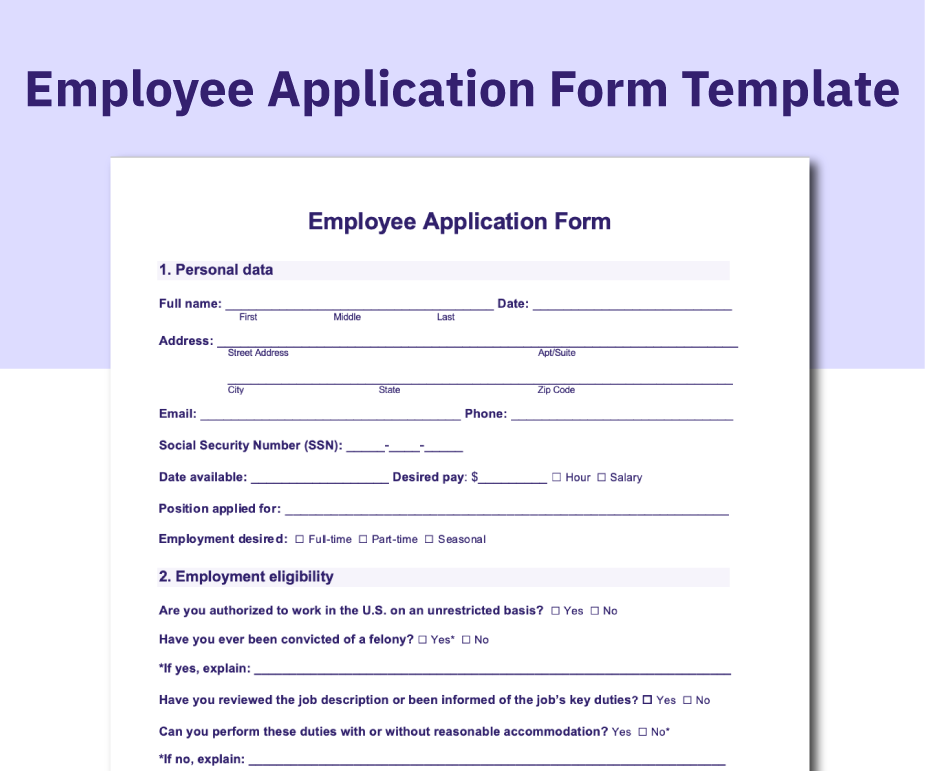
AIHR has developed its own employee application form that you can download for free to help you improve your hiring process. We’ve designed this printable employment application to be clear, practical, and easy to customize, so you can tailor it to your organization’s needs while maintaining a consistent, professional form across roles and locations.
Developing an employee application form: 6 best practices
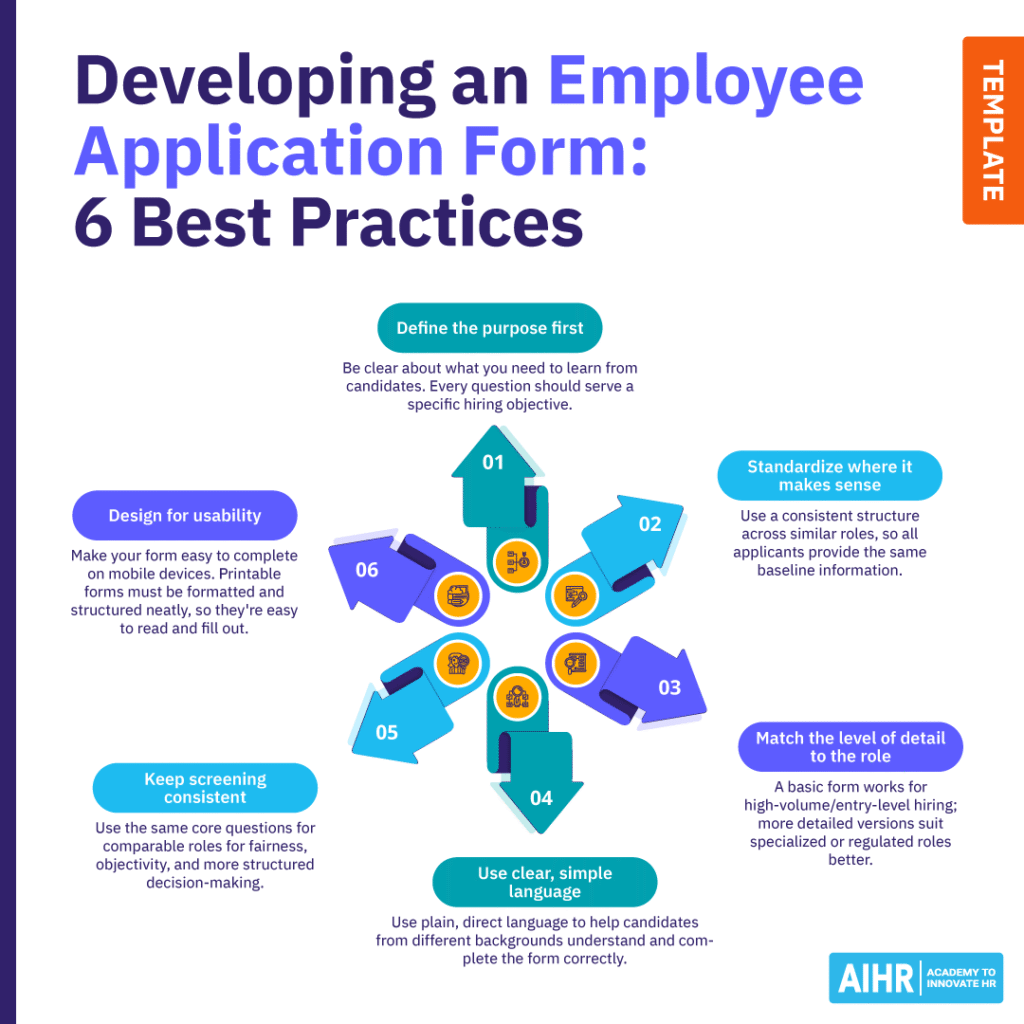
A well-structured employee application form supports better hiring decisions, improves consistency, and creates a smoother experience for both candidates and hiring teams. Here are six best practices to follow to help you design your form with purpose, clarity, and usability in mind:
- Define the purpose first: Before building your employee application form or selecting a template, be clear about what you need to learn from candidates. Every question should serve a specific hiring objective.
- Standardize where it makes sense: Use a consistent structure across similar roles, so all applicants provide the same baseline information. This makes employee application forms easier to review and compare.
- Match the level of detail to the role: Not every role requires the same depth. A basic employee application form works well for high-volume or entry-level hiring, while more detailed versions are better suited to specialized or regulated roles.
- Use clear, simple language: Write questions and instructions in plain, direct language. This ensures candidates from different backgrounds can understand and complete the form without confusion.
- Keep screening consistent: Use the same core questions for comparable roles. This helps improve fairness and minimize subjectivity, and supports more structured decision-making.
- Design for usability: Make sure your form is easy to complete on mobile devices. If you offer a printable version, ensure it’s clean, well-structured, and easy to read and fill out.
Employee application form: Sample structure
A clear, well-organized structure helps make your employee application form easy to complete and review. Whether you’re creating a digital form or a printable employment application, keeping sections logical and consistent improves both usability and data quality. Below is a simple employee application form example structure:
- Employer information: Company name, contact details, and location.
- Position applied for: Job title, department, and preferred location (if applicable).
- Applicant details: Full name, phone number, email, and residential address (if required).
- Work history: Previous employers, roles, dates, and key responsibilities.
- Education: Schools attended, qualifications, and relevant training.
- Skills/certifications: Role-relevant skills, licenses, or technical competencies.
- Availability: Start date, working hours, and shift preferences.
- References: Professional contacts who can verify employment and performance.
- Applicant statement and signature: Confirmation of accuracy and acknowledgment, especially for a printable employment application.
Next steps
A well-designed employee application form is a practical tool that shapes how you attract, assess, and compare candidates. By standardizing information and aligning your questions with real hiring needs, you create a more consistent and effective process from the outset. Then, you can apply these principles in practice.
Build or refine your employee application form, test it across roles, and adjust it as your hiring needs evolve. Check out AIHR’s Sourcing & Recruitment Certificate Program to develop practical skills in crafting targeted job descriptions, optimizing recruitment processes, and creating a better candidate experience.