
What could you and your team do with 40% more time each week? Employees spend roughly that much time searching for information. An HR workflow template can streamline HR processes, reclaiming time and freeing teams from administrative overload, so they can focus on strategy, engagement, and supporting the business.
An HR workflow template provides a structured approach to mapping how work currently flows, clarifying responsibilities and approvals, and preparing your processes for automation in your HRIS or workflow tool.
Instead of relying on “how we’ve always done it”, you get clear, repeatable systems. Tasks move smoothly between HR, IT, Finance, and managers for processes such as onboarding, performance reviews, promotions, offboarding, and leave approvals.
Contents
Who is this HR workflow template for?
Why use an HR workflow template?
HR workflow examples you can plug into your template
How to conduct an HR workflow analysis using the template
Free HR workflow template

Who is this HR workflow template for?
This HR workflow template is designed for:
- HR Managers / HR Business Partners who want fewer surprises and escalations
- HR Operations / People Ops teams who are preparing processes for automation
- HR Generalists who handle everything from recruitment to exit, and need clarity
- People leaders in fast-growing companies who are moving from ad hoc to scalable HR.
If you often find yourself thinking, “There must be a better way to run this process,” this template is for you.
Why use an HR workflow template?
An HR workflow template helps your HR team work smarter, not harder. It brings structure, consistency, and visibility to complex processes that currently live in people’s heads or scattered documents. Here’s what it does for you and your team:
- Provides a clear map for automation: Before automating onboarding, payroll, or leave approvals, it is essential to identify the current steps. The template helps you visualize each action and identify repetitive, time-consuming tasks that can be handled through your HR software.
- Makes handovers predictable: Everyone knows when and how to act, reducing delays and confusion between HR, IT, payroll, and management. This is particularly helpful if you support multiple locations or remote teams.
- Prevents skipped steps: Your template serves as a checklist for compliance, covering background checks, policy sign-offs, access updates, and documentation. This protects both your organization and employee trust.
- Helps new HR team members ramp up faster: Instead of shadowing colleagues for weeks, new HR hires can follow ready-made workflows that are tailored to their specific needs. They understand “how we do things here” and where they fit in.
- Supports compliance and accountability: Standardized workflows make it easier for you to show due diligence to auditors or legal teams because every task and approval can be traced.
- Improves efficiency and transparency: Clear workflows reduce duplication, streamline communication, and help you spot bottlenecks early. It’s easier to answer questions like “Where is this request stuck?” or “Who owns this step?”
- Creates a foundation for continuous improvement: As your business evolves, you can adjust your HR workflow template instead of overhauling processes from scratch.
HR workflow examples you can plug into your template
Here are eight practical HR workflow examples that you can map directly in your HR workflow template, then refine and automate over time.
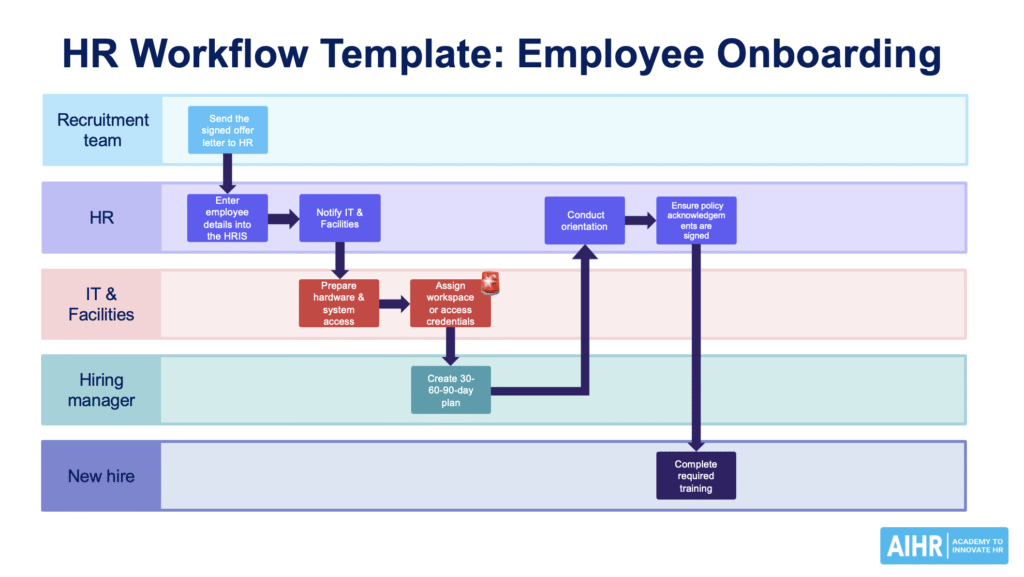
1. Employee onboarding HR workflow
The goal of this workflow is the smooth integration of new hires into the organization. This workflow is a good starting point if you often have last-minute IT or equipment issues.
HR workflow steps:
- The recruitment team sends the signed offer letter to HR
- HR enters the employee details into the HRIS and notifies IT and Facilities
- IT prepares hardware and system access
- Facilities assigns workspace or access credentials
- The manager creates a 30-60-90-day plan
- HR conducts orientation and ensures policy acknowledgements are signed
- The new hire completes the required training.
2. Employee offboarding HR workflow
An employee offboarding HR workflow ensures a secure, compliant, and respectful exit process. If you’ve ever discovered an ex-employee who still has access to systems, this is a workflow to prioritize in your template.
HR workflow steps:
- The manager notifies HR of an employee’s resignation or termination
- HR confirms the final working day and begins the exit checklist
- IT revokes system access and collects company devices
- Payroll prepares the final payment and benefits information for the employee.
- HR schedules an exit interview
- The manager transfers responsibilities or initiates recruitment for a replacement
- HR updates employee records and archives documentation.
How to use the template here:
Map each step, assign owners (e.g., HR, IT, manager), and include deadlines (e.g., IT access at least 3 days prior to the start date). Then use your HR workflow template to identify which steps can be automated in your HRIS.
A well-designed HR workflow doesn’t just prevent delays—it unlocks efficiency, clarity, and confidence across your organization. But to fully realize these benefits, your HR team needs more than templates. They need the capability to map, analyze, and optimize processes end to end.
With AIHR for Business, your HR team will learn to:
✅ Conduct workflow analyses to reduce cycle times and compliance risks
✅ Use digital tools and automation frameworks to streamline HR operations
✅ Design scalable workflows that improve collaboration across HR, IT, Finance, and beyond
📈 Give your HR team the skills to turn chaotic processes into strategic, streamlined systems.
3. Performance review HR workflow
The goal of the performance review workflow is to conduct structured, fair performance evaluations without requiring managers to chase forms.
HR workflow steps:
- HR notifies managers of the upcoming review cycle
- Employees complete self-assessments
- Managers evaluate performance using standardized criteria
- HR reviews for consistency and compliance
- Managers conduct review meetings with employees
- HR stores completed reviews and updated performance data
- Development plans or promotions are initiated where relevant.
In your HR workflow template:
Add automated reminders for managers and employees, and define deadlines for each step. This reduces last-minute rushes and missed reviews.
4. Leave request and approval HR workflow
Manage employee leave efficiently and transparently with a leave request/ approval HR workflow. This workflow is especially important if managers frequently request “quick checks” on balances or team availability.
HR workflow steps:
- The employee submits a leave request via the HRIS or a form
- The manager reviews the workload and either approves or denies the request
- HR updates leave balances in the system
- Payroll is notified of any unpaid leave adjustments
- The team calendar is updated to reflect absences
- HR monitors leave patterns for compliance and planning.
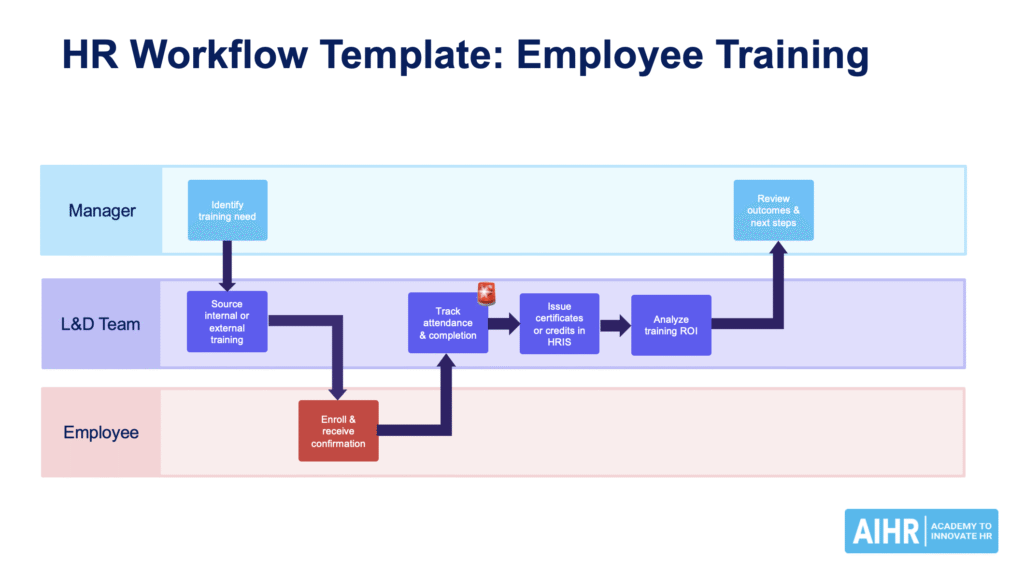
5. Employee training and development HR workflow
An employee training workflow helps track and manage learning initiatives for skill development. If your learning activities feel ad hoc and hard to report on, this is a good workflow to formalize in your template.
HR workflow steps:
- The manager or HR identifies training needs
- L&D sources internal or external training options
- Employee enrolls and receives confirmation
- HR tracks attendance and completion
- Certificates or credits are recorded in the HRIS
- The manager reviews outcomes and discusses next steps in the performance review
- HR analyzes training ROI and updates development plans.
6. Recruitment and hiring HR workflow
Streamline the process of sourcing, screening, and hiring top talent with a recruitment and hiring HR workflow.
HR workflow steps:
- The manager submits a job requisition to HR for approval
- HR reviews and posts the job on selected platforms
- Applicants are screened automatically or manually for key qualifications
- HR shortlists candidates and schedules interviews
- The hiring panel conducts interviews and submits feedback
- HR coordinates reference and background checks
- The offer letter is prepared, approved, and sent to the chosen candidate
- Once accepted, HR initiates the onboarding workflow.
Use your HR workflow template to:
Show where the ATS is used, where manual steps still exist, and where delays typically happen (for example, waiting for hiring manager feedback).
How to conduct an HR workflow analysis using the template
An HR workflow analysis helps you understand how your processes actually work and where they can be improved or automated. The easiest way to start is with one workflow that you know is painful, for example, onboarding or offboarding, and use your HR workflow template to break it down step by step.
Step 1: Identify and prioritize critical workflows
Ask yourself:
- Which workflows create the most escalations or complaints?
- Where do errors cause real business risk (e.g., payroll, contracts, compliance)?
- Which workflows involve multiple departments and systems?
Common high-impact workflows to start with include onboarding, offboarding, payroll changes, and performance reviews.
Document why you chose each workflow and define SMART goals. For example:
- Reduce onboarding cycle time by 20%
- Eliminate missed payroll approvals
- Improve the completion rate of performance reviews to 95%.
This keeps your improvement efforts focused on the most valuable processes for your organization.
Step 2: Map the workflow with operational depth
Using your HR workflow template, map how the process works today—not how it was designed on paper.
Capture:
- Actions and owners: Every step and who completes it.
- Triggers: What starts the workflow (offer letter signed, resignation notification, performance cycle opening)?
- Systems and documents: HRIS, ATS, spreadsheets, forms, shared drives.
- Handoffs: Where work moves between HR, managers, IT, payroll, or legal.
- Approval steps: Where approvals occur and how they’re tracked.
- Exceptions: Where rework, escalations, or delays occur frequently.
This gives you a realistic baseline. It often reveals issues you already sense: for example, “IT always gets access requests at the last minute” or “Managers bypass the system and send emails directly.”
Step 3: Analyze stakeholders, capacity, and accountability
For each step in your template, identify:
- Who is responsible
- Who is accountable
- Who needs to be informed
Then ask:
- Do stakeholders understand their role and timing?
- Are delays caused by workload or unclear expectations?
- Where do employees or managers feel confused?
Most workflows break at the handoff, not in the system. Understanding where HR, IT, Finance, or managers are overloaded or unclear helps you redesign ownership and add reminders or SLAs where needed.
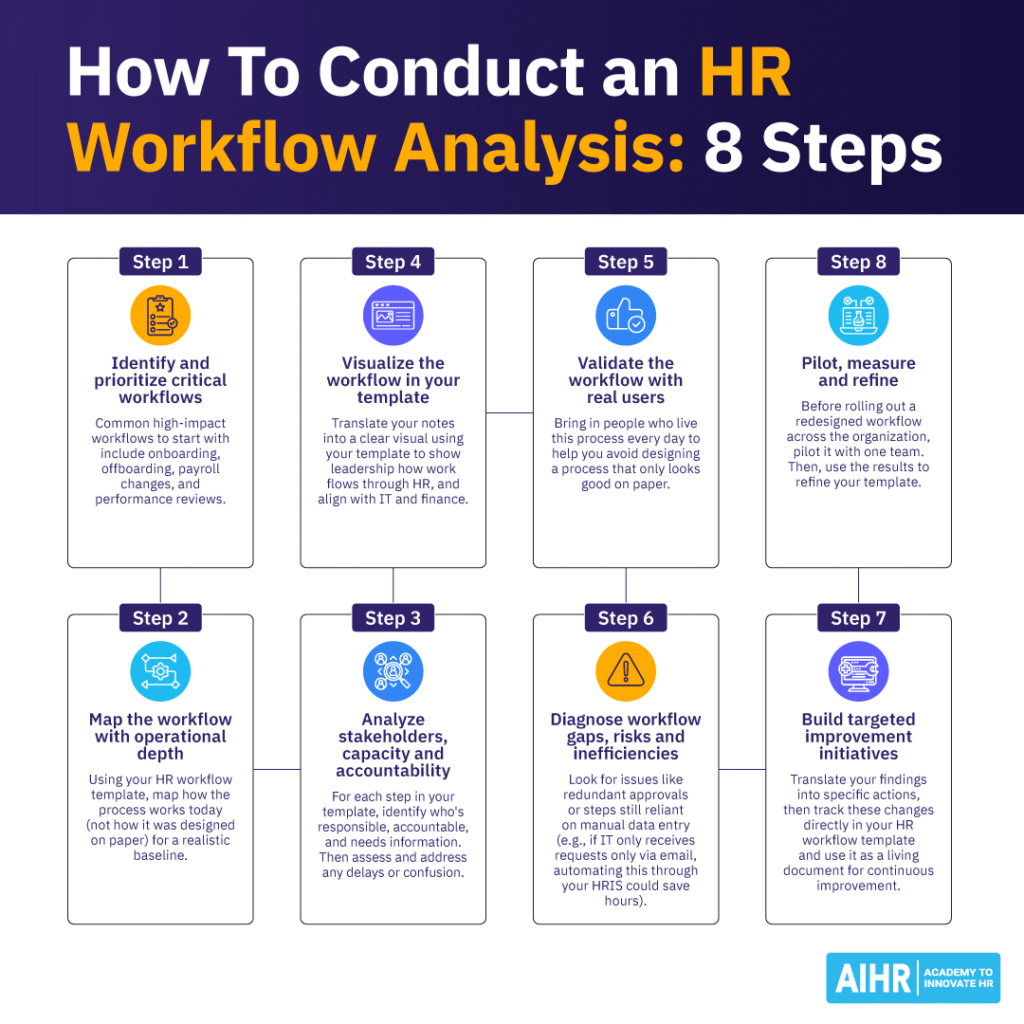
Step 4: Visualize the workflow in your template
Now translate your notes into a clear visual using your HR workflow template:
Include:
- Sequential steps
- Decision points (yes/no, approve/reject)
- Approvals
- System touchpoints
- Handoffs
- Policy or compliance requirements
A visual map makes it easier to:
- Show leadership how work flows through HR
- Align with IT and Finance on responsibilities
- Spot bottlenecks such as duplicate approvals or manual data entry
Step 5: Validate the workflow with real users
Bring in the people who live this process every day, such as your HR colleagues, managers, IT personnel, payroll staff, and employees, where relevant.
Walk them through the workflow in your template and ask:
- Where do delays consistently occur?
- Which steps create confusion or rework?
- What information is routinely missing?
- Which parts feel manual or unnecessary?
- Where does this workflow create frustration?
This step helps you avoid designing a process that looks good on paper but doesn’t reflect reality.
Step 6: Diagnose workflow gaps, risks, and inefficiencies
Using your HR workflow template and stakeholder input, evaluate:
- Cycle time: Where does work slow down?
- Error rates: Which steps produce the most mistakes or corrections?
- Compliance gaps: Are mandatory steps consistently completed?
- Manual workload: Where are teams re-entering data or relying on email chains?
- Employee experience: Where do employees feel confused or ignored?
- Manager burden: Which steps create unnecessary admin for managers?
This analysis shows the real cost of inefficiency and risk. It also provides you with concrete talking points when presenting changes to leadership.
Step 7: Build targeted improvement initiatives
Translate your findings into specific actions:
- Simplify: Remove or merge unnecessary steps.
- Clarify: Define ownership, timelines, and SLAs in your template.
- Automate: Use your HRIS to trigger reminders, approvals, and data flows.
- Standardize: Create templates, checklists, and unified forms.
- Integrate: Connect systems to avoid duplicate data entry.
- Enhance communication: Add clear employee touchpoints and guidance.
You can track these changes directly in your HR workflow template and use it as a living document for continuous improvement.
Step 8: Pilot, measure, and refine
Before rolling out a redesigned workflow across the organization, pilot it with one team or business unit. Measure:
- Cycle time improvement
- Reduction in errors or rework
- Compliance completion rates
- Employee satisfaction (for example, onboarding feedback surveys)
- Manager satisfaction.
Use the results to refine your template and build a stronger case for scaling the new process.
Free HR workflow template
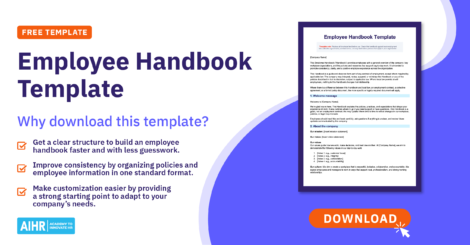
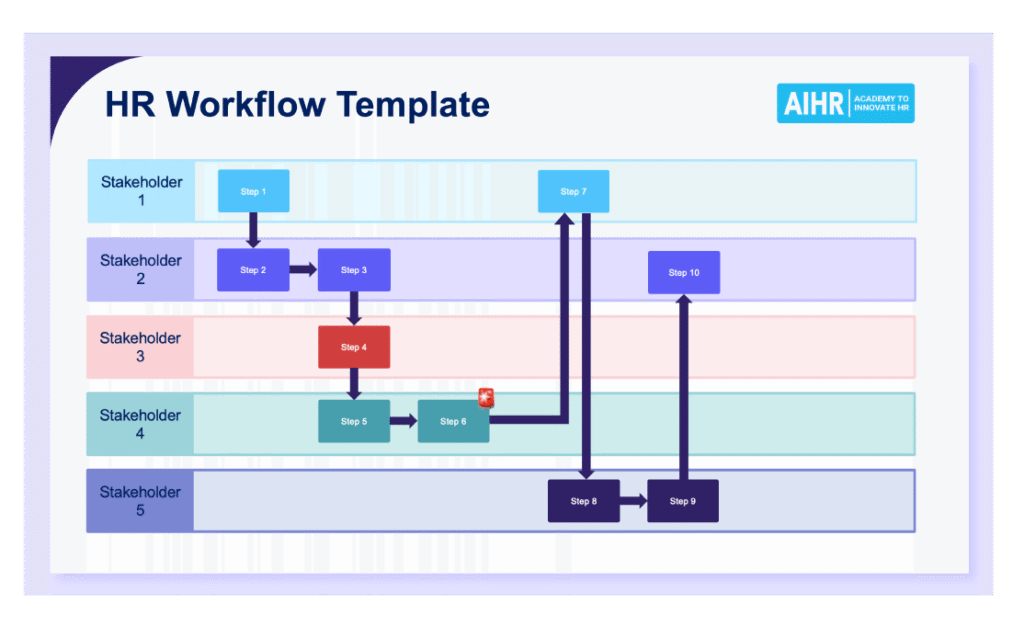
Our HR workflow template is a ready-to-use visual guide created to help HR teams map their current processes, clarify ownership, prepare for automation, and communicate workflows clearly to stakeholders. Its simple, color-coded structure lets you outline each step from start to finish and see exactly who is responsible at each stage.
The template is flexible enough to support a wide range of HR activities, including onboarding and offboarding, recruitment and internal mobility, payroll and compensation updates, performance and development cycles, as well as compliance and policy-related workflows.
To get started, pick one high-impact workflow, such as onboarding, and map it using the template. Share the draft with your stakeholders, gather their feedback, and refine it. Once you have a solid version in place, you can reuse the same structure for the rest of your HR processes.
To sum up
Ask any HR team, and you’ll hear the same thing: repetitive tasks eat up far too much time. Once processes are cleaned up and mapped clearly, hiring, onboarding, and day-to-day operations start to run with far less friction.
Well-designed HR workflows do more than keep things organized. They give you and your team the clarity you need to move work forward without confusion or unnecessary delays. When every step, responsibility, approval, timeline, and handoff is clearly mapped out in your HR workflow template, tasks move smoothly between people and departments. The result is a more consistent employee experience, stronger compliance, and noticeable time savings.
With a clear HR workflow template in place, you’re better positioned to:
- Spot patterns in turnover or process breakdowns
- Anticipate future skills and capacity needs
- Show leaders exactly where processes help or hinder performance.
Instead of simply managing transactions, your HR team contributes foresight and direction, helping you build a workforce that’s engaged, supported, and aligned with your organization’s goals.