
Claude for HR is the latest AI tool built to support core people operations. It helps HR teams create job descriptions, onboarding plans, performance reviews, and compensation insights more quickly. 43% of organizations now use AI for HR tasks, up 17% year-on-year. This suggests HR teams are actively adopting AI-powered tools to reduce their operational workload.
Claude for HR promises to save time by taking over repetitive tasks. However, can you rely on its output, especially for more complex work like compensation or salary benchmarking? To answer that, this article explains what the tool does through different use cases, how to use it, and, importantly, where AIHR’s own testing shows it still falls short.
Key takeaways
- Claude for HR runs inside Claude Cowork and can be configured with connectors across categories such as ATS, HRIS, calendar, email, chat, knowledge base, and compensation data.
- HR professionals can automate time-consuming administrative duties by using six core slash commands.
- The tool is a first-draft engine that handles technical ‘hand-offs’ among various software apps, but still requires human review to validate outputs before they’re finalized.
- AIHR’s own testing revealed inaccuracies in compensation data for senior-level positions, indicating that Claude’s salary benchmarks should be used only as a rough guide.
Contents
What is Claude for HR?
What the Claude for HR plugin can do (at a glance)
How to get the Claude for HR plugin: 6 steps
6 use cases of Claude for HR: A closer look
AIHR’s test of the Claude for HR plugin for compensation benchmarking

What is Claude for HR?
Claude for HR is an AI plugin for HR teams that helps you handle document-heavy tasks with less manual work. Instead of drafting an offer letter, formatting it, and sending it through the right platform yourself, you can trigger the process with a single command.
For example, after an interview, you could ask Claude to create an offer letter using the agreed salary and your company template. It could then send the document through DocuSign from the same interface.
It runs in Anthropic’s Cowork desktop app and supports structured HR workflows, including offer drafting, onboarding, performance reviews, policy lookup, compensation analysis, and people reporting. Depending on your connected tools and setup, Claude can help prepare and move work across your workflow.
HR tip
It’s important to think of Claude for HR plugin as a ‘first draft engine’, not a replacement for your professional judgment. As with all AI tools, human monitoring is essential; all outputs must be reviewed and validated to ensure accuracy and compliance before being sent.
What the Claude for HR plugin can do (at a glance)
What separates Claude for HR from generic AI prompt engines is what it connects to and how you instruct it. The plugin comes with six built-in slash commands (listed below). You can type / in the Cowork chat to see them all. Each one launches a structured workflow: you fill in the relevant details, and Claude executes the task inside your connected tools.
Let’s come back to our previous example. Depending on which tools you’ve integrated, when you run /draft-offer, Claude doesn’t simply produce text for you to copy. It can use connected tools and files to prepare drafts and move work forward with less manual handoff.
Below are examples of commands built into Claude for HR, and what you can use them for:
/hr:comp-analysis
Analyze and benchmark compensation
/hr:draft-offer
Generate an offer letter with agreed terms and digital signing workflows
/hr:onboarding
Create an onboarding checklist for a new hire with calendar integration
/hr:people-report
Generate a people operations report
/hr:performance-review
Prepare or conduct a performance review with scorecarding and scheduling
/hr:policy-lookup
Search the employee handbook and policies
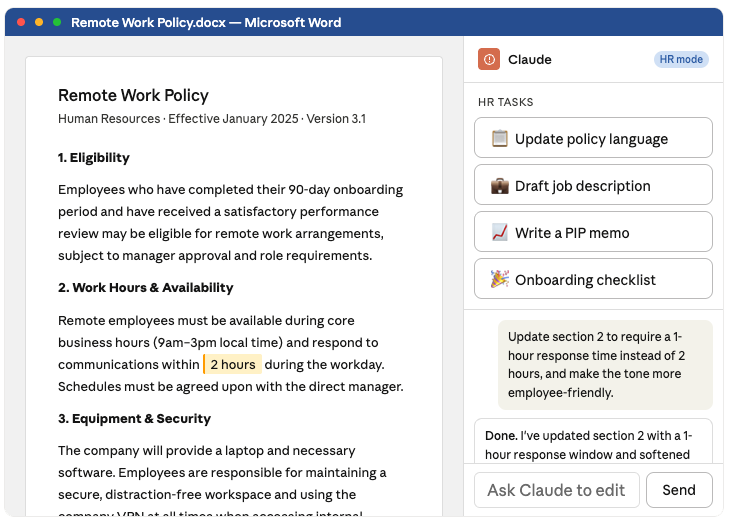
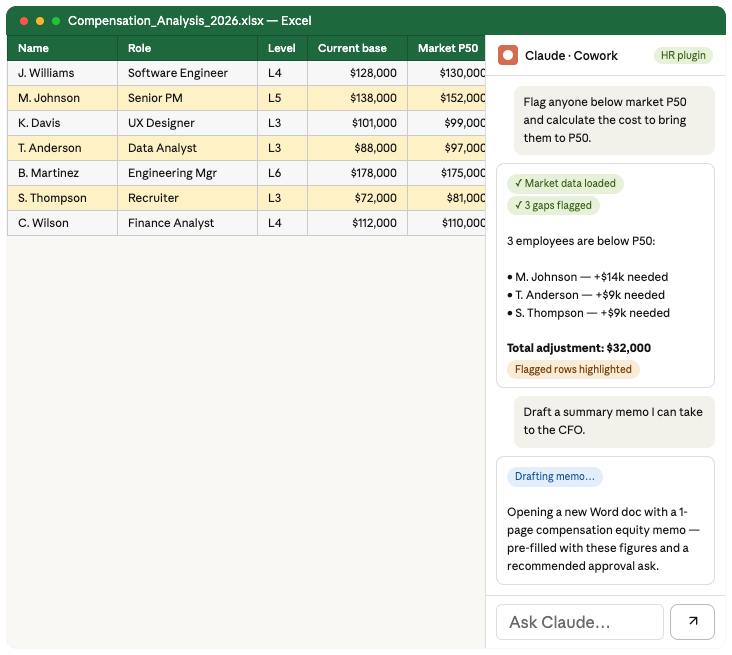
Below, you can see examples of Claude HR plugin in action.
Example of an offer letter workflow built with Claude for HR plugin, integrated with Word and DocuSign
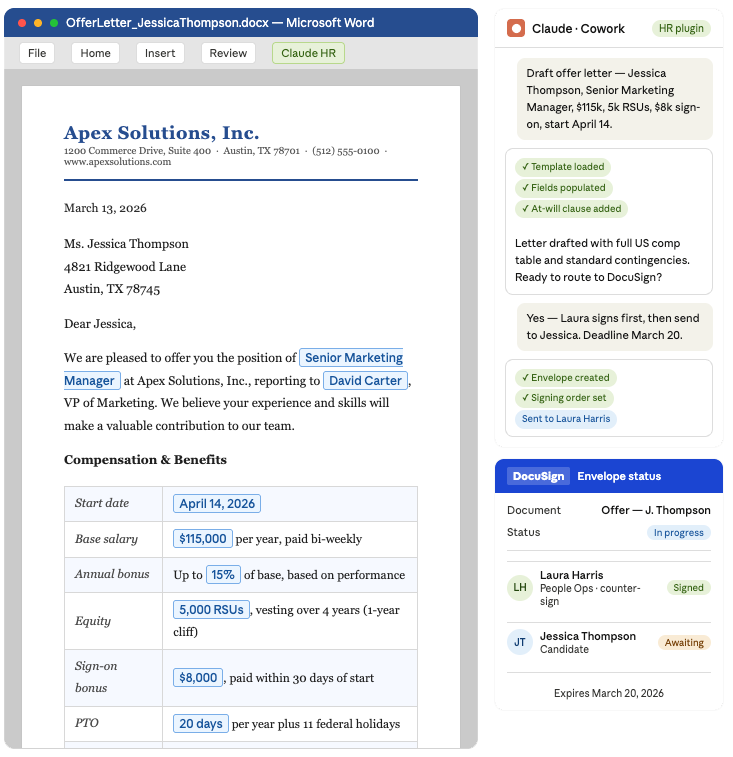
Example of a policy document workflow built with Claude for HR plugin, integrated with Word
Example of a compensation analysis workflow built with Claude for HR plugin, integrated with Excel
How to get the Claude for HR plugin: 6 steps
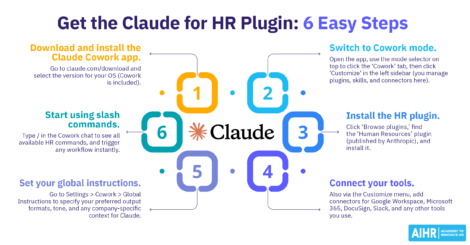
The HR plugin runs inside Claude Cowork, which is built into the Claude desktop app. Here’s how to get set up:
- Step 1: Download and install the Claude Cowork app. Go to claude.com/download and select the version for your operating system (macOS or Windows). Cowork is included, so you don’t need a separate download.
- Step 2: Switch to Cowork mode. Open the app and use the mode selector at the top to click the ‘Cowork’ tab. Then, click ‘Customize’ in the left sidebar; this is where you manage plugins, skills, and connectors.
- Step 3: Install the HR plugin. Click ‘Browse plugins’, find the ‘Human Resources’ plugin (published by Anthropic), and install it.
- Step 4: Connect your tools. Add the connectors relevant to your workflow, such as ATS, HRIS, calendar, email, chat, knowledge base, and compensation data tools.
- Step 5: Set your global instructions. Go to Settings > Cowork > Global Instructions to specify your preferred output formats, tone, and any company-specific context for Claude (no coding required). This applies to every Cowork session.
- Step 6: Start using slash commands. Type / in the Cowork chat to see all available HR commands and trigger any workflow instantly.

As generative AI becomes increasingly common in HR, knowing how to apply it effectively and ethically can help boost your HR function significantly.
AIHR’s Artificial Intelligence for HR Certificate Program will help you:
✅ Master hands-on skills across the most widely used Gen AI tools
✅ Explore HR-specific use cases within different Gen AI applications
✅ Identify opportunities to integrate Gen AI into HR tasks and workflows
✅ Master hands-on skills across the most widely used Gen AI tools
6 use cases of Claude for HR: A closer look
Here’s a closer look at the six core workflows, including what each produces, and where your ‘human in the loop’ judgment is essential.
1. Run a compensation analysis
Connect your pay data (Excel, Google Sheet, or HRIS export), specify role, level, and location, and Claude will build a structured analysis. This includes internal pay versus market ranges, outliers, equity gaps, and a plain English summary.
The important caveat is that AIHR’s testing found the app’s compensation benchmarking feature significantly unreliable for senior roles. Our advice: Use it only as an initial orientation for junior and mid-level positions, and validate it against a dedicated benchmarking platform before making any offer.
How to use it
Connect your spreadsheet or HRIS export to Cowork, type /comp-analysis, then enter role, level, and location details. Claude for HR will read the data, benchmark against available market data, and surface gaps.
Expected output
- Pay vs market table with flagged outliers and equity gaps
- Plain English summary, e.g., “Sales team median pay is 12% below market; recommended range: $80k–$90k”
- Stated assumptions and data sources to help you know exactly what to validate.
Practical tip: Your compensation analysis data updates automatically when you update the connected spreadsheet. Before setting offers, always cross-reference senior-level outputs against third-party comp platforms such as Figures, Mercer, or Ravio.
2. Draft an offer letter
Provide details on job role, level, compensation, start date, and terms. Claude for HR will generate a formatted offer letter draft for your review and DocuSign routing. The quality depends on your setup; customizing the plugin with your standard template produces a much tighter output.
Be sure to review the final document before it reaches your candidate, because Claude for HR can’t verify the accuracy of compensation or jurisdiction-specific legal requirements.
How to use it
Connect DocuSign to Cowork, type /draft-offer, and complete the form with info on the role, comp, start date, and key terms. Claude for HR will generate a formatted draft, which will save to your files and beready for review.
Expected output
- Fully formatted offer letter with all specified terms populated
- Direct path to DocuSign routing once you’ve approved the letter.
Practical tip: Load your standard offer letter template into the plugin setup first. It’s the single biggest factor in improving output quality and aligning it with your company standards.
3. Generate an onboarding checklist
Most employees decide whether they’ll stay at a company within their first 90 days, and companies with higher onboarding maturity are up to 103% more likely to see improvements in new-hire retention and engagement.
Prompt Claude with details like the new hire’s specific role, team, and goals to generate a tailored onboarding checklist that reflects the exact tools, workflows, and milestones relevant to that position. This ensures every employee gets a personalized path to productivity from day one.
How to use it
Type /onboarding with role details, department, location, and start date. Claude willl generate the plan and deliver it to Google Drive, or send it via Slack (based on your configuration) to the hiring manager.
Expected output
- Role-specific first-week checklist covering access, introductions, and essential training
- 30-60-90 day plan with goals, milestones, and manager actions per phase.
Practical tip: Connect your HRIS or policy documents, so your onboarding plans reflect your company’s specific probation terms and compliance requirements.
4. Create a people report
Feed in the metrics you’re already tracking, such as headcount, attrition, time to fill, and engagement. Claude for HR will generate a readable narrative report with trends surfaced, formatted for your audience.
Here’s where your cross-app workflow is particularly useful. Claude for HR can pull data from Excel, build the narrative, and generate a board-ready PowerPoint in a single workflow. However, it can’t interpret business context. For instance, a spike in attrition means different things in different climates, so you must craft the narrative yourself.
How to use it
Connect your Excel, Google Sheets, or HRIS export, type /people-report, then specify the period, audience, and metrics to include.
Expected output
- Structured people report covering headcount, attrition, diversity, and organizational health
- Optional board-ready PowerPoint generated from the same data, with no manual reformatting required.
Practical tip: Specify your audience upfront. A board report reads differently from a CHRO update, and Claude for HR will calibrate depth and language accordingly.
5. Structure a performance review
Provide your goals, feedback, and context. Claude for HR can generate a structured review draft covering achievements, development areas, and rating justification, consistently formatted across all reviews in the cycle.
In practice, this looks like a manager spending 20 minutes refining a Claude draft instead of 90 minutes writing one from scratch. Performance review will then inform compensation and promotion decisions, and a manager must own the final version.
How to use it
Type /performance-review with the employee’s role, review period, goals, and feedback. Claude will generate the draft and save it to your files for manager review.
Expected output
- Structured reviews with achievements, development areas, and rating justification
- Consistent formatting and language across all your reviews in the cycle.
Practical tip: Remind your managers that Claude for HR produces the draft, but they must own the output. Submitting an unedited Claude for HR draft is unacceptable for performance reviews, as it’s impersonal, insincere, and unfair to the employee.
6. Find and explain company policy
Connect your policy documents via Google Drive or your HRIS, and Claude for HR will find the relevant language and rewrite it clearly. This could be in the form of an employee FAQ, manager briefing, or direct answer to a specific question.
This is one of the plugin’s most reliable use cases, as the output is grounded in documents you’ve already written. For anything involving a specific employee situation, disciplinary action, or legal risk, have HR or legal review the response before sharing it.
How to use it
Connect your policy documents or knowledge-base sources to Cowork, then type /policy-lookup and enter your question (e.g., “How does parental leave apply to fixed-term contract employees?”). Claude will search your documents, find the relevant section, and rewrite it in the format you tell it you want.
Expected output
- Plain English answer with a reference to the source policy section
- Employee FAQ or manager briefing format, depending on what you specify.
Practical tip: Keep your source documents up to date. The quality of Claude’s output is only as accurate as the policy documents it reads.
AIHR’s test of the Claude for HR plugin for compensation benchmarking
Since compensation benchmarking is a crucial HR task that impacts salaries, we at AIHR decided to test it. AIHR co-founder Erik van Vulpen ran a structured analysis of Claude for HR’s compensation outputs against real-time salary data to see if the Claude’s ‘ready-to-use’ outputs were reliable.
While the tool is powerful, Erik’s testing uncovered a serious vulnerability, especially for senior roles. Claude for HR’s compensation figures were fundamentally disconnected from market reality, with an error margin reaching as high as 83%. The full findings from Erik’s original LinkedIn article make for an interesting read; below are a few highlights from his testing.
The method
Erik compared Claude for HR’s outputs for seven seniority levels across three job families: Account Management/Customer Success, Software Engineering, and Accounting assessed, at five salary percentile points.
The benchmark was Ravio, a real-time platform integrated directly with payroll data across more than 46 countries. The test was scoped to the Dutch technology sector, a competitive, internationally-recruited labor market that would aid Claude’s ability to find reliable public data.
The results
Across all data points tested:
- 16% of Claude for HR’s figures were a close match (within ±5% of Ravio’s data)
- 23% were a mismatch (5% to 15% off)
- 61% were a critical mismatch; they were over 15% off Ravio’s real-time figures.
Claude showed the worst performance at the senior IC level, where it underestimated compensation by 50% to 80% across all three job families. Using Claude for HR’s output uncritically for a Senior Software Engineer role, for instance, would lead to lowballing the candidate with a salary that’s structurally disconnected from what the market rate.
HR tip
Claude for HR is designed to work with connectors across categories such as ATS, HRIS, calendar, chat, email, knowledge base, and compensation data. Official examples in Anthropic’s HR plugin docs include Google Calendar or Microsoft 365 for calendar, Gmail or Microsoft 365 for email, Slack or Teams for chat, Notion or Confluence for knowledge base, and Pave, Radford, or Levels.fyi for compensation data.
Why aren’t the errors random
The errors follow a clear pattern. Claude for HR systematically compresses salary ranges, modeling a smaller gap between junior and senior pay than exists in the market. The cause is structural: Claude for HR draws on publicly available salary data via platforms like Glassdoor, PayScale, or LinkedIn Salary, rather than payroll records.
For junior roles with abundant data, this works reasonably well. For senior and specialist roles whose public data is thin and self-reported, Claude simply doesn’t have enough reliable signals.
What this means for how you use Claude for HR on comp
Here’s an overview of what you should know if you intend to use Claude for HR for compensation benchmarking:
- Where it can help: Junior roles only, for a rough early orientation before you pull verified data.
- Where it can hurt: Senior hiring decisions and pay equity. The compression problem concentrates at exactly the seniority levels where offers are typically the highest. Getting it wrong has direct consequences for both acceptance rates and pay equity.
- Worth noting: When Erik asked Claude directly about its data limitations, the model was transparent, acknowledging variable source quality, training data cutoffs, and reporting bias in self-reported figures. It explicitly recommended comparing against dedicated compensation platforms.
- Test limitation: The test assessed Claude in a default, unconfigured state, not a tuned instance with a comp skill, structured guardrails, or internal pay data layered in. A configured Claude that iterates on corrections may perform differently, and a snapshot of the default can’t capture how the tool will perform once you’ve refined its setup.
Next steps
Claude for HR is a genuinely useful tool for drafting, structuring, and summarizing work that takes up too much of HR’s time. However, its real value lies in teams building the skills to prompt well, review outputs critically, and apply sound judgment, with compensation benchmarking being a distinct exception.
Until Claude for HR’s accuracy at senior levels improves, avoid using it as a standalone source for comp decisions. And while the rest of the toolkit is ready to use, a human must remain in the loop. To learn to use AI correctly and ethically, try AIHR’s Artificial Intelligence for HR Certificate Program, a useful resource for teams that want to develop AI skills in a more structured way.