With the growing prevalence of AI in the workplace, AI training for employees is quickly becoming a key HR responsibility. In fact, McKinsey estimates that corporate use of generative AI could add up to $4.4 trillion annually in productivity growth potential to the global economy. However, only 1% of leaders consider their companies “mature” in terms of AI deployment.
That gap creates both risk and opportunity. Employees experimenting without guidance leads to inconsistent outputs and security concerns. But with structured AI training, you can unlock productivity, innovation, and smarter decision-making. This article explores the benefits of AI training for employees, what AI training courses to take, and how to overcome common challenges along the way.
Contents
What is AI training for employees?
AI training for employees: Key benefits
Why HR must develop its own AI fluency
8 steps to develop AI training programs for employees
10 best AI training courses for employees
Common challenges in AI training for employees (and how to overcome them)
Key takeaways
- AI training isn’t just about tools. It combines literacy, practical use, and risk awareness to drive real workplace impact.
- HR plays a central role in building AI capability, but it starts with developing your own AI fluency.
- The most effective AI training programs are role-based, hands-on, and ongoing.
- Practical methods like workshops, prompt exercises, and use case clinics drive faster understanding, adoption, and more effective AI use.
What is AI training for employees?
AI training for employees refers to structured learning that helps people understand, use, and manage artificial intelligence in their daily work. It’s about building confidence and capability, not turning everyone into data scientists. It’s also not about replacing the “human” in Human Resources.
A strong AI training program for staff typically includes three layers. The first is foundational AI literacy training. Employees learn what AI is, how it works on a basic level, and where it can help or fail. This includes understanding concepts like large language models (LLMs), data inputs, and common limitations (e.g., hallucinations or bias).
The second layer is practical application, where employees learn how to use AI tools for real tasks. These include drafting emails, summarizing documents, analyzing data, brainstorming ideas, or automating repetitive work. The focus is on “how this helps me do my job better”.
The third layer is risk awareness. Employees must understand the importance of privacy, security, accuracy, and compliance in AI use to help minimize legal and reputational risks for the organization.
AI training is not just for technical teams. HR, marketing, finance, operations, and customer service all use AI differently. Another key distinction is between AI literacy and AI proficiency. Literacy is broad awareness across the organization, while proficiency refers to role-specific capability (e.g., what a recruiter or HRBP needs to do their job better with AI.)

AI training for employees: Key benefits
The benefits of AI training for employees go beyond simply keeping up with technology. When done well, it directly improves how employees get work done across your company. In practice, here’s what that looks like:
- Greater productivity and work quality: Employees complete tasks faster and produce better outputs. For example, HR teams can draft policies, job descriptions, and communications in minutes, then refine them with human judgment.
- Better use of approved tools: Without guidance, employees may use random tools they find online. AI training programs for employees ensure theey use only approved, secure platforms correctly.
- Safer AI use: Employees learn what data they can and cannot share. This reduces risks like confidential information leaks or non-compliant usage.
- Faster, more consistent adoption: Instead of uneven uptake across teams, effective AI training creates a shared baseline, and allows everyone to move forward together.
- Improved employee confidence: Many employees feel unsure or even intimidated by AI. Training can help remove that barrier and build everyday confidence.
- Stronger innovation: When employees understand AI’s capabilities, they can start applying it creatively to improving processes and solving problems.
- Better change management: AI adoption is a change initiative. Training gives HR a structured way to guide that change, instead of reacting to it.
- Higher ROI on AI investments: Companies often invest in AI tools but see low usage. Training helps ensure employees not only use those tools but use them well.
- Clearer governance: Training reinforces policies and expectations, making governance practical rather than theoretical.
Without AI training for staff, you’ll see inconsistent tool use, poor quality outputs, prompt mistakes, and even privacy breaches. Some teams will move ahead quickly, while others fall behind. This creates inequality across the workforce, as well as frustration for both employees and leaders, making AI upskilling necessary for HR professionals.
Why HR must develop its own AI fluency
Before HR can lead AI training for employees, you need to build your own AI capability. AIHR identifies AI fluency as a core HR competency. It’s the ability to understand, apply, and promote AI responsibly to improve HR outcomes and business value. Without it, HR struggles to guide the organization effectively.
In an AI-driven workplace, there are multiple expectations of HR. These include shaping policies and guardrails, partnering with IT, legal, and security teams, and identifying role-based skills gaps. HR must also redesign jobs and workflows, support change management and communication, and model responsible AI use. AI fluency directly affects HR tasks, such as:
- Recruiting and screening: Using AI tools to draft job ads or screen résumés responsibly.
- L&D content creation: Designing faster, more personalized learning materials,
- Internal communications: Drafting clear, consistent messaging at scale.
- Policy drafting: Creating and updating AI governance policies.
- Workforce planning: Understanding how AI changes skill needs.
- Performance support: Helping managers use AI tools effectively.
If you lack AI fluency, tyourhe organization’s AI efforts may become fragmented. When HR leads confidently, however, AI becomes a structured capability and not a scattered experiment.
Learn how to implement effective AI training for employees to ensure confident, responsible AI use that meets privacy, security, ethical, and fairness standards
AIHR’s Artificial Intelligence for HR Certificate Program will help you:
✅ Understand the different types of AI, including purposes and benefits
✅ Develop and execute an AI strategy to ensure business success
✅ Learn best practices for using Gen AI safely, securely, and ethically
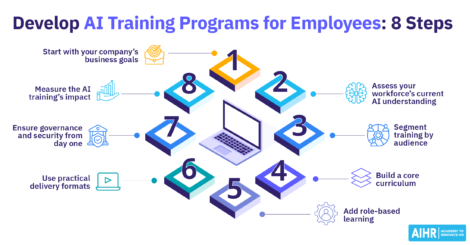
8 steps to develop AI training programs for employees
Building effective AI training programs for employees doesn’t require a massive budget, but it does require a structured approach. Here are eight steps you can take:
Step 1: Start with your company’s business goals
Before designing any training, clarify why your company wants to invest in AI. AI training should support specific business priorities (e.g., improving productivity, reducing manual work, speeding up decision-making, or strengthening the employee experience). Tying training to these outcomes makes it easier to get leadership support and show why the initiative matters.
This also helps define what success looks like. For example, if the goal is to help teams save time, the training should focus on practical use cases that reduce repetitive work. Starting with business goals keeps the program focused and prevents training from becoming too broad or disconnected from real work.
Step 2: Assess your workforce’s current AI understanding
Before deciding what to teach, understand where employees are currently. Some may already use AI tools informally, while others may have little experience or feel unsure about the technology. A simple assessment can help you measure current knowledge, confidence, tool usage, and attitudes toward AI. This could include pulse surveys or manager feedback.
This prevents wasted effort. If you assume everyone is starting from zero, you may slow down those ready for more advanced learning. If you assume too much knowledge, you risk confusing those who need more support. A current-state assessment helps identify skills gaps, common concerns, and areas needing extra guidance, so you can build training at the right level.
Step 3: Segment training by audience
Not everyone needs the same AI training. Different teams use different systems, make different decisions, and face different risks. Segment your audience by role, function, or responsibility level, so the training is relevant. For instance, HR may need guidance on AI in recruitment, L&D, and employee support, while finance may focus on reporting, forecasting, and data analysis.
Segmentation also helps avoid overly generic training. First, identify broad learner groups, such as executives, managers, functional teams, and technical specialists. Then, define what each group must know, what tools they can use, and their level of decision-making. The closer the training matches real tasks, the more likely staff are to engage with it and apply their learning.
Step 4: Build a core curriculum
Once you know your goals and audience groups, create a core curriculum that every employee can complete. This should be the baseline foundation for AI use across the company. It should cover essential topics, like what AI is, what it can and can’t do, how employees should use it, and how to do so safely and responsibly. The goal is to build shared understanding.
A strong curriculum should also explain terms in plain language and connect them to everyday work. For example, employees should learn that while generative AI creates new content based on data patterns, it can also produce incorrect or misleading outputs. They must learn to write clear prompts, check the quality of AI-generated responses, and know when to apply human judgment. This provides a common starting point before deeper role-based training.
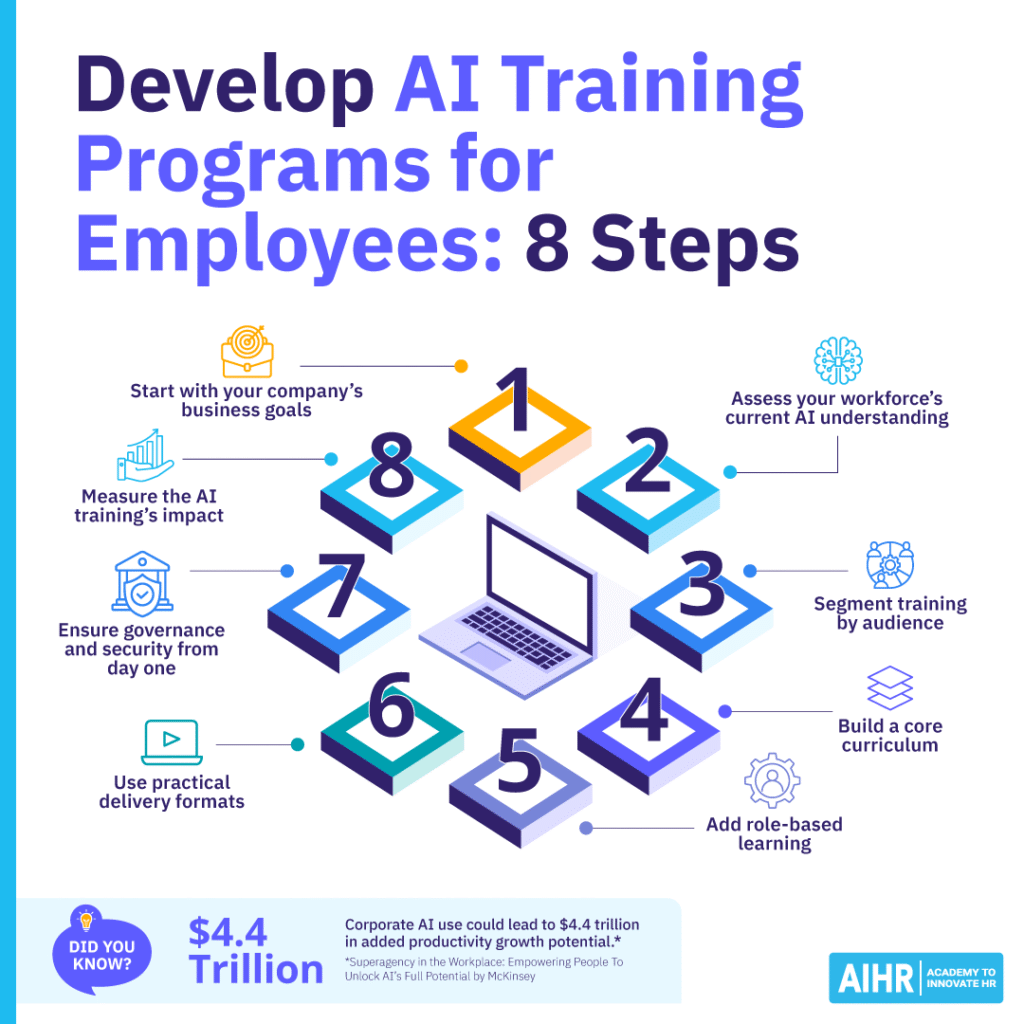
Step 5: Add role-based learning
After the foundation is in place, develop more targeted learning for specific roles or teams. Role-based learning should focus on employees’ actual tasks and how AI can support them. For instance, recruiters may learn to use AI to draft job descriptions or summarize interview notes, while L&D teams may focus on building learning content or skills taxonomies.
The best role-based training focuses on use cases, not just tool features. Show employees where AI fits into their workflow, where it can save time, and where caution is crucial. Include examples of strong, weak, and risky use to make the learning more practical and help employees understand both the opportunities and limits of AI in their specific context.
Step 6: Use practical delivery formats
AI training is more effective when people can apply what they learn straight away. Avoid making the program too theoretical or lecture-heavy. Instead, use practical formats such as workshops, guided exercises, short simulations, live demos, peer learning sessions, and scenario-based activities. By using AI in realistic situations, these methods help employees build confidence.
You should also make the learning easy to access and repeat. Short modules, job aids, prompt libraries, and manager-led discussions can help reinforce learning. Training shouldn’t be a single event employees complete and forget, but a mix of structured learning and ongoing support that allows them to keep improving as tools, policies, and business needs evolve.
Step 7: Ensure governance and security from day one
AI training shouldn’t sit separately from governance, compliance, or data protection. Employees need clear rules from the start about what AI tools they can use, what data they can enter, how to verify outputs, and when to escalate questions or concerns. Without this guidance, even well-intentioned employees can create risks related to privacy, confidentiality, or bias.
Instead of only explaining policy, show staff what safe behavior looks like in real situations. For example, teach them to avoid using confidential business data, employee records, or customer information in public AI tools, and to check facts and review outputs for bias or mistakes. Good governance training protects the business while helping employees use AI the right way.
Step 8: Measure the AI training’s impact
To improve the program over time, measure its impact instead of just completion rates. Track KPIs such as approved AI tool adoption, time saved on common tasks, improvements in work quality, and manager feedback on practical use. If possible, connect the training to business outcomes, such as shorter turnaround times, better employee support, or reduced manual workload.
You should also collect feedback from employees and managers early and often to help refine and keep the program relevant as AI tools change. Not every employee needs advanced AI skills, and a successful program isn’t about making everyone an expert. Rather, it’s about giving the right people the right level of capability at the right time, with the right guardrails in place.
Practical AI training methods for employees
If you want AI training to stick, focus on practical, repeatable methods, such as:
- Short AI literacy modules for all employees: Keep these modules brief and focused on the basics employees need right away, such as what AI can do, where it can go wrong, and when to ask for help.
- Live AI training workshops focused on real tasks: Use examples from employees’ actual day-to-day work, so they can immediately see how AI fits into their respective roles and can support them.
- Guided prompt-writing exercises: Give employees a simple task, give them a weak prompt and a strong prompt to use, let them compare the results, then have them explain why one is better than the other.
- Role-based use case clinics: Build each training session around one or two real challenges from the team receiving training, so the program content is relevant and usable to all team members.
- AI office hours with internal champions: Schedule a regular weekly or monthly slot, during which employees can ask questions, test ideas, and get quick support from more advanced AI users who can push novices in the right direction.
- Manager toolkits to reinforce safe use: Equip managers with short talking points, examples, and reminders they can use in team meetings and one-to-ones to remind employees to adhere to safe, ethical AI use.
- Scenario-based AI security training: Use realistic risk scenarios, such as pasting confidential data into a public tool, so employees know what to avoid in practice.
- Internal examples of good and bad prompts: Choose examples from your organization’s business context, so employees can learn from situations that feel familiar and, as such, learn faster and more easily.
- Job aids, checklists, and prompt libraries: Make them easy to locate and simple to use so employees can apply them with minimal effort in their day-to-day workflows.
- Refreshers when tools or policies change: Tie each refresher to a specific update or change, and explain clearly what employees need to do differently to continue using AI tools correctly and with ease.
10 best AI training courses for employees
Here are some of the most effective AI training courses for employees across different functions:
A comprehensive program focused on applying AI in HR, including recruitment, L&D, and workforce planning
HR professionals
Prompting Essentials (Google)
Teaches learners how to write effective prompts for generative AI tools
All employees
Generative AI for Everyone (Coursera)
A beginner-friendly course explaining how GenAI works and how to use it
Non-technical roles
AI Learning Hub (Microsoft Learn)
A collection of modules covering AI basics and practical applications
General workforce
Generative AI Essentials (AWS)
Focuses on real-world applications and business use cases
Business teams
Covers AI concepts, ethics, and business implications
Managers and leaders
Gain the AI Skills You Need to Succeed (Salesforce Trailhead)
Interactive, hands-on AI learning paths
Customer-facing teams
Introduction to Claude (Anthropic)
Focuses on safe and effective use of conversational AI tools
Knowledge workers
Foundational AI and prompt resources (OpenAI Academy)
Practical resources for prompt writing and AI use cases
All employees
Common challenges in AI training for employees (and how to overcome them)
Even well-designed AI training programs for employees can fail if you don’t proactively address a few common roadblocks. The good news? Most of these challenges are predictable and manageable with the right HR approach.
Not knowing where to start
Many HR teams feel overwhelmed by the pace of AI development. Tools evolve quickly, and it’s not always clear what’s worth training on. This often leads to delay, because teams spend too much time trying to understand the whole AI landscape before taking the first step.
How to address it
Start with use cases, not tools. Focus on everyday tasks where AI can help, like drafting, summarizing, or analyzing data. Once you define those, you can choose the right tools to support them. A small pilot built around a few high-volume tasks is often the fastest way to create momentum and learn what works.
Low employee confidence or resistance
Some employees worry that AI will replace their roles. Others feel intimidated or assume it’s too technical for them. In many cases, resistance is less about the technology itself and more about uncertainty, lack of support, or fear of getting it wrong.
How to address it
Position AI as a support tool, not a replacement, and show quick wins. For example, demonstrate how a recruiter can write a job description in minutes, or how HR can summarize policy feedback instantly. Use simple, low-risk exercises early on, so employees can build confidence without feeling exposed or judged.
One-size-fits-all training that doesn’t work
Generic AI training often fails because it doesn’t connect to real work. Employees might leave sessions thinking, “This doesn’t apply to me.” When training feels too broad, people may still have no idea how to use AI in their own roles, despite understanding its overall concept.
How to address it
Segment your training early. A finance analyst, HRBP, and marketing manager will use AI differently, so you should tailor examples and exercises to each role’s reality. Even basic role-based tracks can make training feel more relevant and improve adoption across teams.
Lack of manager support
If managers don’t reinforce AI training, adoption stalls. Employees need permission and encouragement to use new tools. Without visible support from managers, employees may assume AI use is optional, risky, or not worth prioritizing.
How to address it
Equip managers with simple toolkits. Give them talking points, example use cases, and guardrails they can use to guide their teams confidently. Ask managers to follow up after training by checking how employees are applying AI in real tasks, and where they still need help.
Security and compliance concerns
Legal and IT teams often worry about data privacy and misuse, which can slow down or even block AI adoption. These concerns are valid, especially when employees are unclear about what information they can safely enter into AI tools.
How to address it
Build AI security training for employees into your program from the start. Be clear about what data they can use, which tools are approved, and how to review outputs. Use clear examples of allowed and prohibited behavior to help employees make safer decisions in day-to-day work.
No measurement of impact
Without clear metrics, it’s hard to demonstrate the value of AI training for staff, hindering the ability to secure ongoing investment. It also becomes harder to improve the program, because you can’t tell which parts of the training are driving real behavior change.
How to address it
Track a mix of indicators, such as:
- Employee confidence in AI tool usage
- Frequency of AI tool usage
- Time saved on key tasks
- Output quality improvements
- Reduction in errors or rework.
Choose a small set of metrics at the start and review them regularly to keep the program tied to business results. Even simple “before and after” comparisons can show meaningful progress.
Training fatigue
Employees typically already deal with multiple learning initiatives; adding AI training on top can feel overwhelming. Additionally, when training feels separate from daily work, employees are far less likely to engage with it consistently.
How to address it
Keep training short, practical, and embedded into work. Instead of long sessions, use bite-sized modules and integrate learning into existing workflows. Tie each learning activity to a real task employees already need to complete, so the training feels useful rather than extra.
Most AI training challenges aren’t about technology. They’re about behavior, communication, and design. If you keep your programs practical, role-based, and aligned with real work, you’ll avoid the biggest pitfalls. More importantly, you’ll turn AI from a buzzword into a capability your workforce can actually use.
Next steps
AI training for employees is quickly becoming a baseline capability, not just a competitive advantage. Moving early leads to faster adoption, better outcomes, and lower risk. If you’re not sure where to begin, start small. Build a pilot AI literacy program, test practical training methods, and expand from there.
It’s also important to note that most AI training challenges aren’t about technology but behavior, communication, and design. Keep your programs practical, role-based, and aligned with real work to avoid the biggest pitfalls. Certifications like AIHR’s Artificial Intelligence for HR Certificate Program can help you build your own AI fluency and lead AI upskilling with confidence.